Each members tracking reports in Adobe Analytics | Community
Skip to main content
August 29, 2018
Solved

Each members tracking reports in Adobe Analytics

  • August 29, 2018
  • 2 replies
  • 1671 views

I want to track the behavior of each member on a login-based website.

eg. The page path they moved, the content they consumed in the site, the entry they wrote, and so on.

And I want to see each members behavior tracking report.

Web analysis is typically a report about who visited a particular page and how many times.

On the other hand, the question is what each individual visitor did on the site.

How can I do this at Adobe Analytics?
This post is no longer active and is closed to new replies. Need help? Start a new post to ask your question.
Best answer by Altham

I think there are multiple ways you can achieve this.

One quick approach which comes in my mind...

Assuming you can capturing login id in an evar (custom variable)

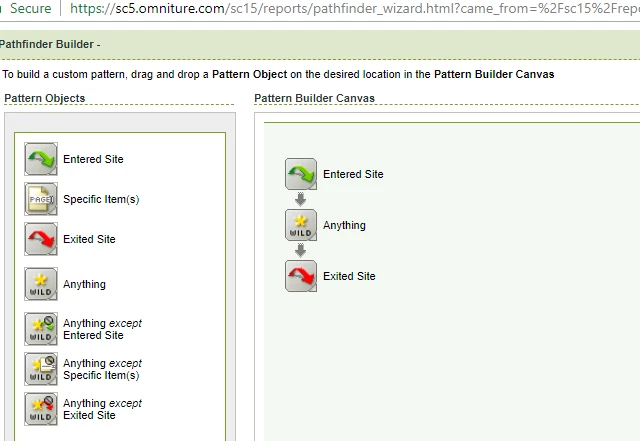
1. Try generating pathfinder report. Use pattern. (refer to attached screenshot at the bottom of the thread.)

- entered site

- anything

- exited site.

OR

- entered site

- Specific Item(s) -> Select Pages which you want to monitor.

- exited site.

2. Generate the report.

3. Create a new segment for a specific user & apply it on a generated PathFinder report.

Again, I believe there are multiple ways you can get this info. each way can have some pro's and con's.

Another Approach is Custom Events Funnel report, but has some limitations.

2 replies

BrianTophamAdobe
Adobe Employee
Adobe Employee
September 7, 2018

I am not sure I fully understand your question. However, it is not uncommon for a user ID (that has been de-personalized) to be used to identify users after a login (or other way to identify a specific user). If you provide such an ID in your implementation, you could do the kind of analysis suggested here.

Things to be aware of:

Hash Collisions - Logs of unique values with low traffic raises the risk of hash collisions. Data Warehouse does not have this issue so, it can be used as a work around.

(Low-Traffic) Logic - The UI, defaults to 500,000 unique values per variable per month.

AlthamAccepted solution
Level 3
September 7, 2018

I think there are multiple ways you can achieve this.

One quick approach which comes in my mind...

Assuming you can capturing login id in an evar (custom variable)

1. Try generating pathfinder report. Use pattern. (refer to attached screenshot at the bottom of the thread.)

- entered site

- anything

- exited site.

OR

- entered site

- Specific Item(s) -> Select Pages which you want to monitor.

- exited site.

2. Generate the report.

3. Create a new segment for a specific user & apply it on a generated PathFinder report.

Again, I believe there are multiple ways you can get this info. each way can have some pro's and con's.

Another Approach is Custom Events Funnel report, but has some limitations.