Dynamic Day counter | Community
Skip to main content
march63855757
February 24, 2021
Solved

Dynamic Day counter

  • February 24, 2021
  • 1 reply
  • 1065 views

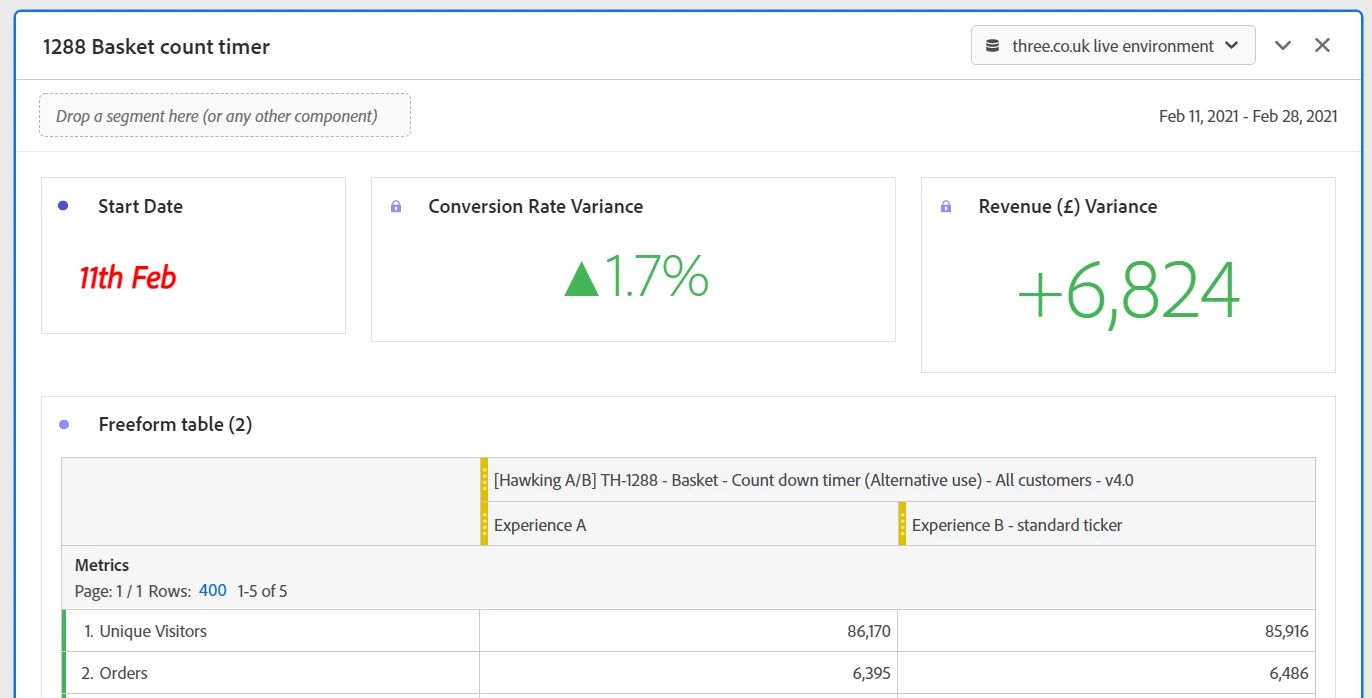
I am looking for a way to create a ‘Summary Number’ or ‘Text’ field in Adobe Analytics Workspace that will count the number of days passed since the start of a Adobe Target test, is this possible?


So in the example below, the start date of the test was 11th Feb. I want to create another ‘Summary Number or Text Box’ that would show ‘The Number of Days The Test Has been Running’. It would work dynamically from today’s date. So the entry for today (24th Feb) would be ’13 days’. Is this possible?



This post is no longer active and is closed to new replies. Need help? Start a new post to ask your question.
Best answer by yuhuisg

Here's one way:

  1. Ensure that your panel's date range is for your experiment's dates.
  2. Add a freeform table.
  3. Drag the "Day" dimension into the table. Delete the "Occurrences" metric.
  4. Add a new metric to the table, using the formula "Row Count ()". You should end up with the same number in all rows.
  5. Create a Summary Number visualisation from the metric in the first row.

The Summary Number should now show the number of days that your experiment has been running for.

1 reply

yuhuisg
Community Advisor
yuhuisgCommunity AdvisorAccepted solution
Community Advisor
February 24, 2021

Here's one way:

  1. Ensure that your panel's date range is for your experiment's dates.
  2. Add a freeform table.
  3. Drag the "Day" dimension into the table. Delete the "Occurrences" metric.
  4. Add a new metric to the table, using the formula "Row Count ()". You should end up with the same number in all rows.
  5. Create a Summary Number visualisation from the metric in the first row.

The Summary Number should now show the number of days that your experiment has been running for.

march63855757
February 26, 2021
Thanks Yuhuisg, that works for me!