Duplicate analytics call in AEP debugger | Community
Skip to main content
Level 5
August 9, 2023
Solved

Duplicate analytics call in AEP debugger

  • August 9, 2023
  • 2 replies
  • 3035 views

Hi,

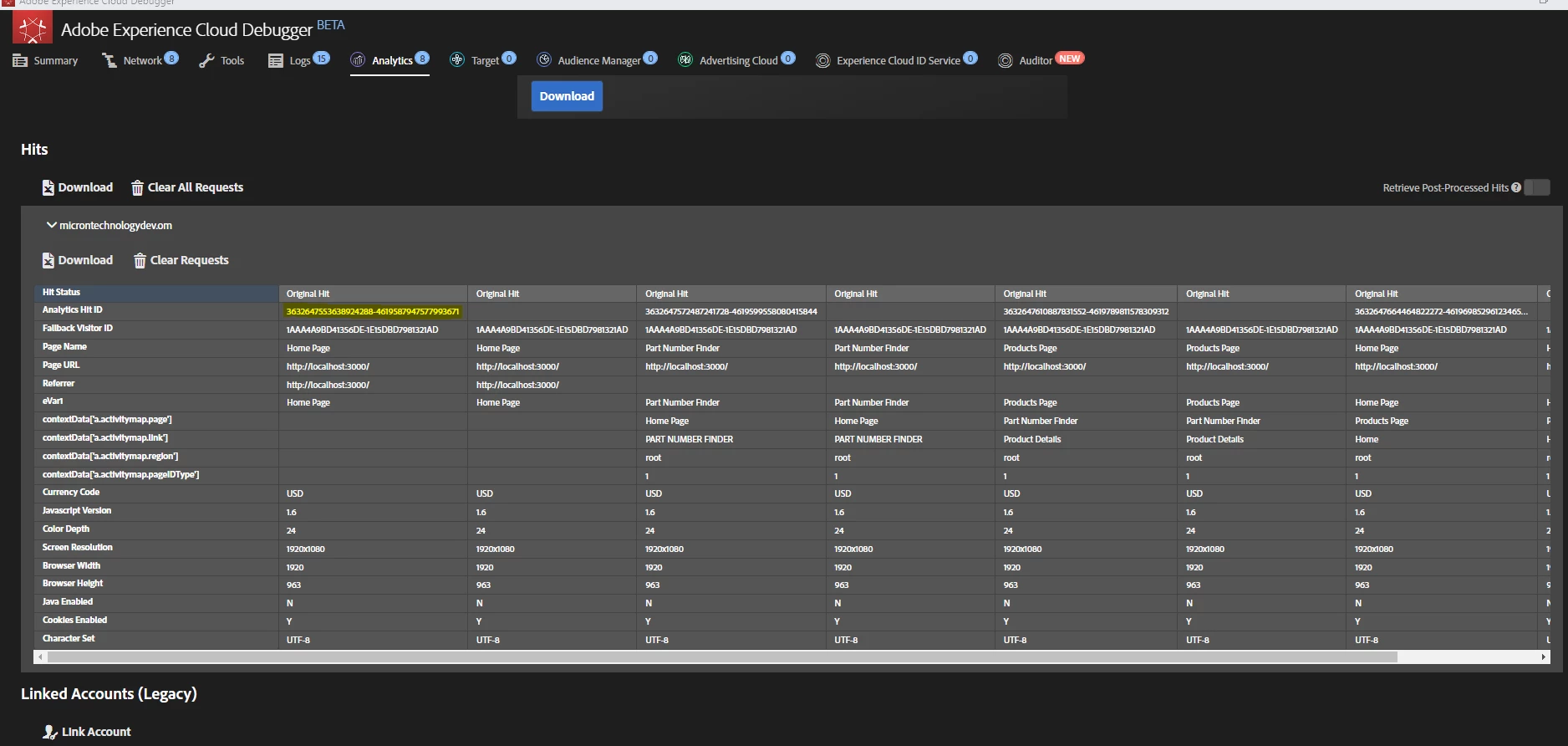
We are implementing Adobe Analytics on react application where we see duplicate calls captured in Adobe Experience Cloud Debugger. We are sure that Data Collection Rule is triggered only once.

One call has Analytics Hit ID and the second/duplicate call does not have value for this field, rest of the values are exactly the same.

Attached screenshot for reference.

Can you please let us know what might be wrong here?

@pratheeparunraj @jennifer_dungan 


This post is no longer active and is closed to new replies. Need help? Start a new post to ask your question.
Best answer by Jennifer_Dungan

I think I know what is happening... 


I noticed that you are testing a dev environment (i.e. Localhost).


The ECID cannot be set on Localhost... now, when the ECID is first set (or attempted to be set), the very first call actually gets redirected (so that the value can be obtained to be included on the call)... the first call (the one that is redirected) doesn't actually track anything, it's the second call that does (since it has the proper fingerprinting), but both calls show up in the debugger... (if the ECID fails to set, a fallback id is set instead - and I can see your fallback id in your tracking calls)


When the ECID cannot be set, every single call does this "double" appearance in the debugger. Its very annoying and makes it difficult to identify real "double tracking calls".


You can confirm this by using your browser's Network panel and filtering for "b/ss"


If you clear it out, then load a page, you should see two hits.. one should have a 307 redirect status code, and the other will have a 200 status code. 
2 replies

Jennifer_Dungan
Community Advisor and Adobe Champion
Jennifer_DunganCommunity Advisor and Adobe ChampionAccepted solution
Community Advisor and Adobe Champion
August 9, 2023

I think I know what is happening... 


I noticed that you are testing a dev environment (i.e. Localhost).


The ECID cannot be set on Localhost... now, when the ECID is first set (or attempted to be set), the very first call actually gets redirected (so that the value can be obtained to be included on the call)... the first call (the one that is redirected) doesn't actually track anything, it's the second call that does (since it has the proper fingerprinting), but both calls show up in the debugger... (if the ECID fails to set, a fallback id is set instead - and I can see your fallback id in your tracking calls)


When the ECID cannot be set, every single call does this "double" appearance in the debugger. Its very annoying and makes it difficult to identify real "double tracking calls".


You can confirm this by using your browser's Network panel and filtering for "b/ss"


If you clear it out, then load a page, you should see two hits.. one should have a 307 redirect status code, and the other will have a 200 status code. 

Level 5
April 15, 2025

Hi  @Jennifer_Dungan 

Below is the configuration of ECID extension of the Data Collection. Unable to see ECID in AEP Debugger, can see Fallback Visitor ID only. Can you please help what changes in ECID extension can fix the issue?

Jennifer_Dungan
Community Advisor and Adobe Champion
April 21, 2025

@srikanthpo3 @srikanthpo3 the problem is not mainly with your ECID extension's settings. Instead, the problem is with where you are browsing your web pages from.

As @jennifer_dungan had said, you are browsing your web pages from the website that is running in localhost, i.e. on your computer. I don't know why you're doing that, maybe your developers had instructed you to build a copy of the code in your computer. But as long as you're browsing your website that is runningfrom your computer, i.e. localhost, then the ECID cookies will not be able to be set properly. Then AA will always use its fallback ID.

So the solution is rather simple: browse your web pages from your actual website. Or if you need to browse from a pre-production website, then ask your developers to let you browse the staging or UAT website. But definitely, do not browse from the website that is running on your own computer.


@srikanthpo3 since you have resurrected this old thread, your setup may be different from the original poster (who was accessing their website from localhost)....


If you are accessing a proper UAT or Staging environment (and not localhost), there may be a config issue on the environment that is preventing the cookie from being set... I had that once on one of our pre-prod environments... it was extremely annoying... so it worked on QA, and it worked on Prod, but Pre-Prod... nope...  it made testing so much harder.


If that is the case, you may have to work with your devops team to fix the environment, because there doesn't seem to be any issues with your ECID setup...


However, you might want to add some additional variables such as explicitly setting your trackingServer and trackingServerSecure, your cookieDomain and if you want secureCookies... 


Those aren't needed, but I like to make sure they are set to ensure no mismatches.

yuhuisg
Community Advisor
Community Advisor
August 9, 2023

(Not answering your question directly.)

You should use the Adobe Experience Platform Debugger. The AEC Debugger that you're using is not really supported by Adobe any more.

Reference: https://experienceleague.adobe.com/docs/experience-platform/debugger/home.html?lang=en

Installation instructions: https://experienceleague.adobe.com/docs/experience-platform/debugger/install-debugger.html?lang=en

Level 5
August 9, 2023

Hi @yuhuisg 

Somehow I am unable to find the analytics calls in Adobe Experience Platform Debugger. I made sure that I opened AEP Debugger chrome extension is correct browser tab where I am loading the application/page, it shows that it is connected to respective page but cannot see the calls captured in debugger, but it's getting tracked in Adobe Experience Cloud Debugger.

Other web pages from a different environment are tracked in AEP Debugger.Not sure if I am missing something here.

yuhuisg
Community Advisor
Community Advisor
August 9, 2023

Wow, that has never happened to me before! I'm sorry to hear that you're experiencing that anomalous result. It sounds like you're ensuring that the window with your web page is the one on your screen just before you switch over to the AEP Debugger, which is the correct thing to do.

As a failsafe, you could also click the "Lock" button at the bottom of the AEP Debugger's window and it will lock its results to those from the indicated window, even when you switch to other windows.