Direct Traffic Spike | Community
Skip to main content
JyotiSharmaV
Community Advisor
Community Advisor
January 4, 2024
Solved

Direct Traffic Spike

  • January 4, 2024
  • 2 replies
  • 2762 views

In analytics reporting, we found a spike in Direct traffic 3 times the normal direct traffic and bounce rate. We have BOT Exclusions and segments to rule out bot traffic in reporting. Can you please suggest how can I drill down direct traffic to know the root cause of the spike?


Thanks

This post is no longer active and is closed to new replies. Need help? Start a new post to ask your question.
Best answer by Jennifer_Dungan

I would try limiting your Marketing Channel first to the instance when the Marketing Channel was set (so that you can break it down by other dimensions without running into issues with different attribution models - 30 days paired with Visits, etc)
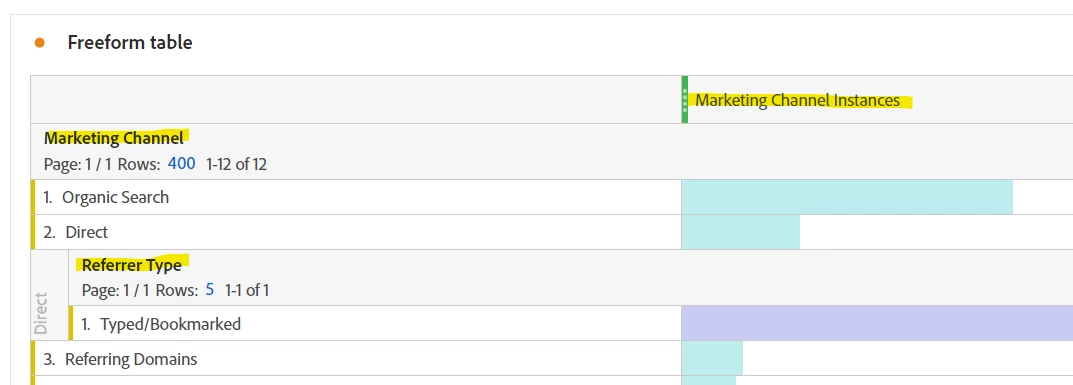


Try first to break down by "Referrer Type".. if you have anything else here then I would say you need to start by reviewing your Marketing Channel Rules... if it's like this, with just Typed/Bookmarked, it means the data (as far as the header information is concerned) really is "direct"... but then you may have to look at site functionality, like potential redirects not forwarding headers, or maybe there are a lot of links coded with the rel="nofrerrer" that is preventing the referrer from being set properly, and causes havoc with your data.

2 replies

Jennifer_Dungan
Community Advisor and Adobe Champion
Jennifer_DunganCommunity Advisor and Adobe ChampionAccepted solution
Community Advisor and Adobe Champion
January 4, 2024

I would try limiting your Marketing Channel first to the instance when the Marketing Channel was set (so that you can break it down by other dimensions without running into issues with different attribution models - 30 days paired with Visits, etc)


Try first to break down by "Referrer Type".. if you have anything else here then I would say you need to start by reviewing your Marketing Channel Rules... if it's like this, with just Typed/Bookmarked, it means the data (as far as the header information is concerned) really is "direct"... but then you may have to look at site functionality, like potential redirects not forwarding headers, or maybe there are a lot of links coded with the rel="nofrerrer" that is preventing the referrer from being set properly, and causes havoc with your data.

JyotiSharmaV
Community Advisor
Community Advisor
January 8, 2024

I tried break it down and I see typed/bookedmarked traffic only so looks like legit numbers

Jennifer_Dungan
Community Advisor and Adobe Champion
January 8, 2024

Do you know if your company is using any redirects? That could be impacting everything.. by sending people through redirects (and not forwarding the headers) you will lose all the referrer information, and could be losing your campaign parameters as well.


If redirects are done poorly it can cause massive issues that cause many things to be seen as Direct when it's not...

kayawalton
Community Advisor and Adobe Champion
January 5, 2024

In addition to what @jennifer_dungan said, it might be worth tracking your current organic and paid marketing campaigns if you have not already to eliminate the possibility of your marketing platforms causing the spike. 

https://experienceleague.adobe.com/docs/analytics/implementation/use-cases/campaign-tracking.html?lang=en

Pablo_Childe
Community Advisor
Community Advisor
January 5, 2024

Hi both previous mentions(Jennifer and Kaya) are great sources to eliminate potential causes. I also would check with your  IT in case and penetration or load testing was done.