
Direct Channel Numbers are Higher than expected | Community
Skip to main content
DhanA2
Level 3
May 22, 2023
Solved

Direct Channel Numbers are Higher than expected

  • May 22, 2023
  • 1 reply
  • 2823 views

Hi Team,


Please Help me with the following doubts.
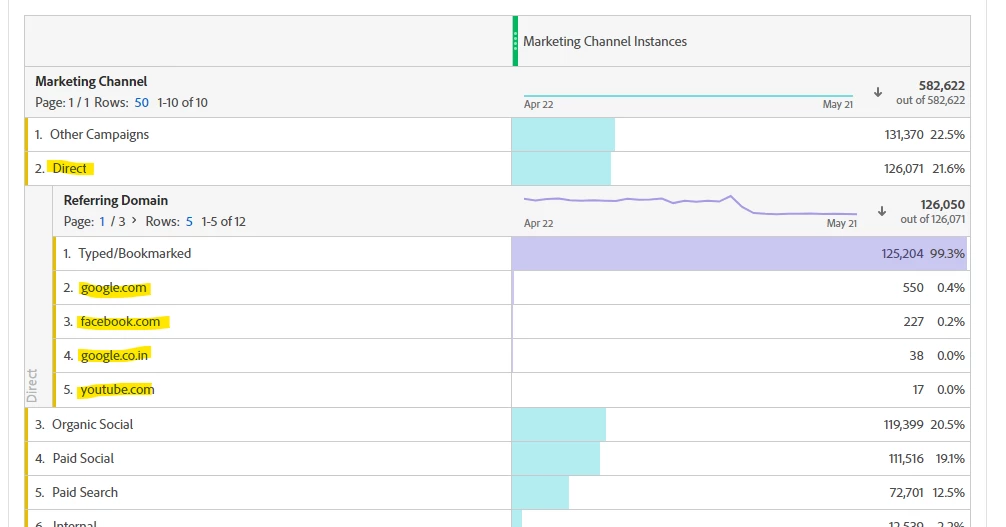


1. My Direct Numbers are so high compare to other channel that is not expected coz most of the traffic should comes from campaigns

2. When we break down to understand the direct, I can see other domains like Facebook and google. Is it right way to breakdown and if yes why we are getting other domains in Direct channel.

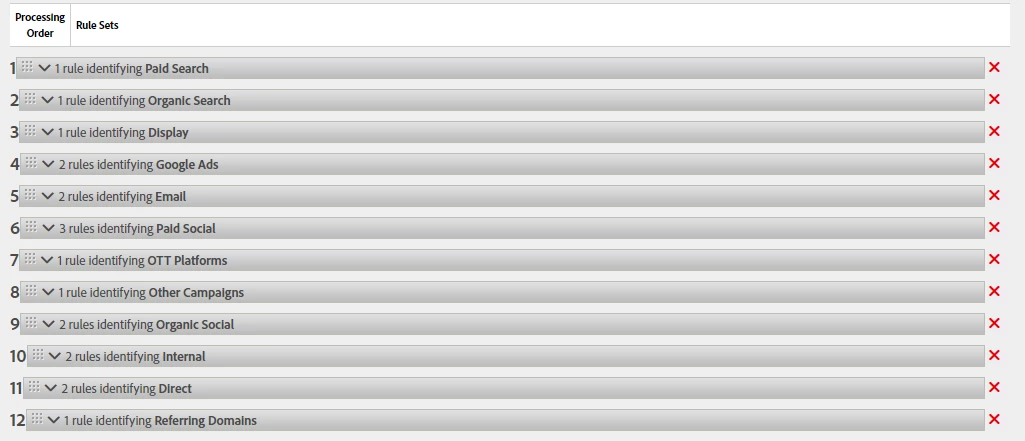
Pleas find my Marketing channel processing rule order for  your reference.
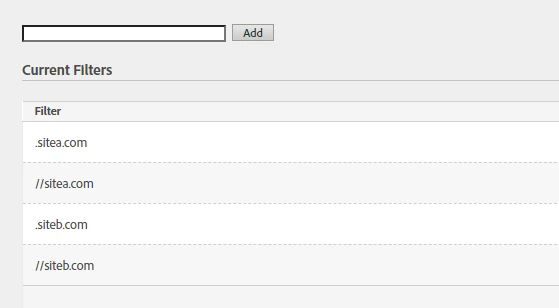
3. Do we need work anything on Internal URLs, Since we are tracking two different site(sitea.com and siteb.com) of the same org in this one report suite, Internal ULRs


I would like to know the why it is happening, what could be the root cause for these?
 

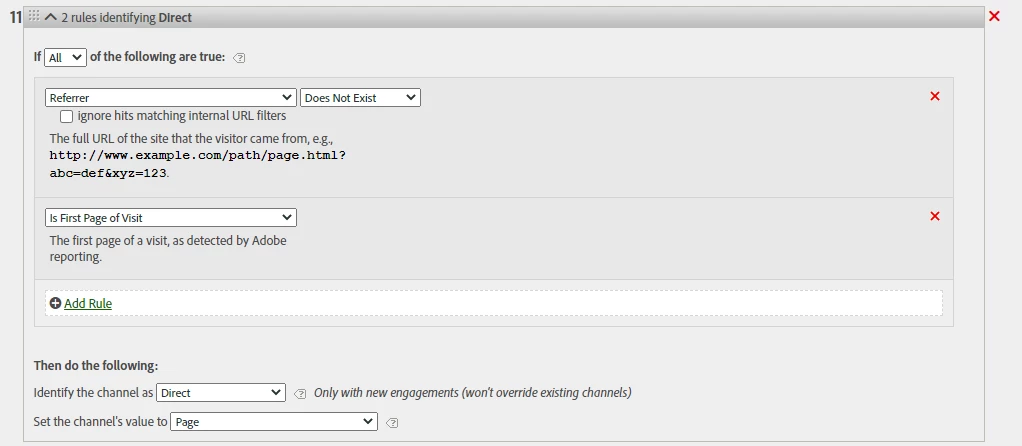
Direct Config:
 

Internal URL Filter setup:
 

Thanks!
CCing Top contributors for faster Response: 
@arunpatidar 
@jennifer_dungan 
@yuhuisg 


This post is no longer active and is closed to new replies. Need help? Start a new post to ask your question.
Best answer by Jennifer_Dungan

Hi, you can correlate Marketing Channel to Referrer in the way you showed, but you need to be aware that you could be mixing 2 different attributions... which can cause some discrepancies...


Marketing Channel is likely set up to 30 Day or 7 Day attribution, but Referering Domain will be Visit...  That said, because you are looking at "Direct" Marketing Channel, which should be overwritten by your other Marketing Channels (i.e. Search or Social), then it's strange that you are seeing those referring domains...


I wonder if it's the "First Page of the Visit" rule that is causing issue in your Direct Rule... 


Remember that a lot of users could do a Google Search, click on an item (triggering a first page view on your site), then back out, then click on a second item (this will not be the first page of the visit), click back again, and continue to click through to multiple pages into your site....


That said, those are the rules that are "default".. so possibly one of the rules above it is also looking at "First Page of Visit" and causing ripples down your rules...


So that maybe someone did come directly to your site, then decided to try and use Google search to find additional content... or was using multiple tabs and found content from social media within the same visit period...


I would start by checking the rules on your Search and Social channels first... trying to identify why those referrers aren't being caught by the above rules.


1 reply

Jennifer_Dungan
Community Advisor and Adobe Champion
Jennifer_DunganCommunity Advisor and Adobe ChampionAccepted solution
Community Advisor and Adobe Champion
May 22, 2023

Hi, you can correlate Marketing Channel to Referrer in the way you showed, but you need to be aware that you could be mixing 2 different attributions... which can cause some discrepancies...


Marketing Channel is likely set up to 30 Day or 7 Day attribution, but Referering Domain will be Visit...  That said, because you are looking at "Direct" Marketing Channel, which should be overwritten by your other Marketing Channels (i.e. Search or Social), then it's strange that you are seeing those referring domains...


I wonder if it's the "First Page of the Visit" rule that is causing issue in your Direct Rule... 


Remember that a lot of users could do a Google Search, click on an item (triggering a first page view on your site), then back out, then click on a second item (this will not be the first page of the visit), click back again, and continue to click through to multiple pages into your site....


That said, those are the rules that are "default".. so possibly one of the rules above it is also looking at "First Page of Visit" and causing ripples down your rules...


So that maybe someone did come directly to your site, then decided to try and use Google search to find additional content... or was using multiple tabs and found content from social media within the same visit period...


I would start by checking the rules on your Search and Social channels first... trying to identify why those referrers aren't being caught by the above rules.


DhanA2
DhanA2Author
Level 3
May 24, 2023

Hey @jennifer_dungan 

Thanks for your detailed  explanation,

Please review the requested screenshots. search and social


Also, I'm suspecting a behavior of website, Once landed on website there will be one pop-up will appear and collect user input then it reloads a page once again. Will  this cause any issue or inflate direct counts?


Thanks,


Josh__Stephens
Community Advisor
Community Advisor
May 25, 2023

Have you looked at breaking out Direct traffic by the Marketing Channel Detail (page) in this case?  You might see an unexpected page that's driving a lot of the Direct traffic and might help in troubleshooting any implementation or other issues.


For your scenario above, I'd suggest replicating the visitor behavior from a few different browsers.  Try to visit at an off peak time or some other way you can differentiate yourself and see how those visits are being bucketed.


Here's part 4 in a blog series that's really great on marketing channel rules that may be helpful:  https://blog.adobe.com/en/publish/2014/11/12/refresher-on-adobe-analytics-mktg-channels-reports-part-iv (for the previous parts you may need to do some googling as they're a bit old and not at their original URLs)