
Difference in totals when segmenting a custom metric | Community
Skip to main content
Francis_Lemin
July 10, 2020
Solved

Difference in totals when segmenting a custom metric

  • July 10, 2020
  • 1 reply
  • 766 views

I'm looking at some data for a particular page in my journey YTD, so there is a calculated metric to provide figures for unique visits to that page month by month.


However when i duplicate the table and break it down further by a custom segments to split this figure between age ranges for some reason the total of all the new columns is more than the original.

I know there is some data that falls outside the age ranges i have asked for and even some showing as unspecified, but these would surely add even more to this new total.
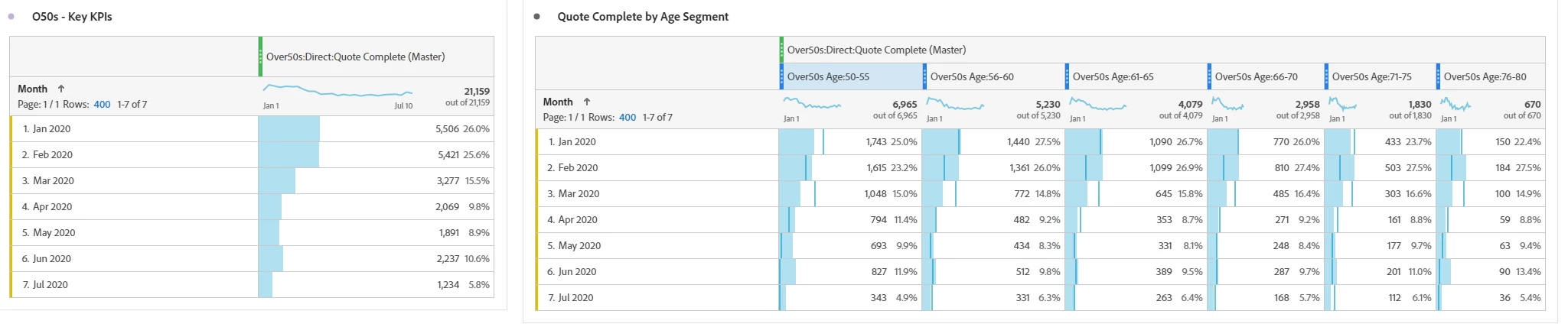
 

The totals of the table on the right are 21732 compared to the original(base) figure of 21159


Any idea what is happening?

This post is no longer active and is closed to new replies. Need help? Start a new post to ask your question.
Best answer by kainth

Hi @francis_lemin ,

Totals is generally calculated at the server-side & our server-side logic dedupes the duplicate value. For example, if a visitor starts his journey at 11:45 PM & continues to browse the web site until 12:10 AM then you if will see one Visit against each line item if you try to look at hourly visits report but the total will show Visit as 1 for this scenario as the same Visit persisted from the previous day.

As you mentioned that when you try to apply the segment below the calculated metric then the total is not matching. So, think this is happening because there will be some segment that contains the duplicate data.

Can you please share the segment definition that you are using along with the calculated metric?

Regards,

Abhinav  

1 reply

kainthAccepted solution
Level 6
July 13, 2020

Hi @francis_lemin ,

Totals is generally calculated at the server-side & our server-side logic dedupes the duplicate value. For example, if a visitor starts his journey at 11:45 PM & continues to browse the web site until 12:10 AM then you if will see one Visit against each line item if you try to look at hourly visits report but the total will show Visit as 1 for this scenario as the same Visit persisted from the previous day.

As you mentioned that when you try to apply the segment below the calculated metric then the total is not matching. So, think this is happening because there will be some segment that contains the duplicate data.

Can you please share the segment definition that you are using along with the calculated metric?

Regards,

Abhinav