Decimal numbers in Calculated Metrics | Community
Skip to main content
Level 2
May 2, 2019
Solved

Decimal numbers in Calculated Metrics

  • May 2, 2019
  • 4 replies
  • 5174 views

Hi! I just noticed calculated metrics are showing decimal numbers (float) in CSV files or when it is copied into clipboard:
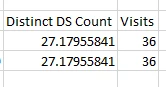
To be specific, we were using a calculated metric for the user count and one month ago, it was displayed as a whole number, but in the last report it shows with decimals.

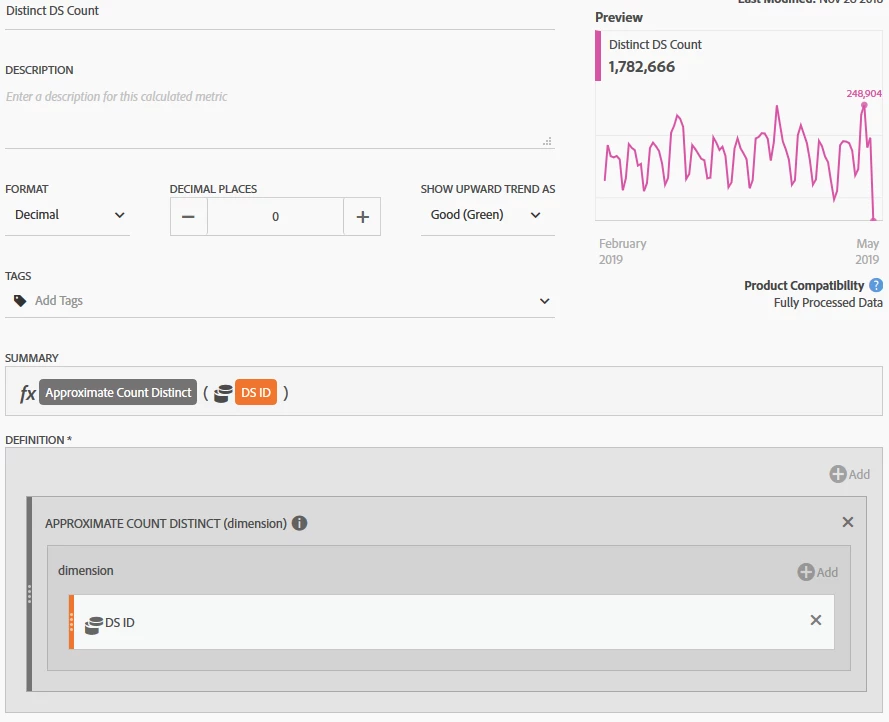
I already check if the calculated metric is selecting decimal numbers (example below), but it does not:
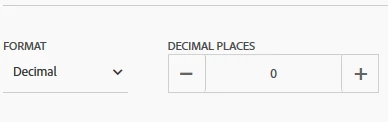
Someone know Why is this happening? There is something that changes after new feature implementation?

thank you in advance.

This post is no longer active and is closed to new replies. Need help? Start a new post to ask your question.
Best answer by Asheesh_Pandey

I came across with recent changes in the workspace CSV download and copy to clipboard. i.e.

Starting on April 11, 2019, several changes were made to CSV downloads (and Copy to Clipboard) from Analysis Workspace to remove formatting from exported data. This change was made to make it easier for customers to apply customized formatting to the exported data.

See more details in Analytics > Update to CSV downloads from Analysis Workspace > Updated April 10, 2019 section in the following the link: Experience Cloud Help

4 replies

Adobe Employee
May 2, 2019

Hi,

There is no recent changes that could have caused such issue. I will suggest you to please raise incident with customer care so that they can help you.

Also, provide Login company, report name and calculated metric name. I will try to check and update.

Regards

Karandeep Singh

Asheesh_Pandey
Community Advisor
Community Advisor
May 3, 2019

It doesn't look an error to me.

Calculated metrics setting allows you to change the formatting (i.e. decimal, percent, etc.) to present in the desired format on the workspace dashboard. 

A Comma Separated Values (CSV) file is a plain text (unformatted) file that contains a list of data, therefore, .csv export is supposed to remove any formatting which was changed to display on workspace dashboard. Similarly, when using "copy to clipboard" it copies value as text (unformatted) else you will have HTML copied with it.

To test it, download the same report in PDF format. it should not remove calculated metrics formatting while download.  As PDF file preserves the original graphic appearance on workspace dashboard.  

Hope that helps.

Thanks,

Asheesh

Level 2
May 3, 2019

Yep! I understand that, the issue is we selected in the calculated metric options zero decimals, and it was working until past days (we just noticed), that's why I am asking.

It was working fine.

Asheesh_Pandey
Community Advisor
Asheesh_PandeyCommunity AdvisorAccepted solution
Community Advisor
May 17, 2019

I came across with recent changes in the workspace CSV download and copy to clipboard. i.e.

Starting on April 11, 2019, several changes were made to CSV downloads (and Copy to Clipboard) from Analysis Workspace to remove formatting from exported data. This change was made to make it easier for customers to apply customized formatting to the exported data.

See more details in Analytics > Update to CSV downloads from Analysis Workspace > Updated April 10, 2019 section in the following the link: Experience Cloud Help