Date Segments Changed/Broken | Community
Skip to main content
Level 2
February 13, 2023
Solved

Date Segments Changed/Broken

  • February 13, 2023
  • 2 replies
  • 3216 views

has anything changed with the out of the box date segments like 'last week', 'last month' etc.

These used to work independently of the date range on your workspace report, so that you could compare different time periods.

Something has changed and now they are somehow relative to the workspace date rather than todays date.


E.g. Previously if I applied 'Last Month' to my table in workspace, irrespective of what date range was on the workspace report it showed the last full month.

I.E even if my workspace had December on, it would show me January last week (as we were in Feb)

now its showing me November


this completely breaks a lot of our workspace reports created and i now have no idea how we create such things without creating fixed segments for each week or month or time period we wish to compare on a regular basis making it unusable as a tool
This post is no longer active and is closed to new replies. Need help? Start a new post to ask your question.
Best answer by tsherwi

Hi, I think I may have caught a bug with the new "Make date range components relative to the calendar panel" feature in Adobe Workspace. My scenario sort of unique:

  • Globally, my company has Adobe Analytics configured to utilize Mon - Sun weeks
  • The market I'm in (US) uses Sun - Sat weeks for weekly reporting. To make up for this, my team has to rely on Adobe Workspace's custom date range feature when reporting weekly website data trends. We have custom date ranges for each Sun - Sat week of the year (Week 1, Week 2, etc) and rolling Sun - Sat date ranges (1 Week Ago, 2 Weeks Ago, etc) as well.

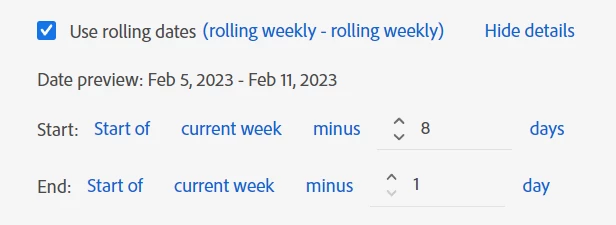
The possible bug I caught relates to my rolling Sun - Sat date ranges. Today is 2/14/23 so the (Sun - Sat) week prior should be 2/5/23 to 2/11/23. Therefore, I built my "1 Week Ago" custom date range in the following manner:


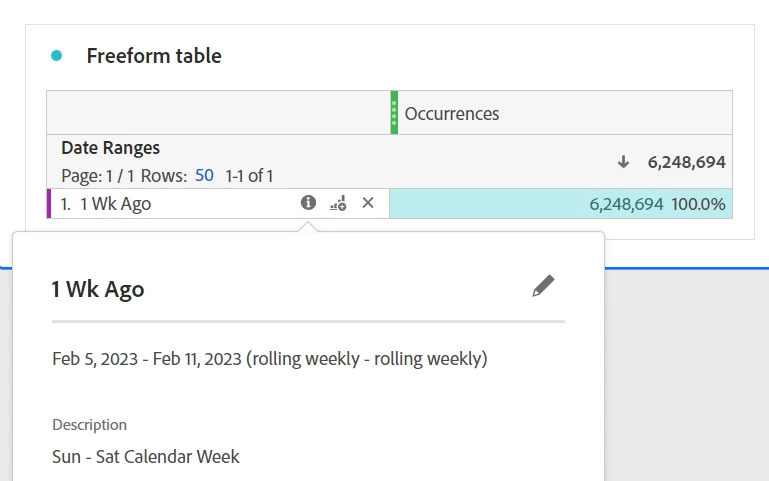
This rolling custom date range works as expected:


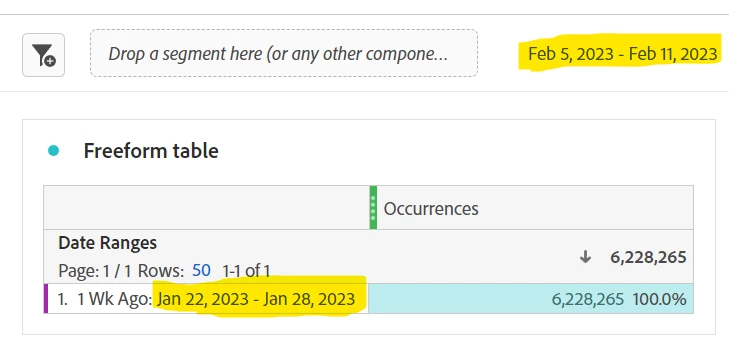
When I open the panel calendar, check "Make date range components relative to the calendar panel", and then change the panel calendar's date range to 2/5/23 to 2/11/23 the expected result would be that my rolling custom date range would be altered to 1/29/23 to 2/4/23 but that is not what is happening:

Is this a bug or should I build my custom calendar date ranges differently?


2 replies

Jennifer_Dungan
Community Advisor and Adobe Champion
February 13, 2023

EEK! That's not good....


In fact, you can no longer make rolling date ranges relative to the current date.. I just tested making my own "Last Month" and it acts the same as the standard "Last Month"  😞


This is going to break a lot of stuff for us too....


Hayley1Author
Level 2
February 13, 2023

I have just been informed @jennifer_dungan that I missed some release notes.

Adobe has made a change, but you need to go into reports and ensure a tick box is unselected now https://experienceleague.adobe.com/docs/analytics/analyze/analysis-workspace/components/calendar-date-ranges/calendar.html?lang=en#formula-relative-dates

Im genuinly puzzed why anyone thought this was an improvement but hey, I am just one user

Jennifer_Dungan
Community Advisor and Adobe Champion
February 13, 2023

That option doesn't appear for me...  is this half released???

Also, all existing date ranges (especially the default ones that are used in so many reports) should maintain the original calculation criteria... if they want to make some new relative date ranges fine....

tsherwiAccepted solution
Level 2
February 14, 2023

Hi, I think I may have caught a bug with the new "Make date range components relative to the calendar panel" feature in Adobe Workspace. My scenario sort of unique:

  • Globally, my company has Adobe Analytics configured to utilize Mon - Sun weeks
  • The market I'm in (US) uses Sun - Sat weeks for weekly reporting. To make up for this, my team has to rely on Adobe Workspace's custom date range feature when reporting weekly website data trends. We have custom date ranges for each Sun - Sat week of the year (Week 1, Week 2, etc) and rolling Sun - Sat date ranges (1 Week Ago, 2 Weeks Ago, etc) as well.

The possible bug I caught relates to my rolling Sun - Sat date ranges. Today is 2/14/23 so the (Sun - Sat) week prior should be 2/5/23 to 2/11/23. Therefore, I built my "1 Week Ago" custom date range in the following manner:


This rolling custom date range works as expected:


When I open the panel calendar, check "Make date range components relative to the calendar panel", and then change the panel calendar's date range to 2/5/23 to 2/11/23 the expected result would be that my rolling custom date range would be altered to 1/29/23 to 2/4/23 but that is not what is happening:

Is this a bug or should I build my custom calendar date ranges differently?


yuhuisg
Community Advisor
Community Advisor
February 14, 2023
Level 2
February 14, 2023

This does not address the issue I described.