Date range for YOY comparison | Community
Skip to main content
April 7, 2020
Solved

Date range for YOY comparison
  • April 7, 2020
  • 1 reply
  • 2022 views

Hi all, 

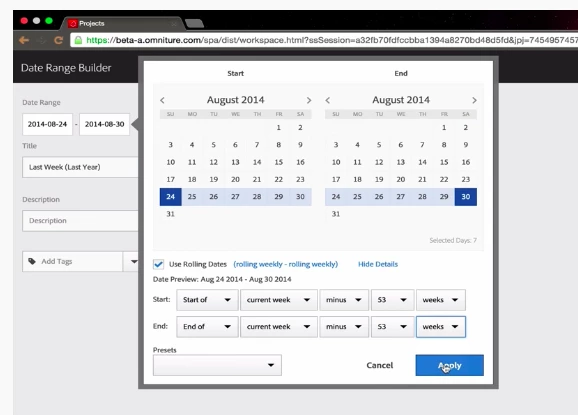
I was watching a video on use of date ranges in Adobe Analytics. I am a little confused as to how the above date range is used for YOY comparison. Shouldn’t the date range be:

Start: Start of current week minus 53 weeks

End: Start of current week


Any help is greatly appreciated, thank you!

This post is no longer active and is closed to new replies. Need help? Start a new post to ask your question.
Best answer by CurtisYoung1987

Depending on what time range you want to compare by Y-o-Y this would still be correct.

The above pic will create a date range that allows you to compare the last weeks data with the previous year's data for the same week.


If you want to compare the last 52 weeks then this should already be a date range semgnet in Adobe (but if not then you can create it as suggested).


For Y-o-Y comparisons it depends on the time range (ie. week, month, year etc) that will dictate how you go about setting up the Y-o-Y comparison.


1 reply

CurtisYoung1987
CurtisYoung1987Accepted solution
April 8, 2020

Depending on what time range you want to compare by Y-o-Y this would still be correct.

The above pic will create a date range that allows you to compare the last weeks data with the previous year's data for the same week.


If you want to compare the last 52 weeks then this should already be a date range semgnet in Adobe (but if not then you can create it as suggested).


For Y-o-Y comparisons it depends on the time range (ie. week, month, year etc) that will dictate how you go about setting up the Y-o-Y comparison.