Datawarehouse data and workspace is not the same | Community
Skip to main content
Level 2
September 26, 2019
Solved

Datawarehouse data and workspace is not the same

  • September 26, 2019
  • 9 replies
  • 3387 views

Hello!

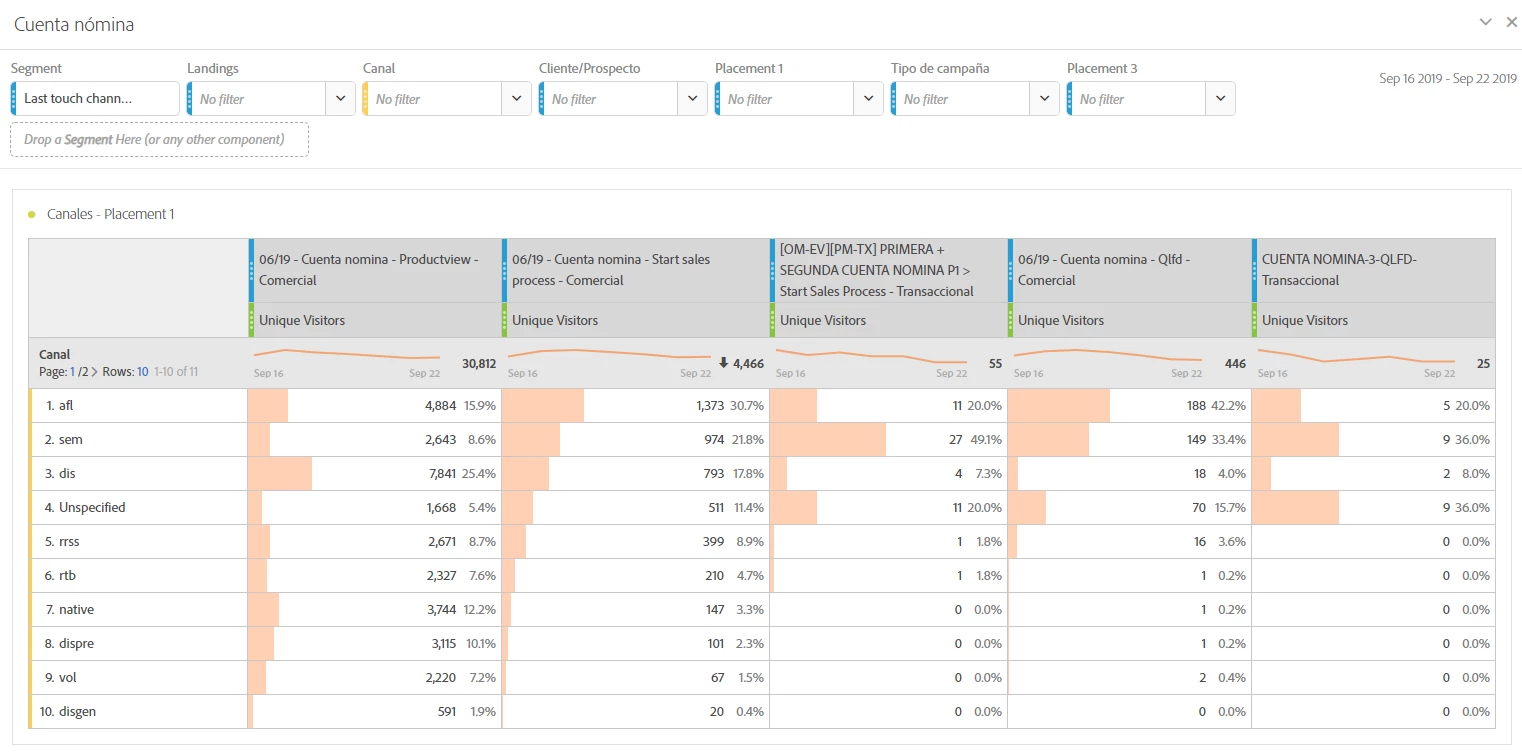
In the datawarehouse I have built a report based on campaign dimensions and unique visitors metrics, with a segment based on a hit with url equals to XX. A have the same report in workspace using exactly the same metric and dimension with the same segment, and a have a 10% difference in the results. Any idea if its normal that the data in datawarehouse and workspace is not the same?

Many thanks!

This post is no longer active and is closed to new replies. Need help? Start a new post to ask your question.
Best answer by Andrey_Osadchuk

Cecilia,

Thank you for the screenshot and the emailed file! I understood the cause of the discrepancy you faced.

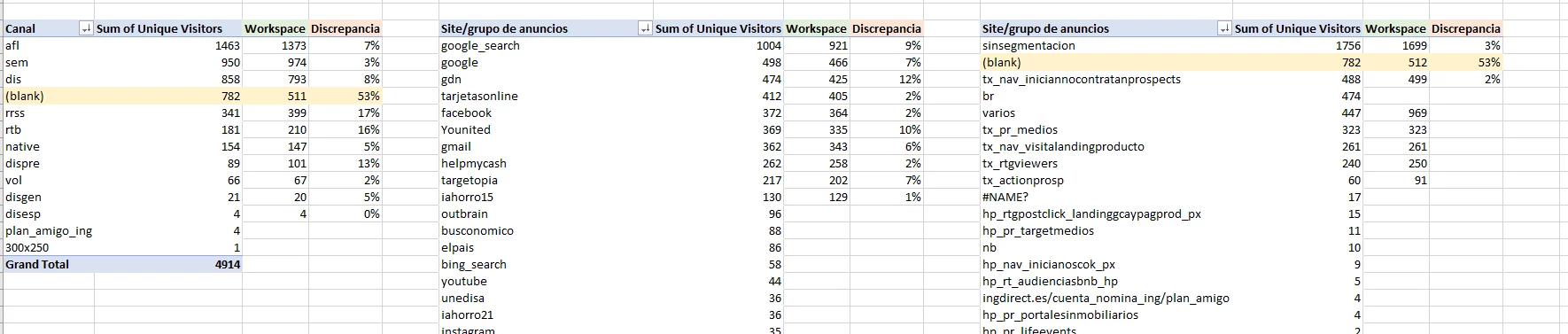
The DW report has multiple break-downs (Canal, Estragia, Publisher, etc.). I assume that you SUM Unique Visitors in the pivot table. The problem is that Unique Visitors have to be deduplicated which is impossible to do in Excel from such an export (imaging the same visitor came from Publisher X and Publisher Y. Then "1" will be shown next to each one, but in Total it was one UV, not two). This is why the Pivot shows inflated numbers of UV.

What you may want to do is to export the data exactly in the format shown in the Workspace freeform table. There should be Channel and Segment dimensions + Unique Visitors metric. In this case, the csv file should have exactly the same numbers as in the Workspace table.

Channel X - Segment A - 100 Unique Visitors
Channel Y - Segment A - 200 Unique Visitors

Channel X - Segment B - 150 Unique Visitors

etc.

9 replies

Andrey_Osadchuk
Level 10
September 26, 2019

It's not normal. If you could share a Workspace screenshot and DW file or its screenshot, it would help understand the situation you have faced.

Level 2
September 26, 2019

Hello!

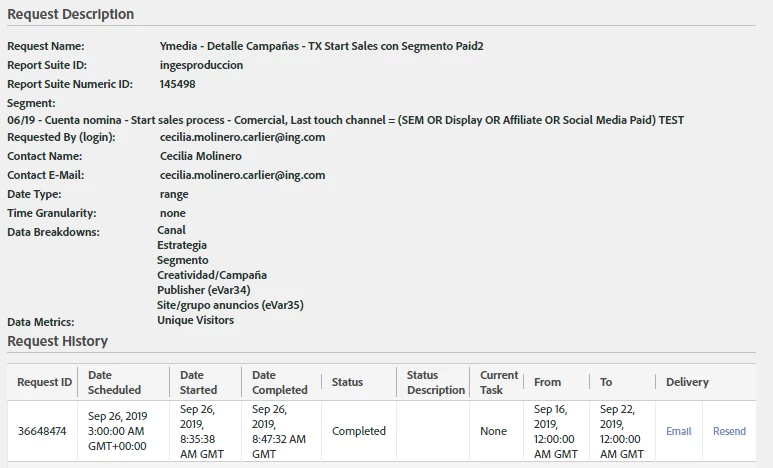
Please find attached the DW file and a screenshot of my workspace and the configuration of the DW file. Many thanks

Andrey_Osadchuk
Level 10
September 26, 2019

It seems they did not come through.

Level 2
September 26, 2019

[cid:image002.jpg@01D5748E.D2A8BEF0]

Level 2
September 26, 2019

Hello, I am not being able to send you the file so im attaching here some screenshots. Is there other way I could send you the screenshot?

Many thanks!

Andrey_Osadchuk
Andrey_OsadchukAccepted solution
Level 10
September 26, 2019

Cecilia,

Thank you for the screenshot and the emailed file! I understood the cause of the discrepancy you faced.

The DW report has multiple break-downs (Canal, Estragia, Publisher, etc.). I assume that you SUM Unique Visitors in the pivot table. The problem is that Unique Visitors have to be deduplicated which is impossible to do in Excel from such an export (imaging the same visitor came from Publisher X and Publisher Y. Then "1" will be shown next to each one, but in Total it was one UV, not two). This is why the Pivot shows inflated numbers of UV.

What you may want to do is to export the data exactly in the format shown in the Workspace freeform table. There should be Channel and Segment dimensions + Unique Visitors metric. In this case, the csv file should have exactly the same numbers as in the Workspace table.

Channel X - Segment A - 100 Unique Visitors
Channel Y - Segment A - 200 Unique Visitors

Channel X - Segment B - 150 Unique Visitors

etc.
Level 2
September 26, 2019

Many thanks Andrey! I am going to try

Best,

Cecilia

Andrey_Osadchuk
Level 10
September 26, 2019

Cool!

Share the result then.

jantzen_b
Adobe Employee
Adobe Employee
April 2, 2020
Do any of the answers below answer your initial question? If so, can you select one of them as the correct answer? If none of the answers already provided answer your question, can you provide additional information to better help the community solve your question?