Data not flowing through from site to Adobe Analytics | Community
Skip to main content
Level 2
July 25, 2023
Solved

Data not flowing through from site to Adobe Analytics

  • July 25, 2023
  • 3 replies
  • 5193 views

We have a number of variables that are tracked on our site and they all flow through to Adobe Analytics. However, I have just noticed that one of the values is not coming through. 


We are using Data Collection and have set the fields as Data Elements to populate. 


When looking in the Adobe Experience Debugger, I can see the value being populated, as well as seeing it in the network response. 

However, just one of the several fields does not show up when running reports. 

I have looked at data for the whole month and nothing is showing.

Any ideas on why some data points would come through and another wouldn't?

This post is no longer active and is closed to new replies. Need help? Start a new post to ask your question.
Best answer by Jennifer_Dungan

Ok, Thanks Jennifer. 

Maybe I have a lot more reading up on this. I had assumed that because AEP was assigned a value to the eVar with in the AEP rules, that was what was setting the value to report on. 
Maybe there is a step in the process that I am missing. 

But if there is another step under the Report Suite processing rules, I need to find where that is because I can't see where it would be happening. 


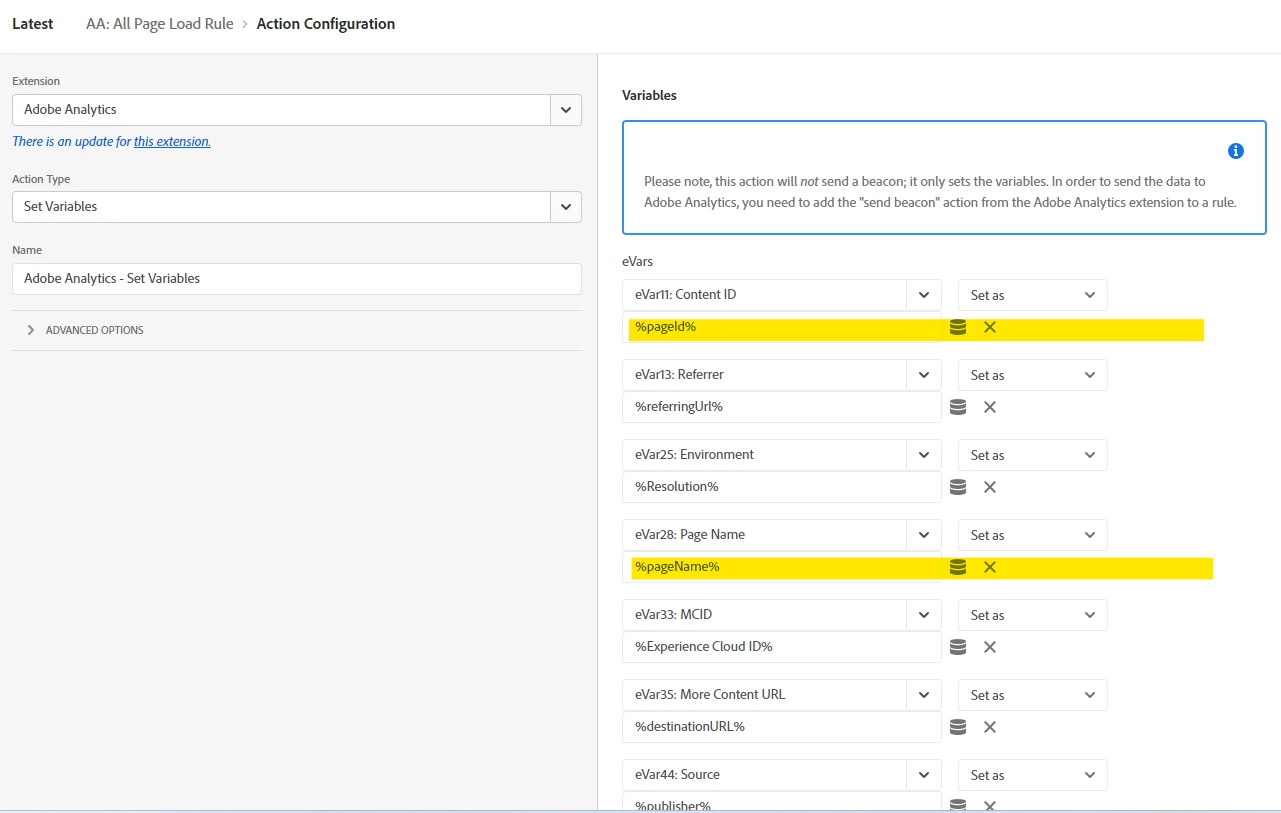
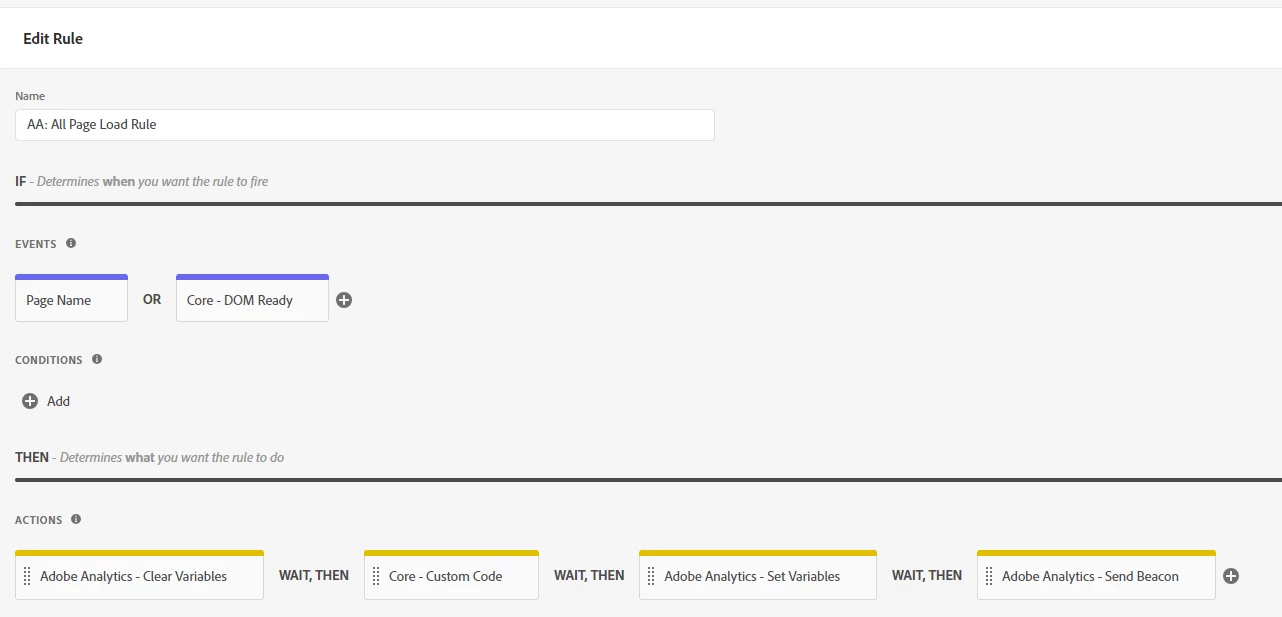
Here is the AEP rules
I am highlighting 2 examples Evar11 works, evar28 does not
 

And here are the processing rules which were set up originally for our first site (that hasn't moved to AEP yet, but both sites are going to the same report suite)
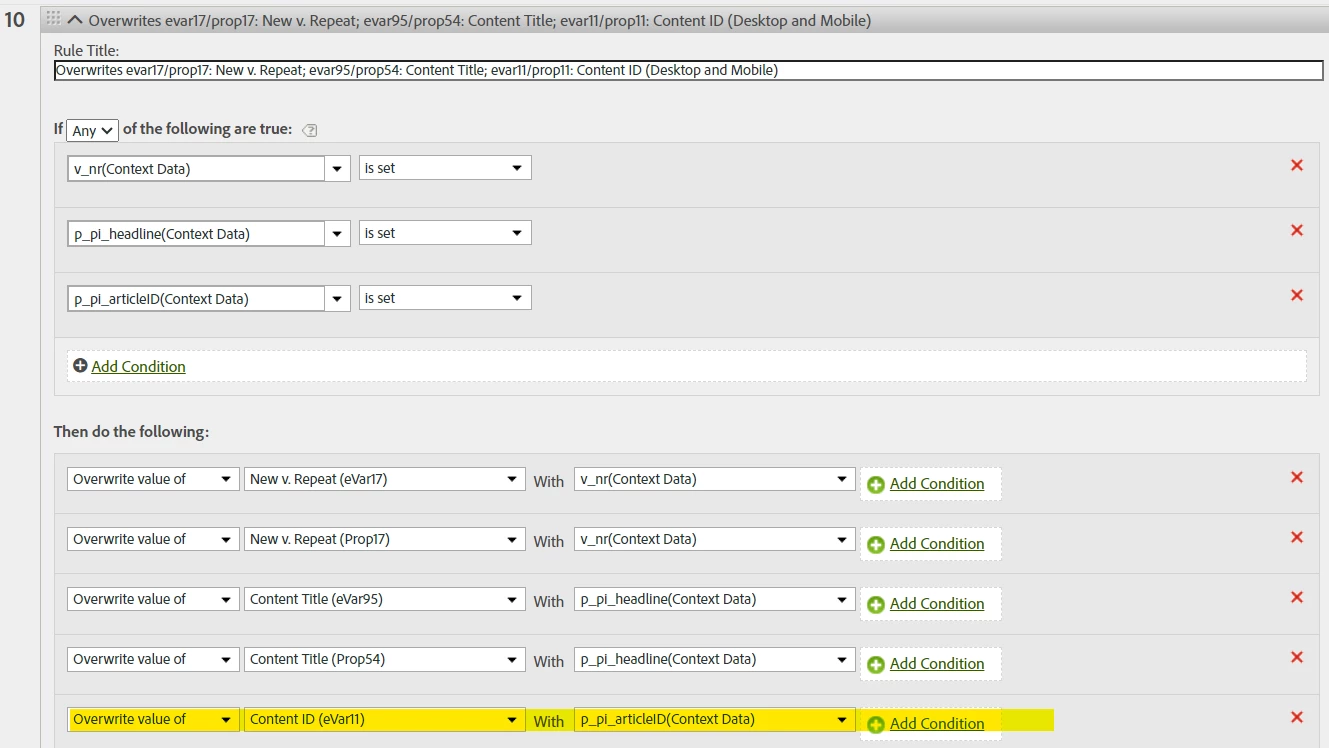
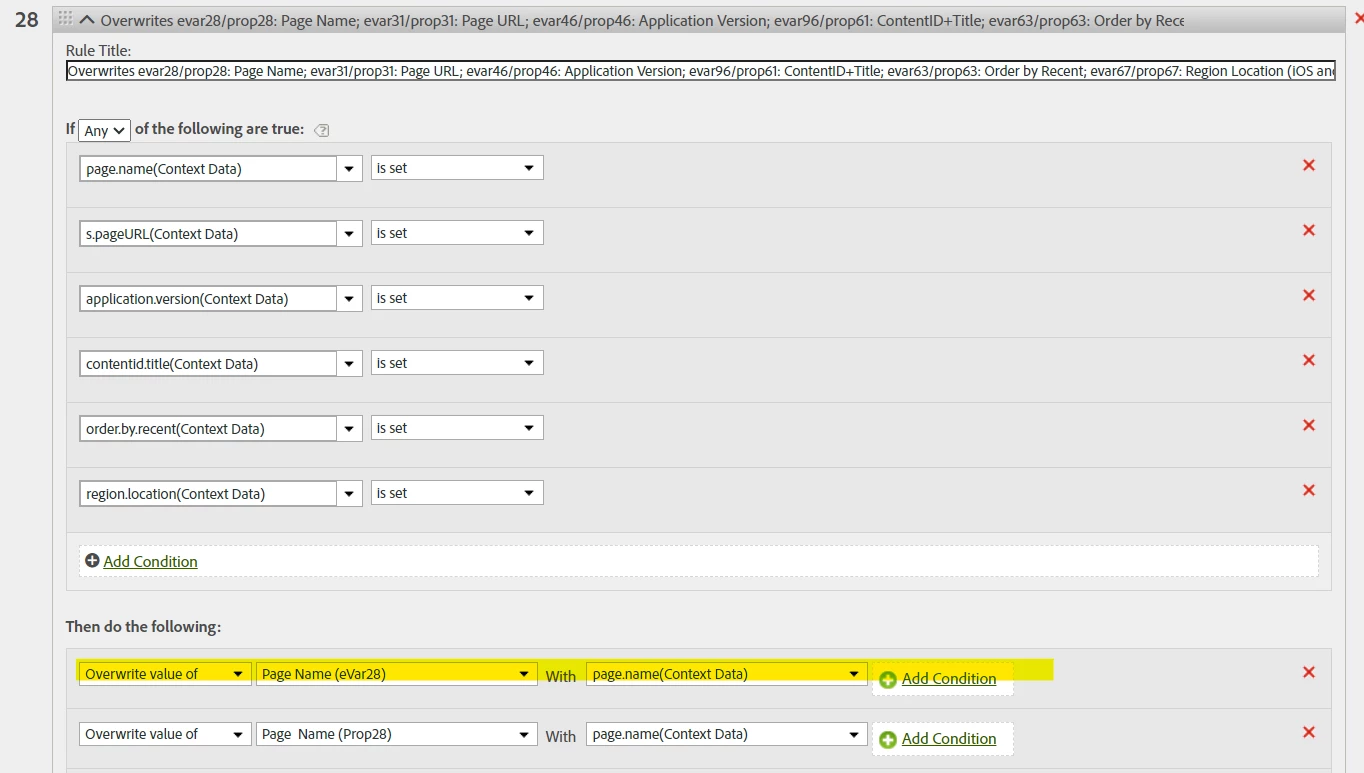
 

Or is that the issue, that this rule could be overwritting the data when it shouldn't be.


Even when you set the eVar or Prop or whatever, you can override those values in Processing Rules...


Not an "override" per se, but Processing Rules are sometimes used to set generic values to eVars (rather than sending it from Launch)... like setting an eVar to the User Agent value, or replicating values without taking up length on the Data Collection bundle.


Rule 28 looks like your culprit...


So Looking at the first Rule 10, likely none of those conditions are met, so the rule doesn't trigger.


But Rule 28, one of those conditions must be "passing", and I am sure that page.name is not being set any longer, which means it's an empty value... and that empty value is overriding the value you are sending from Launch...


You should really review ALL the Processing Rules... if they aren't needed you should remove them all so that other parts of your tracking isn't impacted. Just because Rule 10 isn't triggering now.. doesn't mean that there is some scenario where it might trigger... Keeping your Processing Rules clean and only keeping rules that are needed there is going to be much better for your implementation.. and IF you need to use Processing Rules in the future, the person who adds new rules will only have to deal with active content, and not historical leftovers which are now essentially garbage....


3 replies

V_Pavan
Level 2
July 25, 2023

Hey @dk14 could you kindly elaborate the use case/scenario which type of values are you trying to track and which variables(eVar/prop) are you using to track it and how have you framed the rule.

dk14Author
Level 2
July 25, 2023

Unfortunately our inhouse Adobe knowledge expert left recently so hopefully this is some of the infomration that will be helpful.


In this case, it is an eVar that is being populated (eVar28). 

Here are some screens shots of the Adobe Experience platform results 


I am getting a valid response on the adobe call on the page and I can all see under there the data being populated.


The Data Element

And the Rule


We have many values that are being populated, just not this one and another new one that we were setting up and testing. 


We also have a 2nd site that uses the old adobe processing rules to populate. These both populate the same report suite, and we dont have any issues with that data.


dk14Author
Level 2
July 25, 2023

So the issue is that eVars 11, 19, 25, 35, 44, 67. etc aren't being sent on the third call?


First, you need to check if that is a Page View or an Action... look a little farther down, do you see these rows, and are they populated?


It's possible that the person who designed your site implementation choose specifically not to send the eVars on actions.. or perhaps those eVars are set up with an attribution mode so that there is no need to set them on an action, they will maintain the value from the page without being set...


Are you are logged into your Debugger (since the names of your eVars is shown I would think you are, but it can time out), try turning on "Show post processing hits", to see if those values are being maintained by the eVar retention:


Just for clarification, it is not the third call that was the issue. That was probably the link click tracking. 

It is that evar28 is not being populated at all, even though it is showing in the debugger across all the page loads.

Jennifer_Dungan
Community Advisor and Adobe Champion
July 25, 2023

Is the dimension enabled? You can send data to a prop or eVar (and see it in the cloud debugger), but if that dimension isn't enabled in the Report Suite it won't show up... and technically won't be collecting data until its enabled (though strangely, anything previously enabled that is disabled will continue to collect data)...


Another possibility is that the dimension is enabled, but that dimension hasn't been added to the permissions for the users in the Admin Console for the suite.... even if you are an admin, you will not see any items that have not been added for view permissions.... 

dk14Author
Level 2
July 25, 2023

We currently have our primary site using the old Adobe processing rules .
This populates the eVar correctly which I would assume that means the eVar is set up correctly. 


Unless there is something that needs to happen to allow the variable to collect data from the Adobe experience data collection rules.

Jennifer_Dungan
Community Advisor and Adobe Champion
July 25, 2023

No... from the sounds of your original post, it sounded like you were adding some new dimensions and you weren't seeing them in the reports.. but based on your screenshot, you aren't seeing them in the Cloud Debugger.. but this may not be an issue if your implementation relies on eVar expiries to maintain values... or if these are actions and they original implementation was designed to not send those values on actions.


I am going to borrow this from a friend on how to describe the difference between props and eVars...


eVars are like chewing gum on the side walk... once you step it in, it stays on your shoe until you dislodge it....


Props are like a banana peel, you step on it with an immediate action, then you move on leaving it behind. 

Community Advisor
July 26, 2023

Hello @dk14 ,


from the conversations it seems that there is processing rules enabled to your eVar28 in report suite where you are sending the values and because of this you are seeing value in debugger but not AA report. So request to check the enabling status of  processing rules for eVar28.


Hope this will help.

dk14Author
Level 2
July 27, 2023

Can you please let me know where I need to look for this, because when I look it in the conversion variables I see that it is enabled


Jennifer_Dungan
Community Advisor and Adobe Champion
July 27, 2023

Processing Rules are found in:


Admin > Report Suites
(Choose Suite)

Edit Settings > General > Processing Rules


However, there is no way for us to know which rule could be impacting your eVar, you will have to check all of them.


IF you don't have any rules set up, it could be manipulated with a VISTA rule, but those are set up by Adobe (you cannot access them yourself).. so you will need to contact support.