Data Feed Azure Legacy | Community
Skip to main content
February 19, 2025
Solved

Data Feed Azure Legacy

  • February 19, 2025
  • 2 replies
  • 513 views

Hi,

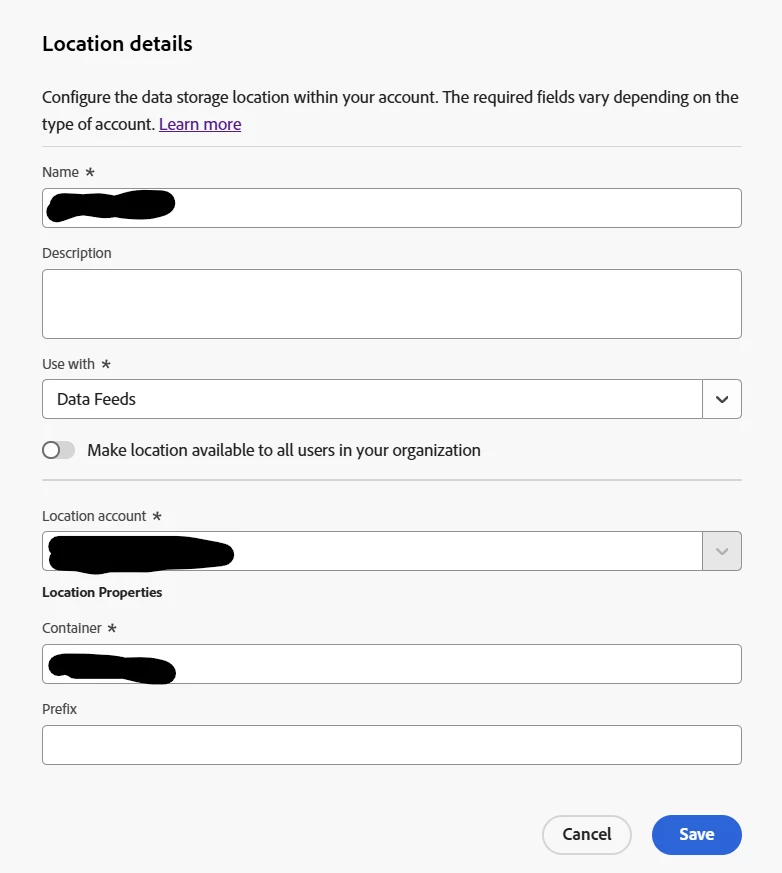
I'm using Azure (Legacy) for our data feed and we have a folder within our container. I don't see any setting to set the folder path. I tried to put "container/folder" in the container box but doesn't seem to work. Is there a way to set the path?



This post is no longer active and is closed to new replies. Need help? Start a new post to ask your question.
Best answer by FarazHusain

Hey @minhng7 actually that will be prefix. Prefix - The folder within the container where you want to put the data. Specify a folder name, then add a backslash after the name to create the folder. For example, folder_name/

2 replies

Jennifer_Dungan
Community Advisor and Adobe Champion
February 19, 2025

That is strange... I would expect that to be an option like FTP has... You may need to log a bug with client care that such an important field is missing from the setup.

FarazHusain
Adobe Employee
FarazHusainAdobe EmployeeAccepted solution
Adobe Employee
February 20, 2025

Hey @minhng7 actually that will be prefix. Prefix - The folder within the container where you want to put the data. Specify a folder name, then add a backslash after the name to create the folder. For example, folder_name/