
Data caputing from ".ics" (calendar) URLs and weird site domains | Community
Skip to main content
OscarMartinezM
Level 3
February 21, 2023
Solved

Data caputing from ".ics" (calendar) URLs and weird site domains

  • February 21, 2023
  • 1 reply
  • 875 views

Hi community, 

We've realized we have some "interesting" hits from URLs like this one: http://azplybthnszfbjoallru/june_2-edited-event-title-2.ics. I edited the event title in URL for confidentiality reasons, but original title seems like valid. I would understand if this data would come from a link. But we found them in Page URL. Does this make any sense? How a ".ics" URL is sending data to Adobe? Why the weird URL domain?
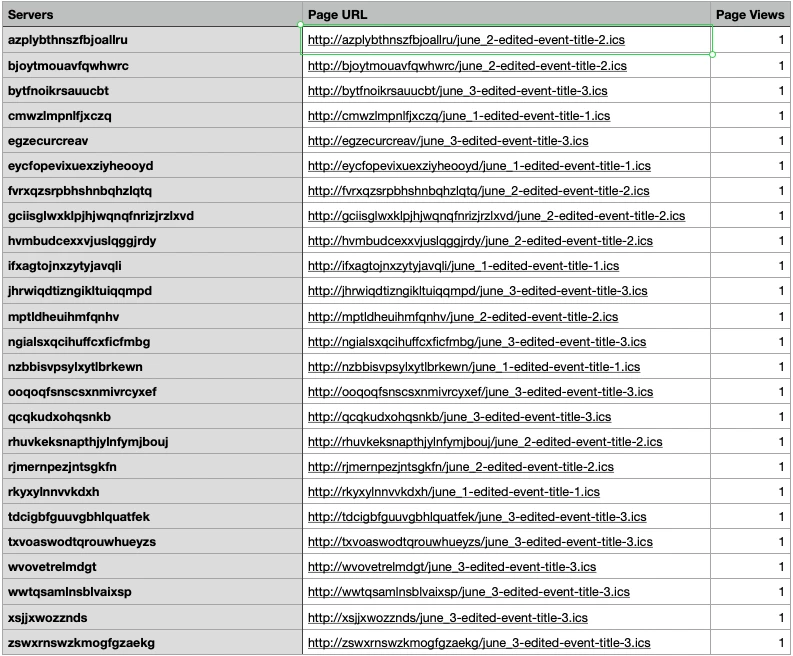
 

Thank you!

This post is no longer active and is closed to new replies. Need help? Start a new post to ask your question.
Best answer by Jennifer_Dungan

That is strange.. without seeing the implementation it's hard to say....


Maybe someone coded a custom link for calendars but used the destination URL in the Page URL field? With Launch, there's a lot of custom tracking that could be configured, and it may not be correct... 


The first thing I would do if I were you would be to test pages with .ics links... watch what is happening and what tracking is being sent...  You can also either use something like the extension "Launch Swtich" to turn on Debug mode, or you can enable it manually in your console with:

_satellite.setDebug(true);

and disable it with:

_satellite.setDebug(false);


This can help show you what rule is triggering (if there is a custom rule in place).


1 reply

Jennifer_Dungan
Community Advisor and Adobe Champion
Jennifer_DunganCommunity Advisor and Adobe ChampionAccepted solution
Community Advisor and Adobe Champion
February 21, 2023

That is strange.. without seeing the implementation it's hard to say....


Maybe someone coded a custom link for calendars but used the destination URL in the Page URL field? With Launch, there's a lot of custom tracking that could be configured, and it may not be correct... 


The first thing I would do if I were you would be to test pages with .ics links... watch what is happening and what tracking is being sent...  You can also either use something like the extension "Launch Swtich" to turn on Debug mode, or you can enable it manually in your console with:

_satellite.setDebug(true);

and disable it with:

_satellite.setDebug(false);


This can help show you what rule is triggering (if there is a custom rule in place).


OscarMartinezM
Level 3
February 21, 2023

Thanks Jennifer for your quick response.

I didn't mention something important. If I tried to access URL I get in a browser I get domain error message, as I would expect since this is not a valid domain.

Jennifer_Dungan
Community Advisor and Adobe Champion
February 21, 2023

Right... I don't think these are valid (and you have shown evidence to support this), but I am also not sure offhand where that info is coming from... but in theory, if there is custom tracking in place.. there could be an issue with the values that are being populated in the Page URL field...


I suspect that this is a custom rule, as I haven't not seen files like that populate into my Page URLs automatically... but again, how the tracking is implemented would help inform what is happening 🙂


If this is coming from automatic tracking, perhaps there are some rules that are modifying that tracking.