Custom Link/Download Link Event Tracking | Community
Skip to main content
Luca_Lattarini
Level 9
July 7, 2020
Solved

Custom Link/Download Link Event Tracking

  • July 7, 2020
  • 3 replies
  • 3050 views

Hello everyone,


Below you can find the issue that I am facing. Basically when I click on a custom button to download a pdf, randomly during the first one or two Analytics call I have the value Download Link = undefined and after I have Custom Link with the value that I want to track. I think that I am tracking the first Analytics server call. Do you have some suggestion how to fix this issue? And what is the difference between Download Link and Custom Link?

Thanks


This post is no longer active and is closed to new replies. Need help? Start a new post to ask your question.
Best answer by raj_mandalapu

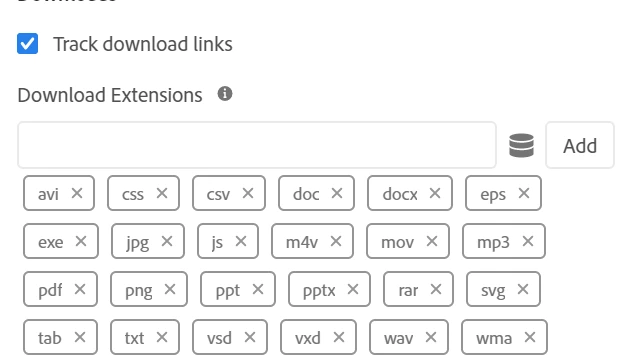
When we try to download a file, the AA will automatically track the respective file if the s.trackDownloadLinks= true is configured. you can configure this in launch either "configure tracker using custom code" or Link Tracking


If you want to track downloads without using the OOTB then you can disable below configurations, but you need to handle same in your custom event which you call when you click on download button


s.trackDownloadLinks= true;
s.linkDownloadFileTypes= 'exe,zip,wav,mp3,mov,mpg,avi,wmv,doc,pdf,xls';


3 replies

Alexis_Cazes_
Level 10
July 7, 2020

You have enabled automatic download link tracking and maybe have s.tl with custom link as type.


Check this:

https://docs.adobe.com/help/en/analytics/implementation/other/dtm/analytics-tool/link-tracking.html

https://docs.adobe.com/help/en/analytics/implementation/vars/config-vars/trackdownloadlinks.html


For download link undefined maybe you cal s.tl with type download but your button does not have a link 

raj_mandalapu
raj_mandalapuAccepted solution
Level 7
July 7, 2020

When we try to download a file, the AA will automatically track the respective file if the s.trackDownloadLinks= true is configured. you can configure this in launch either "configure tracker using custom code" or Link Tracking


If you want to track downloads without using the OOTB then you can disable below configurations, but you need to handle same in your custom event which you call when you click on download button


s.trackDownloadLinks= true;
s.linkDownloadFileTypes= 'exe,zip,wav,mp3,mov,mpg,avi,wmv,doc,pdf,xls';


Luca_Lattarini
Level 9
July 13, 2020

hello rajas66269496,


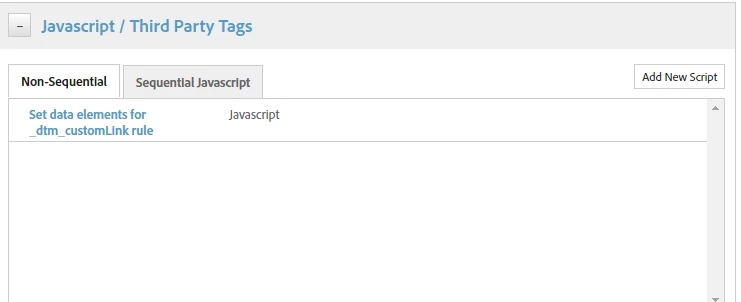
Do you mean to add the code here 

Thanks


jantzen_b
Adobe Employee
Adobe Employee
February 3, 2021
Do any of the answers below answer your initial question? If so, can you select one of them as the correct answer? If none of the answers already provided answer your question, can you provide additional information to better help the community solve your question?