Custom events stopped being collected (AA deployed via GTM) | Community
Skip to main content
Level 2
July 9, 2024
Solved

Custom events stopped being collected (AA deployed via GTM)

  • July 9, 2024
  • 2 replies
  • 1297 views
Hello, we use GTM to deploy the AA tracking script and to tag event tracking. On May 21st all custom events (and custom parameters) stopped being collected in AA, however pageviews are still tracked. Unfortunately the tech support team couldn't help with resolving this issue because we use GTM to deploy AA tracking code.
 
There was a similar question in the AA community but for AEM sites. 
where it was mentioned that Adobe would have fixed this in the June releases. There have been several releases since then, but the issue has not been resolved. Maybe it has been resolved for AEM sites, because we don't use this. I'm also seeing these errors in the console tab.
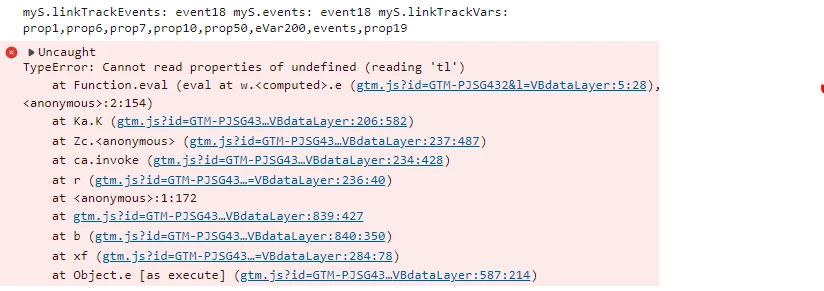
I would appreciate any help with this

This post is no longer active and is closed to new replies. Need help? Start a new post to ask your question.
Best answer by Jennifer_Dungan

Ah, yeah, if you changed the s object to myS, then you will also need to use that on your tl call.


(this).myS(true, linkType, linkName);


The "Overrides" variable is for a single call, it's still relying on the s object to be available... That's more for when you are sending analytics to multiple suites with different profiles


So let's say you have Suite A and Suite B (and you need s.eVar1 on A and s.eVar28 on B)


you would set a different object for A and B


s for Suite A

and sB for Suite B


(note this sample is ultra simplified for illustration purposes)

s.eVar1 = sB.eVar28 = "value"; s.tl(true, linkType, linkName); // this should send to Suite A and include eVar1 s.tl(true, linkType, linkName, sB); // this should send to Suite B and include eVar28


If you only have a single suite, was there a reason why you overwrite the s object? Was there a conflict with something else on your site? Changing the s object can lead to a lot of headaches, I would only do that in extreme circumstances like needing to send to multiple suites on different profiles, or something like the devs decided to use "s" in their core functionality and now everything is conflicting (and even in that I would kindly ask them to change if possible 😛 )

2 replies

Jennifer_Dungan
Community Advisor and Adobe Champion
July 9, 2024

This looks like a hard JS error in relation to the s.lt() function? 


I think this is very different from a data layer interaction issue that was happening in the other post, but it's hard to say.


I think we would need to see more of your setup to be able to support this. Using GTM for AA is much more difficult than using Adobe Launch to track GA.


Aside from playfully suggesting using Launch 😉 I do use GTM for other stuff, and if you are willing I could probably find some time to jump on a call with you to look at what is happening (assuming you are willing or able to do that), and if not, I will need to see some screenshots of your actual GTM code to try and figure out what is happening.

alexc287Author
Level 2
July 10, 2024

Thank you for looking into this @jennifer_dungan - Yes, Launch is something we plan to implement in the future when we have the budget for it. Thank you for offering to jump on a call, I've just messaged you directly

Ankit_Chaudhary
Community Advisor
Community Advisor
July 10, 2024

Hi @alexc287 

It seems like you have changed the adobe tracker from "s" to "myS" while setting up app measurement code also the error seems like related to tl function which is used to send non page view beacon to adobe from the screenshot it looks like a syntax error you need to add the tracker as well before adobe function like like t() and tl(), try replacing tl in your click tag in GTM with myS.tl(true, "o") to send a non page view beacon to adobe.

check this article for more information on tl method and its required arguments.


Note: Make sure to pass the required argument in the tl() function else the calls will be treated as a page view.

alexc287Author
Level 2
July 10, 2024

Thank you for sharing your thoughts on this @ankit_chaudhary . Yes, myS and tl() are used in the AA related custom variable and tags.

The confusing part is that no changes were made to the AA setup, the issue appeared all of a sudden. I'll read up about this, will try to implement it and will let you know if that resolves the issue


Jennifer_Dungan
Community Advisor and Adobe Champion
Jennifer_DunganCommunity Advisor and Adobe ChampionAccepted solution
Community Advisor and Adobe Champion
July 10, 2024

Ah, yeah, if you changed the s object to myS, then you will also need to use that on your tl call.


(this).myS(true, linkType, linkName);


The "Overrides" variable is for a single call, it's still relying on the s object to be available... That's more for when you are sending analytics to multiple suites with different profiles


So let's say you have Suite A and Suite B (and you need s.eVar1 on A and s.eVar28 on B)


you would set a different object for A and B


s for Suite A

and sB for Suite B


(note this sample is ultra simplified for illustration purposes)

s.eVar1 = sB.eVar28 = "value"; s.tl(true, linkType, linkName); // this should send to Suite A and include eVar1 s.tl(true, linkType, linkName, sB); // this should send to Suite B and include eVar28


If you only have a single suite, was there a reason why you overwrite the s object? Was there a conflict with something else on your site? Changing the s object can lead to a lot of headaches, I would only do that in extreme circumstances like needing to send to multiple suites on different profiles, or something like the devs decided to use "s" in their core functionality and now everything is conflicting (and even in that I would kindly ask them to change if possible 😛 )