Custom Event created via Core Extenstion Does not gets Triggered Correctly | Community
Skip to main content
Level 2
June 11, 2024
Solved

Custom Event created via Core Extenstion Does not gets Triggered Correctly

  • June 11, 2024
  • 2 replies
  • 1527 views

I am facing this issue of my purchase event getting triggered at incorrectly pageURLs 

Example 
when the user comes to my cart my url is : www.abc.com/checkout?..&step=1

when the user fill the payment details my url is www.abc.com/checkout?..&step=2
when the user completes the checkout my url is  www.abc.com/checkout?..&step=4

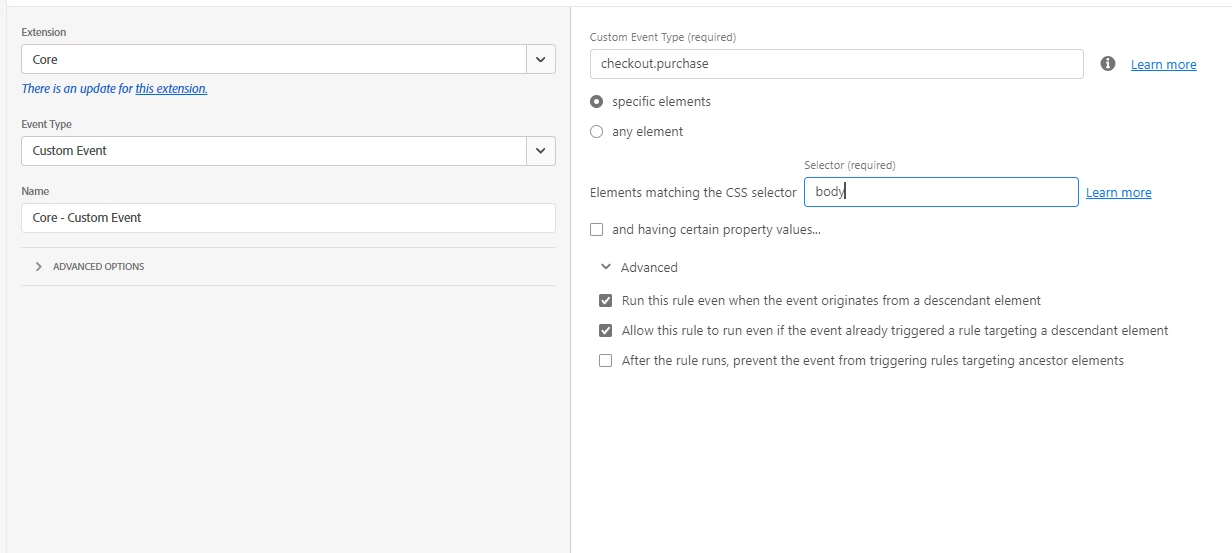
I am seeing majority of my purchase calls getting trigerred at  www.abc.com/checkout?..&step=2 . I have checked with the backend team the custome event dispacthing looks solid. are there any precautions that should be taken while configuring the custom event? - below is the attached screenshot. I am including the eventObject.name 

@jennifer_dungan @yuhuisg 
This post is no longer active and is closed to new replies. Need help? Start a new post to ask your question.
Best answer by bjoern__koth

Hi @omkarbh 

is there any chance your devs can push the URL into the event, and you can pick it up from there instead of using the URL?

2 replies

bjoern__koth
Community Advisor and Adobe Champion
June 11, 2024

Hi @omkarbh 

what's happened to step3? 🙂


Just kidding, but maybe this case would be the perfect situation to have a data layer to push event data in and react to that instead of setting up custom DOM events that may be cancelled while bubbling up.


There are a couple of extensions available in the Adobe Launch world e.g., Adobe's Client Data Layer (window.adobeDataLayer), there is a Google Data Layer (window.dataLayer) and even also some 3rd party extensions. All of them are fairly easy to use, but take a little bit of extra work for your frontend guys to set up. But then you have a clean interface 


(Or you just ask your frontend guy to trigger your "checkout.purchase" event as a direct call and listen to it in your rule. This is the rather classic way and in my opionion not 2024 anymore.


_satellite.track("checkout.purchase", { // your additional event payload goes here })

)


Hope that helps a little 

Cheers from Switzerland!
omkarbhAuthor
Level 2
June 13, 2024

DataLayer sounds like a very good idea. 

When we say direct call is it tlike 

_satellite.track("checkout.purchase", {
  // your additional event payload goes here
})

putting the above snippet in the code and passing the indentifer checkout.purchase in launch while setting up the direct call rule via core extension? 

Jennifer_Dungan
Community Advisor and Adobe Champion
June 12, 2024

Is Step 4 the success page? But maybe the actual success, before sending the person to that page is on the previous step? If this is an SPA, then this might be related to a timing delay...


So for example:

  • Cart
  • Checkout Page (Please enter your details)
  • User Enters Details and Submits
  • Payment is processed
  • Payment Complete occurs (this is your actual success event)
  • Payment Success Page


Technically the "completion" is between pages... if an SPA, this might trigger before the URL is updated to the success page?

omkarbhAuthor
Level 2
June 12, 2024

Yes - the step 04 is a sucess page andyes our application is on SPA . Is there a way we came over come the timing delay in launch? I am seeing purchase event triggering at 2 & 3 step. 3 can be understandle but purchase event triggering on step2 is very suprising? 

Can the checkboxs ticked below can cause it? What suitable conditons can be given to ensure the success event will trigger correctly on the success page

bjoern__koth
Community Advisor and Adobe Champion
bjoern__kothCommunity Advisor and Adobe ChampionAccepted solution
Community Advisor and Adobe Champion
June 13, 2024

Hi @omkarbh 

is there any chance your devs can push the URL into the event, and you can pick it up from there instead of using the URL?

Cheers from Switzerland!