Creating filters with High-cardinality values | Community
Skip to main content
Level 2
June 19, 2017
Solved

Creating filters with High-cardinality values

  • June 19, 2017
  • 13 replies
  • 4613 views

Hello everyone,

I don't believe this is possible, but wanted to ask before I gave up .

Is there a way to create a filter/segment within the Adobe Analytics reporting suite that allows you to filter by a specific set of values, but one that is potentially very large, and with a very high level of cardinality. For example, say I have a list of 500 ID's thatt I want to create a filter/segment for, but I do not want to manually paste in each ID, line by line, to create my segment. Due to the nature of the data, regular expressions simply would not work.

Is this something that is possible? for the record, what I am trying to do here is take a customer evar (client ID) and run it against various tools within Adobe Analytics (such as the pathing analysis).

*fingers crossed*

Mike
This post is no longer active and is closed to new replies. Need help? Start a new post to ask your question.
Best answer by Hyder_Ziaee

You can use API to create large size segments quickly.


Example if you have evar1 as Customer ID and want to create a segment for all visits containing specific Customer IDs:

{

     "definition":{

          "container":{

               "type":"hits",

               "operator":"and",

               "rules":[

                    {"element":"evar1","operator":"equals","value":"12345"},

                    {"element":"evar1","operator":"equals","value":"23456"},

                    {"element":"evar1","operator":"equals","value":"34567"},

                    {"element":"evar1","operator":"equals","value":"45678"},

                    {"element":"evar1","operator":"equals","value":"56789"}

               ]

          }

     },

     "description":"creating Segment through API",

     "name":"Segment Name",

     "owner":"account_username",

     "reportSuiteID":"insertReportSuiteID",

}

You need to repeat the line 7 as many times as you have the Customer IDs. Notice the last line in rules (line 11) doesn't have a comma in the end.

You can run the API here: Developer Connection | Adobe Developer Connection

Your username and shared secret for the connection can be retrieved from your account. (let me know if you need more details)

I would recommend starting with a few values and checking the segment in the UI,

-Hyder

13 replies

Level 2
July 13, 2018

Thanks for the quick response!

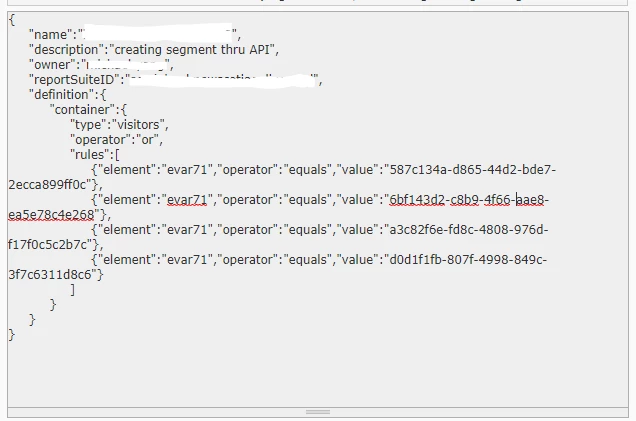
Nothing has changed. below is the request i am currently trying to run:

I am currently going through the postman documentation.

Level 2
July 13, 2018

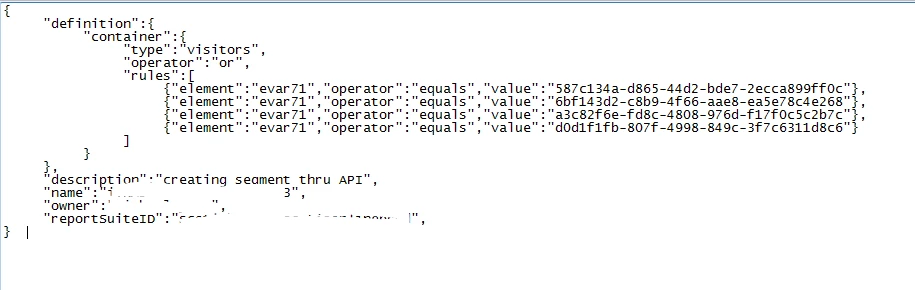
I've figured it out. I kept the request the same but just shuffled things around. No idea what difference it makes but the segment worked. See below:

Thanks!

Hyder_Ziaee
Adobe Employee
Adobe Employee
July 13, 2018

Michael, great to know you resolved it!

I did not get time to run the code and investigate.