Creating a drop down box in workspace for all page URL's | Community
Skip to main content
Level 2
October 29, 2019
Solved

Creating a drop down box in workspace for all page URL's

  • October 29, 2019
  • 1 reply
  • 1857 views

We are moving across from google analytics/data studio where we have historically created any widespread reporting across our organisation. One particularly useful report allows people to self serve by selecting their web page from a drop-down box to see their web traffic (for example).

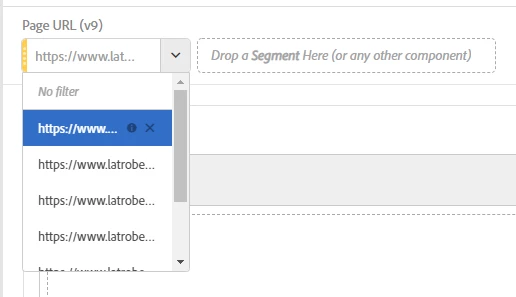
It looks like this:

I'm wanting to recreate this in workspaces but we have over 300,000 page URL's (or if looking by the page name, 22k) - is there any easy way to get ALL url's to show up in a drop-down menu in workspaces without waiting for them all to load in the right-hand side menu then shift+selecting them all? Or is there a better way to approach this?
Thanks in advance!

This post is no longer active and is closed to new replies. Need help? Start a new post to ask your question.
Best answer by Urs_Boller

I suggest you "learn" the end users:

1) how to search in the left-hand-rail for a specific pagename item and how they can add this as filter to the project

2) how they can create a drop-down with the items they are interested the most.

so basically train your end user in "filtering themself" instead of providing such a big selector...

1 reply

Urs_Boller
Community Advisor
Urs_BollerCommunity AdvisorAccepted solution
Community Advisor
October 30, 2019

I suggest you "learn" the end users:

1) how to search in the left-hand-rail for a specific pagename item and how they can add this as filter to the project

2) how they can create a drop-down with the items they are interested the most.

so basically train your end user in "filtering themself" instead of providing such a big selector...