Creating a biweekly time range to breakdown visits | Community
Skip to main content
Level 2
September 12, 2023
Solved

Creating a biweekly time range to breakdown visits

  • September 12, 2023
  • 1 reply
  • 1498 views

Hi folks! 

I have a team in my organisation that wants to breakdown visits they receive in their applications per sprint. This means that it should be every two weeks, from the beginning of the year and dinamically created as it moves on. 

My question is if there is a way of creating this logic on Analytics, instead of adding this information on a dataLayer and taking it from there?


Thank you! 

This post is no longer active and is closed to new replies. Need help? Start a new post to ask your question.
Best answer by yuhuisg

You can create custom dates with rolling date ranges. See https://experienceleague.adobe.com/docs/analytics-platform/using/cja-components/cja-date-ranges/custom-date-ranges.html?lang=en for some examples that you can adapt for your needs.

1 reply

VaniBhemarasetty
Adobe Employee
Adobe Employee
September 12, 2023

@germanroncelli You can create date range in Adobe analytics UI, where you can select that date range and report it in Adobe analytics.

https://experienceleague.adobe.com/docs/analytics/analyze/analysis-workspace/components/calendar-date-ranges/custom-date-ranges.html?lang=en

Level 2
September 12, 2023

Hi, thanks for your answer! I know how to create a custom date range (in this case 14 days). 

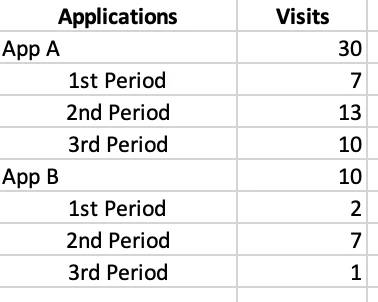
What I need is a dinamic date range that breakdown the current year in gaps of 14 days (that we call sprints). Something like this:

I know this can be achieved by adding a variable on a dataLayer, but by doing this I would not be able to use current data with this criteria. Is there anything Adobe-built that could work as well?

Jennifer_Dungan
Community Advisor and Adobe Champion
September 12, 2023

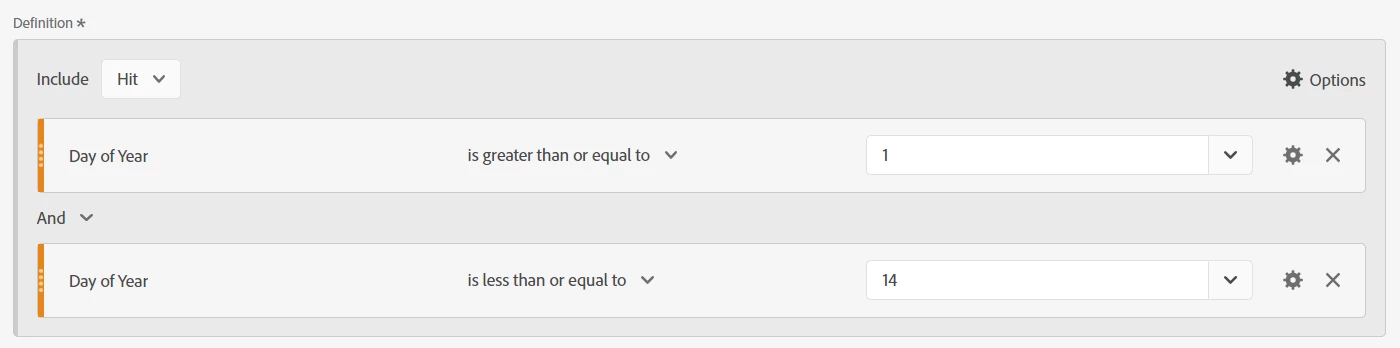
You could create a series of Segments using "Day of Year"