Correlate Product Profile with Report Suites in Adobe Analytics | Community
Skip to main content
August 6, 2020
Solved

Correlate Product Profile with Report Suites in Adobe Analytics

  • August 6, 2020
  • 3 replies
  • 1999 views

I am an administrator for one of the Login company


I have a request from one of our users who needs access to a couple of Report Suites. Now I do see that we have over 200 Product Profiles. I am not aware of how these Product Profiles are organized or which Report Suite is part of which Product Profile.


Is there a way for you guys to provide us with these details so that it would be easier for us to quickly provide access rather than keep guessing and go through the 200 Product profiles searching for the Report Suites.
This post is no longer active and is closed to new replies. Need help? Start a new post to ask your question.
Best answer by kainth

Hi @vmaddikunta,

If you want to check which report suite is linked to which product profile you can follow the below steps.

1. Go to URL: https://adminconsole.adobe.com/

2. Go to Products tab & select the product from the left pane.
3. Select a specific product profile for which you want to check the report suites.

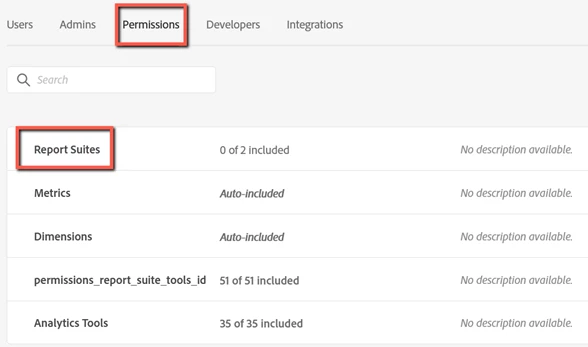
4. Navigate to the Permissions tab in the Product Profile & you will be able to find all the report suites associated with the Product profile there as shown below.


Hope this helps.

Regards,

Abhinav

3 replies

Level 4
August 6, 2020

Upon editing one of the Product Profile within admin console for your organization, You will see which report suites/metrics/dimensions/tool access are assigned to this profile. 

February 4, 2021
None of the answers above provide me with the solution that I am looking for. Larger enterprises have people moving in and out and there could be cases where there is no proper documentation as to how the existing Product Profiles were built or which Report Suites are part of which all Product Profiles. Currently Admin Console doesnt provide any means to figure this out.
kainthAccepted solution
Level 6
August 6, 2020

Hi @vmaddikunta,

If you want to check which report suite is linked to which product profile you can follow the below steps.

1. Go to URL: https://adminconsole.adobe.com/

2. Go to Products tab & select the product from the left pane.
3. Select a specific product profile for which you want to check the report suites.

4. Navigate to the Permissions tab in the Product Profile & you will be able to find all the report suites associated with the Product profile there as shown below.


Hope this helps.

Regards,

Abhinav

August 6, 2020
This is a pretty huge manual effort as I have 200 odd Product Profiles. Is it possible to get these details by other means?
jantzen_b
Adobe Employee
Adobe Employee
February 3, 2021
Do any of the answers below answer your initial question? If so, can you select one of them as the correct answer? If none of the answers already provided answer your question, can you provide additional information to better help the community solve your question?