Correcting/replacing values captured in list eVar through custom code | Community
Skip to main content
NorData
Level 2
January 18, 2024
Question

Correcting/replacing values captured in list eVar through custom code

  • January 18, 2024
  • 1 reply
  • 2185 views

Hello,


We have a list eVar configured to capture the web form's field level errors, like "first_name", "company_name" etc.., when they are triggered. With the recent development change, some of these field name values are started to capture as unique number which looks something like this "00n5000000wfov". 


Its because Dev had to change the hidden name of the inputs so that they would work with our salesforce systems. So, what used to be company_name for instance, is now 00n5000000wfov. And then any reporting/parsing of the data could probably be 'translated" that 00n5000000wfov to company_name.


Can anyone help on how i can replace/map the unique values to the actual field names, so the reporting is clean ?


Below is the custom code which i've tried but is not working:


s.list3=_satellite.getVar("form:formError");

var fieldMapping = {
'00n5000000wfov' : 'company name',
'00n4c000000d1rr' : 'test this replaced text',
'00n4c000000d1ru' : 'replaced with this text'
};

var capturedValue = _satellite.getVar('s.list3');
var replacedValue = fieldMapping[capturedValue] || capturedValue;
_satellite.setVar('s.list3', replacedValue);


Example of our list eVar the way it currently looks : "first_name:last_name:email:00n4c000000d1rr:company:employees:00n4c000000d1ru:00n4c000000d1rp:00n4c000000d1rs:00n4c000000d1rt:00n4c000000d1rq"


Any leads are much appreciated!

Thanks!

This post is no longer active and is closed to new replies. Need help? Start a new post to ask your question.

1 reply

Jennifer_Dungan
Community Advisor and Adobe Champion
January 18, 2024

If the field names don't change, you could just use Classifications to map "00n5000000wfov" to "first_name"?


Classifications process every 4 to 6 hours, and are not included in Raw Data exports (if that is a concern)... but they are available in Workspace, Data Warehouse, Report Builder and the APIs.


If you really want to do this in Launch, can you explain what you want your eVar to look like, like what format you need.


I see you start with

s.list3=_satellite.getVar("form:formError");


What does this value look like before you start manipulating?

NorData
NorDataAuthor
Level 2
January 18, 2024

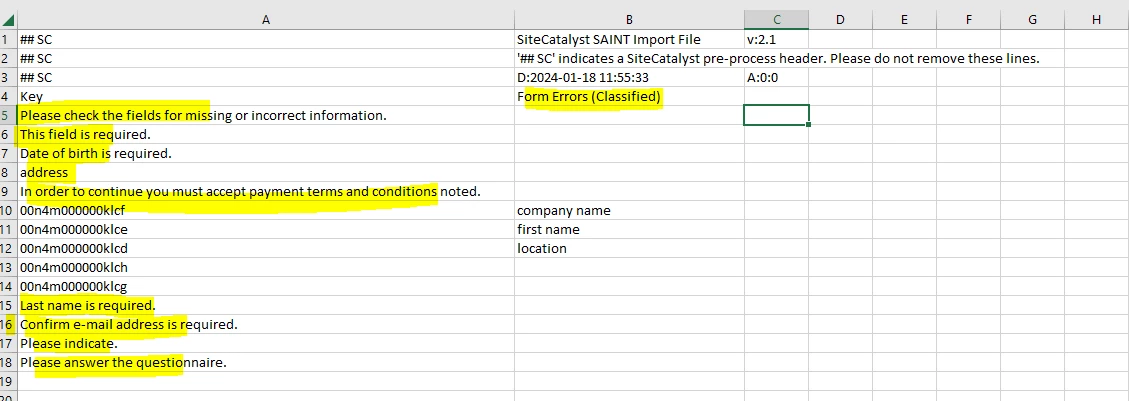
Thanks Jennifer! If i go with classification, dont i also need to copy paste the errors which are currently capturing correctly (highlighted) to the "form error (classified)" classification field? If that is the case, i would need to keep updating the values every time there are new set of errors,no ? Just for the context, we use this same form error event on all the other forms as well. but we just want to classify/map the values which belongs to one form, input names for all the other forms are fine. 


The current format of values being captured in s.list3 is as below :

"first_name:last_name:email:00n4c000000d1rr:company:employees:00n4c000000d1ru:00n4c000000d1rp:00n4c000000d1rs:00n4c000000d1rt:00n4c000000d1rq"


After replacing the below codes with the field names the desired output should look like below :

00n4c000000d1r = business_location

00n4c000000d1ru = contact_number

00n4c000000d1rp = postal_code

00n4c000000d1rs = member_details

00n4c000000d1rt = documents

00n4c000000d1rq = referral_details 


Desired output:

"first_name:last_name:email:business_location:company:employees:contact_number:postal_code:member_details:documents:referral_details"

Jennifer_Dungan
Community Advisor and Adobe Champion
January 18, 2024

Yes, and for the record, with such a relatively small list of items, you could also do the Classifications with the Rule Builder, rather than the Importer... it's a lot easier to review and make changes.


Ok, so if I am reading the above correctly.. some fields are still coming through fine, but others aren't, and this sample would be if every field in the form failed... but say if only "first_name" failed, then you would just pass "first_name", right?


So because list vars are really just a string, trying to map each value won't really work the way you intend it to... and while we could split the values into an array and do a loop, then join them all up again, you could just do this simple method:


var formErrors = _satellite.getVar("form:formError"); formErrors = formErrors.replace("00n4c000000d1r","business_location").replace("00n4c000000d1ru","contact_number").replace("00n4c000000d1rp","postal_code").replace("00n4c000000d1rs","member_details").replace("00n4c000000d1rt","documents").replace("00n4c000000d1rq","referral_details"); s.list3 = formErrors;


I assume you are adding this code into the Custom Code of the Set Variables action? Where the code is placed makes a big difference...