Complicated Segment Question | Community
Skip to main content
Level 2
July 26, 2023
Solved

Complicated Segment Question

  • July 26, 2023
  • 2 replies
  • 2289 views

I believe what I'm trying to accomplish is possible, but I'm having trouble setting it up in Workspace.  What I want is for the segment to look back from today minus 60 through 120 days to identify a population of customers that had a specific payment method.  Once the population is identified, I want to look back the past 60 days on that same population to see how it has fared in the last 60-days.  The tricky part is identifying the population in one date range (minus 60-120 days from today) and then showing metrics for that population in another date range (minus 1-60 days from today) within the same segment.
This post is no longer active and is closed to new replies. Need help? Start a new post to ask your question.
Best answer by Jennifer_Dungan

I would suggest using 2 segments not one, particularly since you are trying to compare the 2 time frames... 


Or you can have one segment for the specific payment method, then just have 2 custom date ranges for "last 60 days" vs "120-60 days ago"....


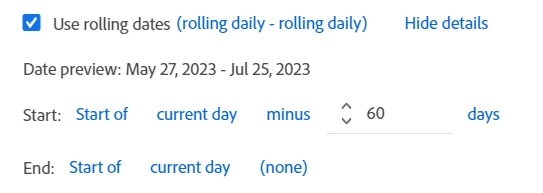
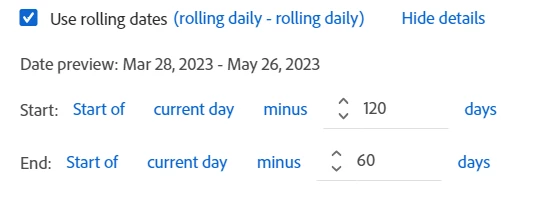
The Date Ranges should be easy:

and


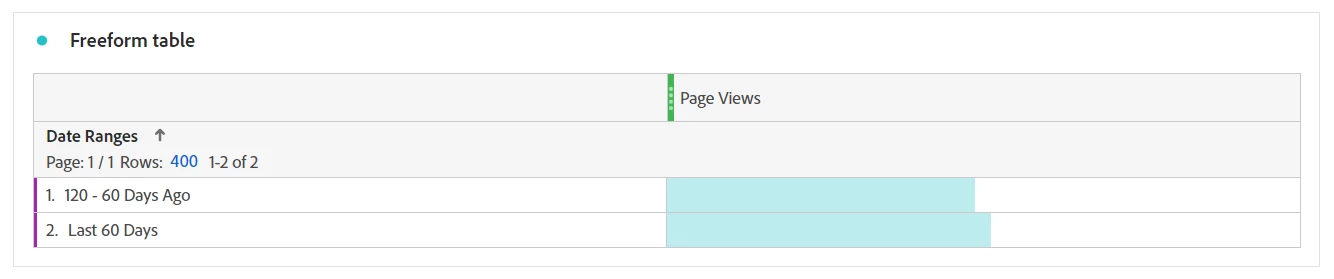
You can use these date ranges in your columns, or as your Breakdown:


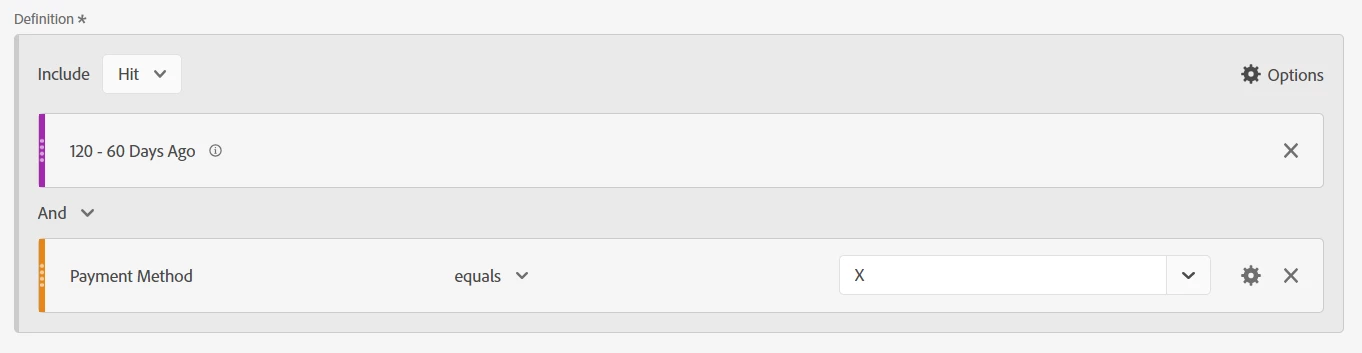
And then use one genetic "Payment Method X" segment.. you you can add these data ranges into two separate Payment Method segments "Payment Method X - Last 60 Days" and "Payment Method X - 120 - 60 Days Ago"


Why do you need both ranges in a single segment? That would be no different than just pulling 120 Days ago to Yesterday... the segment will only return one group of data... 

2 replies

Jennifer_Dungan
Community Advisor and Adobe Champion
Jennifer_DunganCommunity Advisor and Adobe ChampionAccepted solution
Community Advisor and Adobe Champion
July 26, 2023

I would suggest using 2 segments not one, particularly since you are trying to compare the 2 time frames... 


Or you can have one segment for the specific payment method, then just have 2 custom date ranges for "last 60 days" vs "120-60 days ago"....


The Date Ranges should be easy:

and


You can use these date ranges in your columns, or as your Breakdown:


And then use one genetic "Payment Method X" segment.. you you can add these data ranges into two separate Payment Method segments "Payment Method X - Last 60 Days" and "Payment Method X - 120 - 60 Days Ago"


Why do you need both ranges in a single segment? That would be no different than just pulling 120 Days ago to Yesterday... the segment will only return one group of data... 

dlynch80Author
Level 2
July 27, 2023

Thank you for the information.  My issue is that I'm trying to identify a list of customers in the "Identification Period" (Days 61-121) less today and then see their activity in the the "Performance Period" (Last 60 Days).  That's the distinction.  I don't necessarily care about their performance in the "Identification Period", just the list of customers.  I may not be approaching it right with the one segment, but the above is what I'm trying to accomplish.

dlynch80Author
Level 2
July 28, 2023

OK, I think I have a segment solution (sorry for making you wait so long)


Basically, using the 2 same date ranges I used above (I just added "Identification Period" and "Performance Period" for clarity)


I create 2 Visitor Level containers (within a Visitor Level Segment)


The first container looks for any visits within the Identification Period. The second container looks for Payment Method X within the Performance Period... due to the AND clause, both must pass in order to return that Visitor in the segment.


Thank you for the research.  The results I am getting are similar to the result I received in another form of this segment I tried.  Although it is partially giving me what I need, the problem is that the visits and orders (performance period) are flowing from 120 days prior to current and not just the 60 days prior to currnt.  The reason I think this is important is because by using all performance 120 days prior instead of just 60 days artificially inflates the conversion numbers because there is guaranteed to be at least one order in the 61-120 day range, sometimes several.  Whereas if I was able to just get the list of customers from 61-120 with that payment method and see how they did in the past 60-days, I would get a true picture of their performance without any influence from the prior period where there were at least 1+ orders required to qualify.  Then the prior 60-day performance period would give me all from that cohort, even those who had no orders in the performance period.  It may not be possible to do this, but I think it would be useful.

yuhuisg
Community Advisor
Community Advisor
July 28, 2023

Instead of using segments, would a Cohort Table help you? I assume that you want your segment for the purpose of running a report, not for activation (i.e. by publishing the segment to Experience Cloud for use in other Adobe products).

The only thing about the Cohort Table's results that you won't like is that you start from your end point, i.e. 60+60 days ago, and see what percentage of that old cohort has been retained up to today.

dlynch80Author
Level 2
July 28, 2023

Thanks for the idea and I did try that, but some metrics were not available with that method, such as conversion rate, which is really what I'm interested in seeing.