Comparing MTD in Adobe Workspace | Community
Skip to main content
March 31, 2020
Solved

Comparing MTD in Adobe Workspace

  • March 31, 2020
  • 2 replies
  • 2611 views

Is there a way to do a rolling comparison of MTD performance of current and previous month? 


Example:

Today is Apr 15th and I'd like to compare total number of visitors for Apr MTD against the same period in the previous month (So 1 - 15th of March). 


This post is no longer active and is closed to new replies. Need help? Start a new post to ask your question.
Best answer by PratheepArunRaj

Dear Philip,

I don't think that is possible in the workspace handy for all the months. But if you want, you can edit every month once like the below.

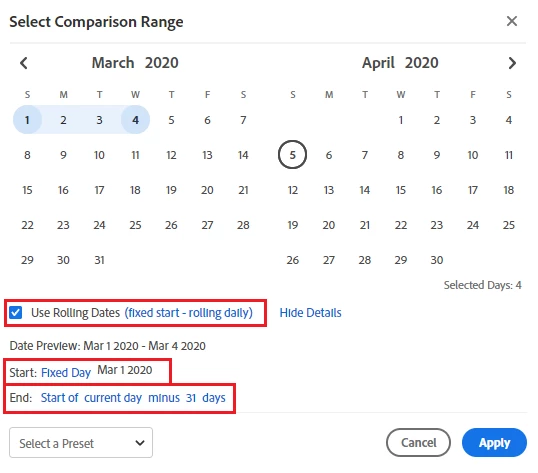
Right-click on compare the time period and set the custom date range: I have set it to compare 1-4 April with 1-5 March. This will be valid until the end of the month. Next month, you should edit the same to re-configure.


Thank You, Arun


2 replies

PratheepArunRaj
Community Advisor and Adobe Champion
PratheepArunRajCommunity Advisor and Adobe ChampionAccepted solution
Community Advisor and Adobe Champion
April 4, 2020

Dear Philip,

I don't think that is possible in the workspace handy for all the months. But if you want, you can edit every month once like the below.

Right-click on compare the time period and set the custom date range: I have set it to compare 1-4 April with 1-5 March. This will be valid until the end of the month. Next month, you should edit the same to re-configure.


Thank You, Arun


Thank You, Pratheep Arun Raj B (Arun) | Xerago | Terryn Winter Analytics
Level 2
June 7, 2021

How do you set this up to count in that some months there are 30 days vs. 31 days? - Adobe seems to lack this function since minus a month goes to month start or end.
