Comparing Metrics with 'Summary Change' Visualization | Community
Skip to main content
February 13, 2019
Solved

Comparing Metrics with 'Summary Change' Visualization

  • February 13, 2019
  • 4 replies
  • 3663 views

How do I modify the "Summary Change" visualization so that it allows me to compare other metrics and not take the default?

It seems as the default calculation is comparing the two metrics adjacent to each other. 
This post is no longer active and is closed to new replies. Need help? Start a new post to ask your question.
Best answer by Kanoul

Hi chriswolfL,

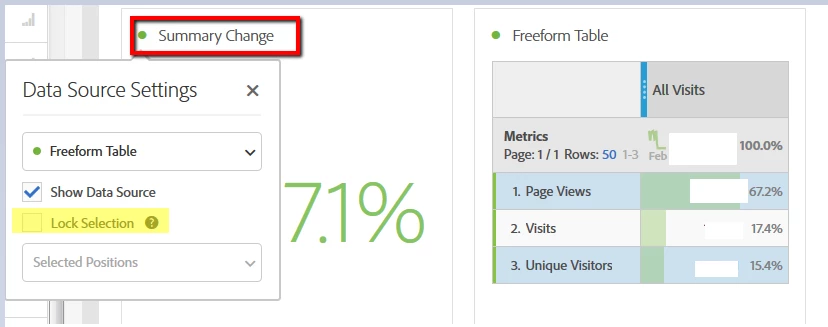
Ensure that 'Lock Selection' isn't enabled and doesn't have selected position. This prevents from choosing other line items for comparison.

4 replies

KanoulAccepted solution
February 13, 2019

Hi chriswolfL,

Ensure that 'Lock Selection' isn't enabled and doesn't have selected position. This prevents from choosing other line items for comparison.

ChrisPh2Author
February 13, 2019

Hi Kanikas19907318,

How do I access 'Data Source Settings'?  I don't see it in my Workspace...

ChrisPh2Author
February 13, 2019

found it!  however, I can't use it to compare data from the previous month.  It only allows me to compare same month and the metric side by side.

Gigazelle
Adobe Employee
Adobe Employee
February 26, 2019

You can select different date ranges as columns, and the visualization should work correctly.
