Classification Rule Builder not working on a SubClassification key | Community
Skip to main content
marishg69668790
Level 2
June 21, 2019
Solved

Classification Rule Builder not working on a SubClassification key

  • June 21, 2019
  • 7 replies
  • 9057 views

Hello,

I am trying to split an Address into - Street1, Street2, City, State, ZIP, Country - from a field "L3MG Original Address" which is part of a feed into Adobe, and therefore part of a Classification table with key "Listing ID".

I created a Subclassification on "Address" for the six items -  Street1, Street2, City, State, ZIP, Country -.

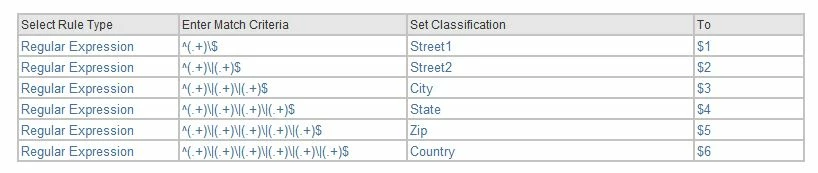
Then in Rule Builder, used regex  ^(.*)\|(.*)\|(.*)\|(.*)\|(.*)\|(.*)$  to split the address as shown below.
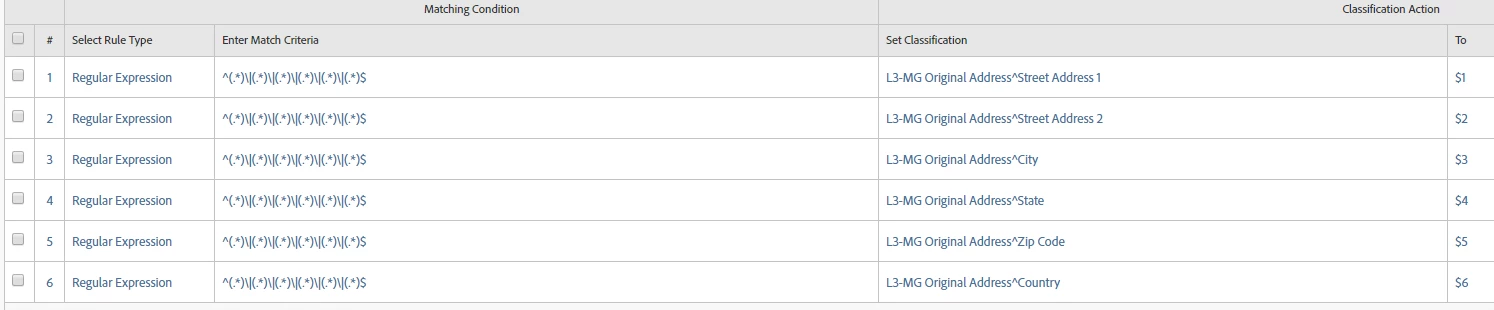
Individually, each expression is matching as shown below:
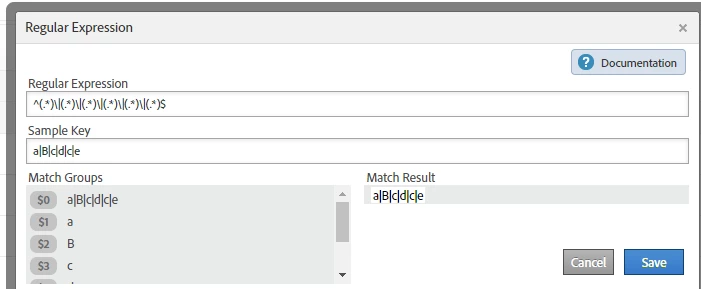
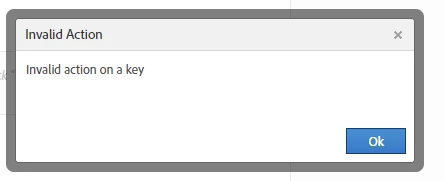
But on "Test Rule Set"  it throws the error -
Can someone help solve this? Is it because rule builder won't work on a Sub Classification key?

Thanks,

This post is no longer active and is closed to new replies. Need help? Start a new post to ask your question.
Best answer by Hyder_Ziaee

You are right, as the rule builder works on the key value (which is the value in the variable), and not the classification value.

Sub-classifications are to be used when a single key can only have a specific classification, and that classification can have a specific sub-classification. If for a single key, there can be two different sub-classification.

In this case, I do not think you need a sub-classificaiton. You can change the structure in the Admin section. And then use the Rule Builder for your automation.

Regards,

Hyder

7 replies

Hyder_Ziaee
Adobe Employee
Adobe Employee
June 21, 2019

From what I can see, this is not a case for sub-classification. change the structure to normal classification, and then use the rule builder.

Andrey_Osadchuk
Level 10
June 25, 2019

Hi hyderziaee,

Could you explain why the advice was to change the structure to normal classification?

Balaji_V
Level 4
June 25, 2019

HI Arish,

Please try the below format,

Thanks,

Balaji

marishg69668790
Level 2
June 25, 2019

Hi Balaji,

I tried the regex you recommended. It is still throwing the error "Invalid Action on a Key"

I doubt it has something to do with the subclassification key!

Thanks,

marishg69668790
Level 2
June 25, 2019

HI @hyderziaee

Could you explain further what you mean by change the structure to normal classification?

The situation is, we are receiving a feed with some 33 fields for some Listings data. The key is listing_id. One of the fields in the feed is an address value which is further needed to be split into Street, city, zip etc.

I have had a similar experience previously also, where when we try to do regex on a subclassification key, it doesn't work as expected. SO my concern is - is it not possible to apply regex on a sub-classification item?

Thanks for any help here.

Hyder_Ziaee
Adobe Employee
Hyder_ZiaeeAdobe EmployeeAccepted solution
Adobe Employee
June 26, 2019

You are right, as the rule builder works on the key value (which is the value in the variable), and not the classification value.

Sub-classifications are to be used when a single key can only have a specific classification, and that classification can have a specific sub-classification. If for a single key, there can be two different sub-classification.

In this case, I do not think you need a sub-classificaiton. You can change the structure in the Admin section. And then use the Rule Builder for your automation.

Regards,

Hyder

Hyder_Ziaee
Adobe Employee
Adobe Employee
July 1, 2019

@Andrey, I missed your question.

The reason why I mentioned for the change in the structure is cause:

  1. Rule Builder will not work on sub-classification
  2. Apart from the structure, there is no other place where you would actually see the reports as a sub-classification, which makes it unnecessary if not required. Here the values can be simple the classification of the actual value, and do not have to be sub-classification
  3. Sub-classification in my opinion should only be used if the key can never be in two sub-classifications, and if the classification needs to be done through file upload (and not rule builder)

Regards,

Hyder