Classification in eVar | Community
Skip to main content
May 18, 2021
Solved

Classification in eVar

  • May 18, 2021
  • 5 replies
  • 6278 views

Hi Team,


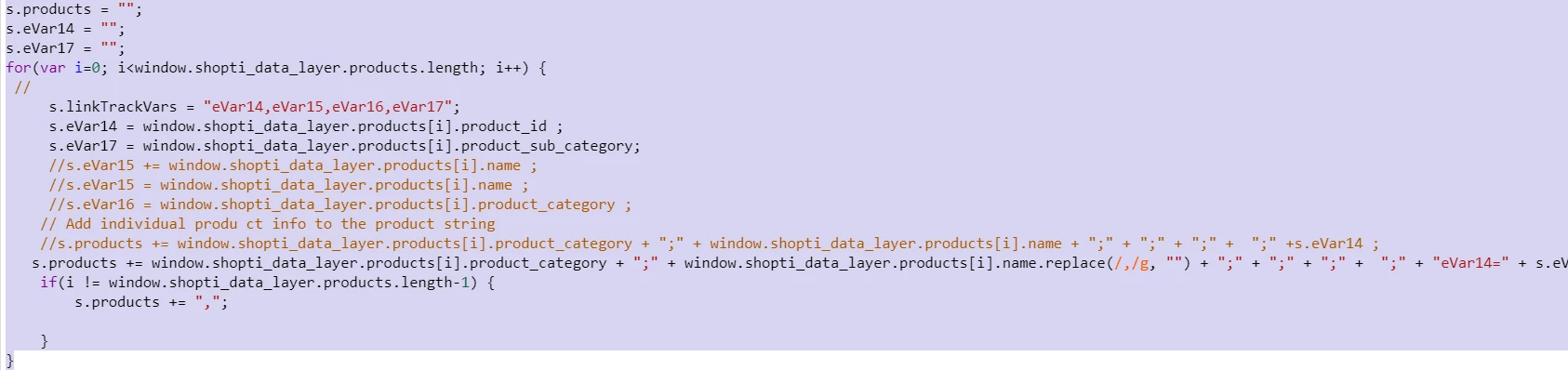
I am using s.product string to capture the product details. I am capturing the primary category in evar16 and 17. I am using the below code to capture the data:


So, now if multiple product is added in the cart, then multiple values in coming in the report, so can I resolve the issue through classification.


This post is no longer active and is closed to new replies. Need help? Start a new post to ask your question.
Best answer by PratheepArunRaj

Dear Bindu,

Sorry, Classification is not the solution for your use case.

Guess, rather than capturing the products in the syntax below

s.products = "Category1;Product1;;;;eVar14=Value1|eVar17=Value1,Category2;Product2;;;;eVar14=Value2|eVar17=Value2,Category3;Product3;;;;eVar14=Value3|eVar17=Value3,";

you are capturing it as

s.products = "Category1,Category2,Category3;Product1,Product2,Product3;;;;eVar14=Value1,Value2,Value3|eVar17=Value1,Value2,Value3";

So, you need to have a proper syntax on your product string and that will resolve your issue.

Thank You, Pratheep Arun Raj B | Xerago | Terryn Winter Analytics

PS: I have bolded few values so that you can understand the difference due to multiple products.
5 replies

yuhuisg
Community Advisor
Community Advisor
May 18, 2021

I think your code is wrong.

You're resetting s.products with each item in your shopti_data_layer's products array. What you should be doing is to append each item to s.products.

So something like this:

s.products = ""; for (var i=0; i < window.shopti_data_layer.products.length; i++) { var product = window.shopti_data_layer.products[i].category + ";" + [rest of the product's data and eVars to be tracked]; s.products = s.apl(s.products, product); }
May 18, 2021
@yuhuisg, it is not resetting basically, when user is adding multiple products in cart, then evar16 and evar17 is storing multiple categories in it. how we can avoid this?
khurshid
Adobe Employee
Adobe Employee
May 18, 2021

Yes you can use classification to resolve this.

yuhuisg
Community Advisor
Community Advisor
May 19, 2021
Which eVar does your freeform table screenshot refer to?
PratheepArunRaj
Community Advisor and Adobe Champion
PratheepArunRajCommunity Advisor and Adobe ChampionAccepted solution
Community Advisor and Adobe Champion
May 19, 2021

Dear Bindu,

Sorry, Classification is not the solution for your use case.

Guess, rather than capturing the products in the syntax below

s.products = "Category1;Product1;;;;eVar14=Value1|eVar17=Value1,Category2;Product2;;;;eVar14=Value2|eVar17=Value2,Category3;Product3;;;;eVar14=Value3|eVar17=Value3,";

you are capturing it as

s.products = "Category1,Category2,Category3;Product1,Product2,Product3;;;;eVar14=Value1,Value2,Value3|eVar17=Value1,Value2,Value3";

So, you need to have a proper syntax on your product string and that will resolve your issue.

Thank You, Pratheep Arun Raj B | Xerago | Terryn Winter Analytics

PS: I have bolded few values so that you can understand the difference due to multiple products.

Thank You, Pratheep Arun Raj B (Arun) | Xerago | Terryn Winter Analytics
May 19, 2021
@pratheeparunraj but I am using data layer to populate the same, then how can I use the above syntax, can you give me working example.
May 19, 2021
@yuhuisg, it is evar16