CJA - Isolating Cart IDs with Only Item | Community
Skip to main content
Level 2
September 24, 2025
Solved

CJA - Isolating Cart IDs with Only Item

  • September 24, 2025
  • 3 replies
  • 442 views

Hello,

I'm currently working on an analysis on Cart Abandonment rates and I'm trying to isolate Cart IDs which match the following conditions:

  • The cart (represented by the Cart ID) is comprised of only a single item, and
  • the item = a specific value (in this case, Product SKU = Professional Membership)

The goal is to see compare abandonment rates of carts with multiple items versus those with a just a single item, Professional Membership.


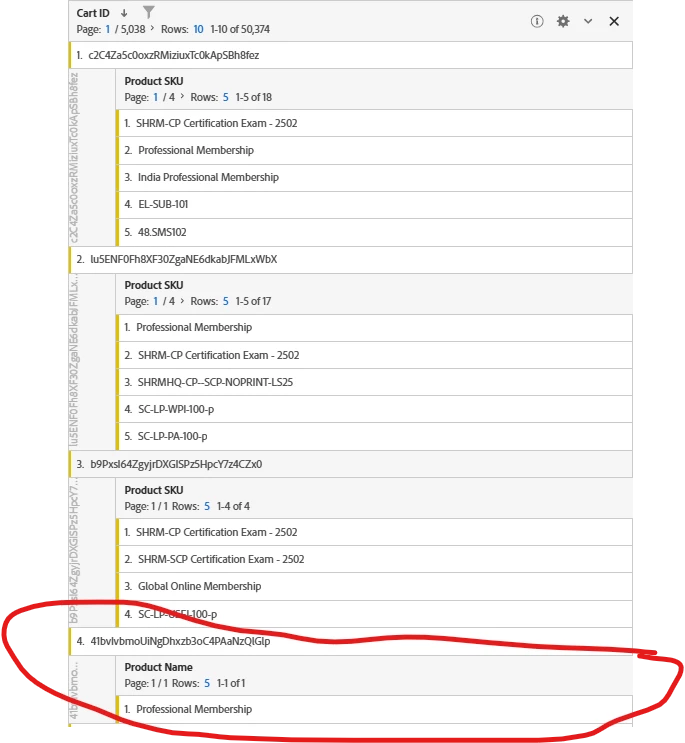
The following screenshot shows Cart ID broken down by Product SKU. I'm trying to capture ONLY instances of where the Cart ID returns a single row. Any ideas on how I can achieve this?
 

Best answer by Jacinda_E

Hi there @nicoleha7 - just following up here. Did the solutions Jennifer and Harveer shared here help you solve your issue? If so, don't forget to select a correct reply to close out the thread and help others who might have a similar question find this topic in the future 😊

3 replies

Jennifer_Dungan
Community Advisor and Adobe Champion
September 25, 2025

The problem is that segmenting Products currently results in the check just looking for the value to exist (either one of the products equals the specified value, or one of the products contains the value), but all products are returned... And there is no concept of "number of products" (unless you happen to be sending a custom dimension with such a value).


That said... I wonder if you could do something like:


HIT [

    Product SKU equals Professional Membership

    AND

    EXCLUDE HIT [

        Product SKU does not equal Professional Membership

    ]

]


Basically, find all hits that have "Professional Membership" and exclude all the hits that have anything other than "Professional Membership"


This, in theory, should work... getting rid of the hits that don't have "Professional Membership" at all, as well as getting rid of the hits with other products...

Harveer_SinghGi1
Community Advisor
Community Advisor
September 25, 2025

Hi @nicoleha7 ,

You can create a derived field in CJA to count number of SKUs in and event like below,


Then you can use this field in segments like "Where Product Count == 1 AND Product Name == Professional Membership". Similar segments can be created for other products of your choice.


Thanks,
Harveer

NicoleHa7Author
Level 2
September 30, 2025

This ended up working for me. Thanks @harveer_singhgi1 for the suggestion!


Nicole

Jacinda_E
Community Manager
Jacinda_ECommunity ManagerAccepted solution
Community Manager
September 29, 2025

Hi there @nicoleha7 - just following up here. Did the solutions Jennifer and Harveer shared here help you solve your issue? If so, don't forget to select a correct reply to close out the thread and help others who might have a similar question find this topic in the future 😊