Channel Overview Report not displaying correctly | Community
Skip to main content
June 27, 2017
Solved

Channel Overview Report not displaying correctly

  • June 27, 2017
  • 5 replies
  • 1631 views

Hi,

When running the Marketing Channel Overview Report, the report is not displaying correctly and is missing data and graphs.  We noticed this about a week ago and prior to that, the report ran and displayed fine.  We also checked and found the same issue on the latest versions of Edge, Chrome, and Firefox.  Anyone else experiencing the same issue and if so, was there a solution?
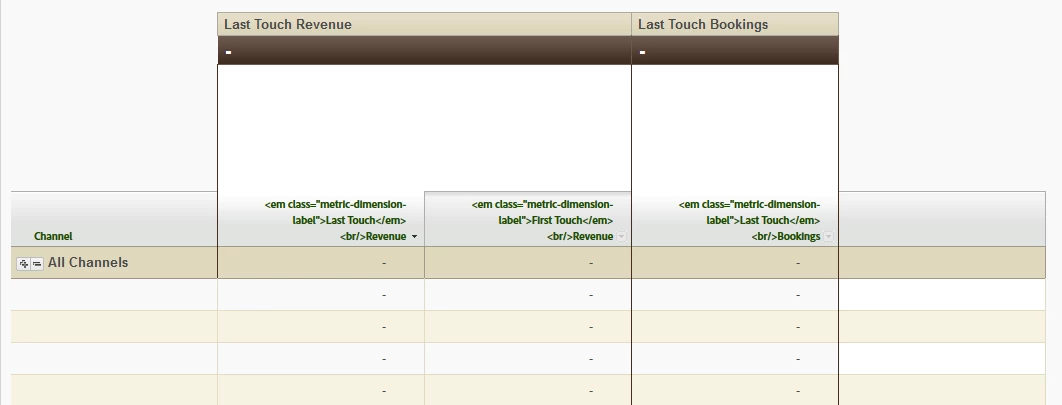
Thanks!

This post is no longer active and is closed to new replies. Need help? Start a new post to ask your question.
Best answer by Hyder_Ziaee

Hi anastasiiaz31290649​, the engineering is aware and working to fix this. I would recommend reaching out to clientcare@adobe.com and let us have the details so that we can validate the fixes.

5 replies

Hyder_Ziaee
Adobe Employee
Adobe Employee
June 28, 2017

Are you trying this within the company's network? what happens if you run the report outside this network?

June 28, 2017

I get the same result.

Hyder_Ziaee
Adobe Employee
Adobe Employee
June 29, 2017

I would recommend reaching out to Customer Care so that they can have a closer look. A supported user from your company will need to initiate it

July 6, 2017

I have the same issue. Would really appreciate some information about the solution.

Thanks

Hyder_Ziaee
Adobe Employee
Hyder_ZiaeeAdobe EmployeeAccepted solution
Adobe Employee
July 6, 2017

Hi anastasiiaz31290649​, the engineering is aware and working to fix this. I would recommend reaching out to clientcare@adobe.com and let us have the details so that we can validate the fixes.