
Changing the default column settings | Community
Skip to main content
Schüko
July 27, 2022
Solved

Changing the default column settings

  • July 27, 2022
  • 1 reply
  • 746 views

Hello Dear Community,


I am rather new user of Adobe Analytics. I have searched it but could not find a solution.

Is it possible to change default column settings in advance?
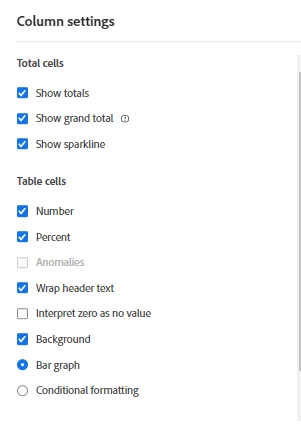
When I prepare long dashboards for my customers i need to select each separate column on each form and then deselect anomalities and sometimes grand totals/percentages to avoid any misunderstanding on my reports.

I would rather arrange these features in default settings  since I feel lazy for these additional boring clicks 😄

Thanks!

Best regards

Sükrü 

This post is no longer active and is closed to new replies. Need help? Start a new post to ask your question.
Best answer by Jennifer_Dungan

Well the good news is, you can set some of these (anomalies)... the bad news is that often when other people open the report, or sometimes when you are making changes they show back up.....


It's a fairly new feature, so hopefully it gets better.


https://experienceleague.adobe.com/docs/analytics/analyze/analysis-workspace/user-preferences.html?lang=en 


Sadly you can't set defaults on Grand Total and Percentages (too bad, I always have to manually turn those off too)

1 reply

Jennifer_Dungan
Community Advisor and Adobe Champion
Jennifer_DunganCommunity Advisor and Adobe ChampionAccepted solution
Community Advisor and Adobe Champion
July 27, 2022

Well the good news is, you can set some of these (anomalies)... the bad news is that often when other people open the report, or sometimes when you are making changes they show back up.....


It's a fairly new feature, so hopefully it gets better.


https://experienceleague.adobe.com/docs/analytics/analyze/analysis-workspace/user-preferences.html?lang=en 


Sadly you can't set defaults on Grand Total and Percentages (too bad, I always have to manually turn those off too)

Jennifer_Dungan
Community Advisor and Adobe Champion
July 27, 2022

Oh one more thing... you can actually select multiple columns at once, and change them in bulk! I know it's still manual, but that should save you some time.