Change Project Role as Admin | Community
Skip to main content
Level 2
March 3, 2023
Solved

Change Project Role as Admin

  • March 3, 2023
  • 2 replies
  • 1972 views

Hi all, 


in our Analytics department we sometimes needed to change the Project Role of a Workspace Project in the past. This happened e.g. if one of our colleagues was on holiday and a shared report or scheduled report needed corrections. Most of the time we give each other "edit" roles - but not always. So in the past we were able to change a role to "edit" via "Components - projects" and correct the report. 


With the new Adobe Analytics we do not find this feature anymore. Is it not possible anymore to change the role of a project as an admin? This would mean if we need to change a scheduled report during holiday of a colleague who owns it and we do not have the "edit" role, we would have to duplicate it and start a new schedule or worst case if we only have the "view" role we can't change it at all or would have to build it new. 
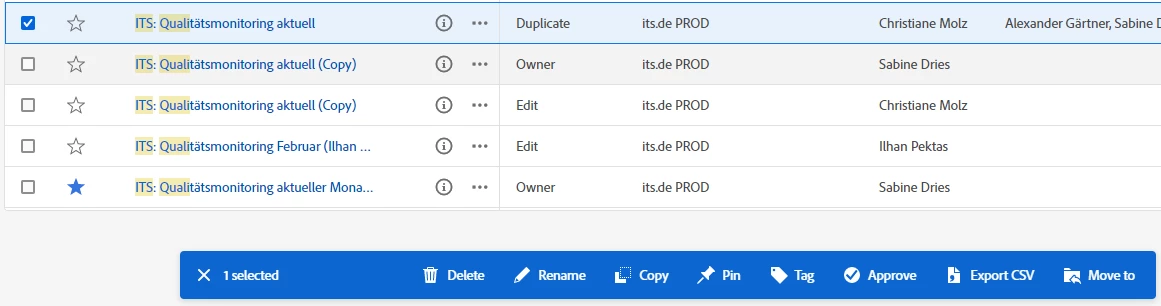
Does anyone know a workaround or solution? 


Best regards

Sabine


This post is no longer active and is closed to new replies. Need help? Start a new post to ask your question.
Best answer by leocwlau

For sharing projects, you are able to update sharing as an admin for all projects, except those projects shared with you as "can view" and "can duplicate". Even if you are an admin and still can only view or duplicate, so not able to update further sharing. Two workarounds:

  1. having another admin with "can edit" right, or not directly shared with on the project, to update sharing
  2. using the transfer user assets function to take ownership of the project

For updating the schedule of scheduled projects, I am not quite sure if there is any limitation from the "sharing" option as I had never tried this before. However, please keep in mind that updating the project schedule should be done in the "Components" -> "Scheduled projects". If you encountered an access issue stopping you to update the schedule, the previous two workarounds for sharing should work for scheduling as well.

2 replies

Jennifer_Dungan
Community Advisor and Adobe Champion
March 4, 2023

I am not sure about the management screen (I never actually used that feature there).. but as an Admin, you should be able to open/edit every report in your system.. and you can add people to edit role through the Share function...


It sounds like its a few extra steps to what you are used to, unfortunately.. but I would suggest you add an Idea to the board, being detailed about the steps and flows you used to have and ask them to re-instate them... it sounds like it may have been an over sight... a function they forgot existed on this page.

leocwlau
Community Advisor and Adobe Champion
leocwlauCommunity Advisor and Adobe ChampionAccepted solution
Community Advisor and Adobe Champion
March 4, 2023

For sharing projects, you are able to update sharing as an admin for all projects, except those projects shared with you as "can view" and "can duplicate". Even if you are an admin and still can only view or duplicate, so not able to update further sharing. Two workarounds:

  1. having another admin with "can edit" right, or not directly shared with on the project, to update sharing
  2. using the transfer user assets function to take ownership of the project

For updating the schedule of scheduled projects, I am not quite sure if there is any limitation from the "sharing" option as I had never tried this before. However, please keep in mind that updating the project schedule should be done in the "Components" -> "Scheduled projects". If you encountered an access issue stopping you to update the schedule, the previous two workarounds for sharing should work for scheduling as well.

Jennifer_Dungan
Community Advisor and Adobe Champion
March 4, 2023

Actually, there is a third option for Projects that your admins are added as "Can View" or "Can Duplicate" only...


Unless something has changed, you can remove that designation from the report for yourself... I had a report that was shared to me as "Can View" (the person wasn't intentionally meaning to lock me out, they just didn't realize that I could open any report as an admin and they shared it with me so that I could help them). Once I opened the report and couldn't do anything, I went into the Share settings and I just removed myself from there and then had full control again...

Level 2
March 10, 2023

And exactly this is our problem 🙂 

If one of my admin colleagues made a project for a colleague from the marketing department and during the holiday of my colleague this project needs adjustment I can't edit it. 


But if I understand it right, you also do not find a solution for it other than the transfer user asset function, which is in my eyes not a good workaround in daily business. 


But, fun fact: It is possible to delete those projects