Cannot create new Data Feed | Community
Skip to main content
JohnBennett66
March 21, 2018
Solved

Cannot create new Data Feed

  • March 21, 2018
  • 7 replies
  • 5068 views

Hi,

I was attempting to setup our first Data Feed and when clicking the "+ Add" button I do not get the expected dialog, instead I get this error...
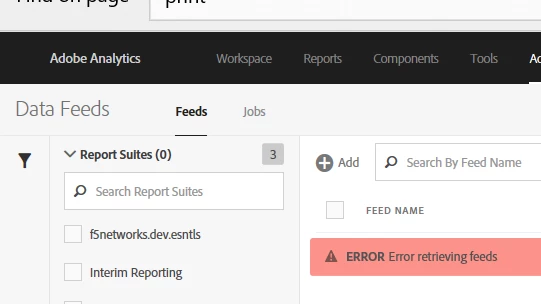
I also tried "Create A New Feed" from the Jobs tab. Same error. I have also tried three browsers, rebooting, alternate logins, and report suites. Same error for several days now. I am an Admin.

Has anyone seen this before? Does anyone have a solution?

Thanks, John

This post is no longer active and is closed to new replies. Need help? Start a new post to ask your question.
Best answer by PratheepArunRaj

Dear John,

Kindly mail to ClientCare@adobe.com to fix this.

If you are supported user in your organization, they will help you. If not, reach your Adobe Analytics Project Manager.

Thank You

Arun

7 replies

PratheepArunRaj
Community Advisor and Adobe Champion
PratheepArunRajCommunity Advisor and Adobe ChampionAccepted solution
Community Advisor and Adobe Champion
March 22, 2018

Dear John,

Kindly mail to ClientCare@adobe.com to fix this.

If you are supported user in your organization, they will help you. If not, reach your Adobe Analytics Project Manager.

Thank You

Arun

Thank You, Pratheep Arun Raj B (Arun) | Xerago | Terryn Winter Analytics
Adobe Employee
March 23, 2018

John

In your screenshot it doesn't show that you have a RS selected. The feeds will be unique to each RS. This is one of those questions like when people have computer problems and they are asked if they have it plugged in so I apologize, but did you select a RS prior to trying to add a feed?

Brandon

JohnBennett66
March 23, 2018

It's not a crazy question Brandon, and while the screen cap shows no RS, I did try it both ways. And I tried all three RSs that I have access to here. Nothing.

Also, from the instructions I thought that you didn't need to select an RS to just Add a data feed because selecting the RS was in the creation dialog, but I could be wrong about that. Do you know for certain? I mean I would check it but…  ;-)

Thanks for the help.

John

PS. I have a ticket in on this now.

Adobe Employee
March 23, 2018

John

You are correct about not having to select a RS, I was just asking to see if you had tried it multiple ways and still getting the same error. I am working on asking some colleagues if they have seen this before and if so what was the cause / fix.

When you say you are an admin, if you go into Admin/User Management under the Access section do you have access to all options and also have the radio button checked?

If you don't want to put it on a public forum, feel free to email me the company you work for and I will see if I can see anything that looks out of the ordinary without getting deep like client care will be able to.

I didn't' ask this and should have but have any other data feeds been set up?

Adobe Employee
March 24, 2018

John

I have done some checking and the only requirement is that you are an admin in the organization. Does your company still use Analytics to manage your users or have you migrated to the Admin Console?

Brandon

JohnBennett66
March 28, 2018

Brandon,

We have not migrated to the new Experience Cloud Admin Console, but that is scheduled in a month. I am admin in Analytics, is there another layer where I need to be admin?

Thanks,

John

Gigazelle
Adobe Employee
Adobe Employee
April 13, 2018

I think PratheepArunRaj is right here - Customer Care is going to be the most effective method to get this resolved, as it appears to be specific to your login. They'll be able to log in to your account to troubleshoot and resolve the issue.
