Can't Share project Daily on Workspace | Community
Skip to main content
Level 2
June 11, 2025
Solved

Can't Share project Daily on Workspace

  • June 11, 2025
  • 3 replies
  • 697 views

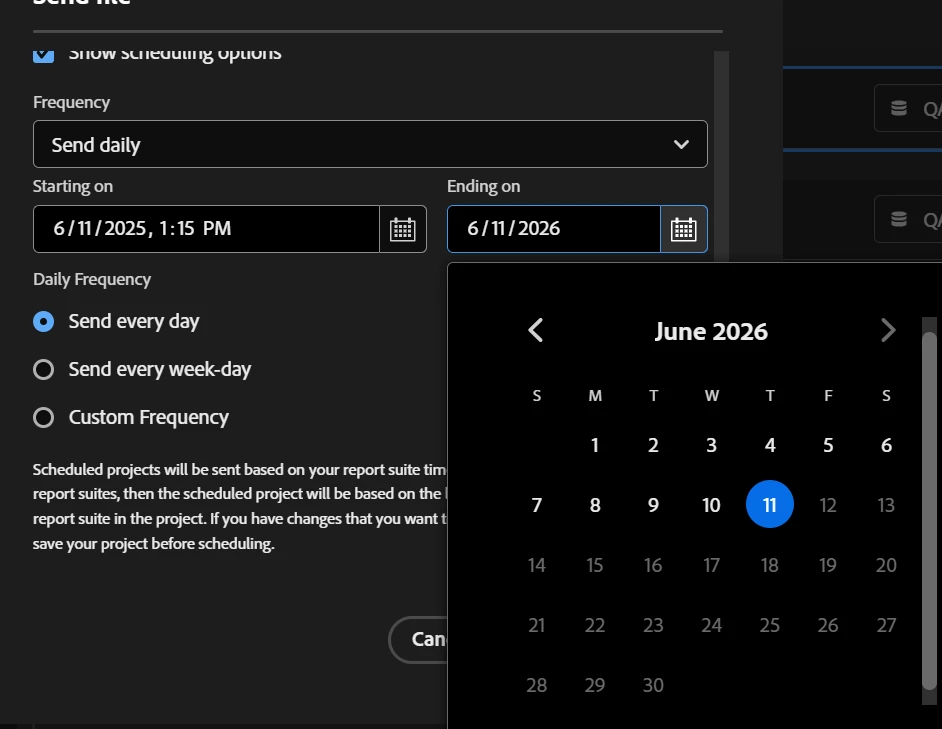
Hi, I'm not able to schedule file export in workspace daily.
When I'm selecting Today is the start day I got the end day is the same day and i can't select any future day? 

Did I miss anything?


Thanks

This post is no longer active and is closed to new replies. Need help? Start a new post to ask your question.
Best answer by Jude_Felix

Hi 

You’re correct in noticing that the start and end dates default to the same day when scheduling a Workspace file export. This is expected behavior when the start date is set to “Today” the interface doesn’t allow selecting a future end date beyond one year from the start date. 


Adobe allows a maximum of 1 year for scheduled exports.

3 replies

Jude_Felix
Jude_FelixAccepted solution
Level 2
June 11, 2025

Hi 

You’re correct in noticing that the start and end dates default to the same day when scheduling a Workspace file export. This is expected behavior when the start date is set to “Today” the interface doesn’t allow selecting a future end date beyond one year from the start date. 


Adobe allows a maximum of 1 year for scheduled exports.

user29588Author
Level 2
June 11, 2025

Thank you got it!

pradnya_balvir
Community Advisor
Community Advisor
June 11, 2025

Hi @user29588 ,


You're encountering a known limitation in Adobe Analytics Workspace scheduling, and you're not missing anything—it’s just how Adobe handles rolling dates in scheduled exports.

Use Rolling Date Range Instead of Fixed Dates

Instead of selecting "Today" as a specific fixed date:

  • In your panel or table, click the calendar.

  • Use the "Rolling Dates" option.

  • Select:

    • Start: Today

    • End: Today

  • Save this configuration.

  • This tells Adobe: “Every day, show me just today’s data.”

Then:

  1. Click Share → Schedule Project.

  2. Choose Daily for frequency.

  3. Set up the email recipients or FTP and file format.

  4. Adobe will now export today’s data daily, without needing a future date.

user29588Author
Level 2
June 11, 2025

Hi @pradnya_balvir 

Thank you for your answer ! Got it!

Jennifer_Dungan
Community Advisor and Adobe Champion
June 11, 2025

One more thing, Adobe at least has a reminder that will get emailed to you about a month before the schedule expires, so that you can extend it.


Part of the reason for only allowing a year (I believe), is because in the past, the old Reports and Analytics Scheduled Reports had no limitations... so reports would run forever, even long past most of the recipients no longer being around and those emails continually bouncing (I think if all emails bounced a few times in a row, the report would be auto-disabled, but if even one person was still around then the report would just continue on)... many organizations didn't run regular reviews / cleanups of this list. The 1 year restriction forces people to stay on top of their scheduled reports and ensure that there is at least a cursory review of everything with a regular frequency.

user29588Author
Level 2
June 11, 2025

Hi @jennifer_dungan  Thank you! That's amazing to know!