Can't get rid of All Visits in Funnel Visualization | Community
Skip to main content
Level 2
June 7, 2018
Solved

Can't get rid of All Visits in Funnel Visualization

  • June 7, 2018
  • 6 replies
  • 4113 views

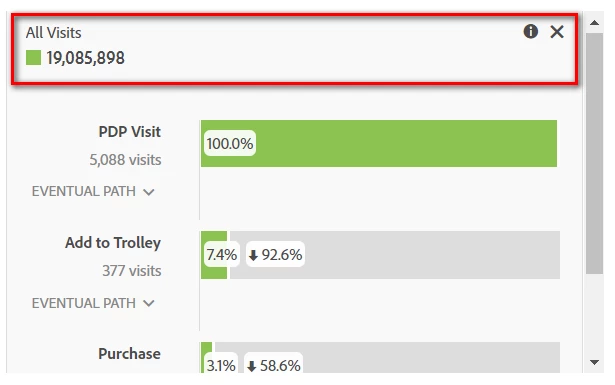
I've been building some Funnel Visualizations in Workspace, and clicked the x to get rid of the 'All Visits' summary at the top. However when I save the Workspace and then close and re-open, the summary number has returned. Is this a bug or expected behaviour? I want to get rid of it because its not relevant to the funnel and I don't want it to be mis interpreted by stakeholders. Doesn't make sense that you can click an x to remove but then it keeps coming back?
This post is no longer active and is closed to new replies. Need help? Start a new post to ask your question.
Best answer by Gigazelle

This is an issue on Adobe's end. It is currently being tracked via AN-165990 - there's no progress on the bug yet since it is considered minor right now, but if there's any future movement on it I'll let this thread know.

6 replies

Level 2
June 7, 2018

Have you tried to remove it from the settings of the Fallout visualization itself?  That's where I remove it when I use this type of report and it always works for me. 

kcudmoreAuthor
Level 2
June 8, 2018

Thanks Mia,

Yes I have that option unchecked but that only removes 'All Visits' as a touchpoint in the funnel, not the summary number at the top of the panel.

Level 2
June 8, 2018

I see what you mean now.  I tried on mine and was able to replicate it. The only thing it lets me do is "edit label," but even that will leave the number and green box.  May be worth submitting as an Idea to remove it completely - I agree, it's very annoying and can be misleading.

kcudmoreAuthor
Level 2
June 11, 2018

I am able to remove it by clicking the x on the right hand side as in my first screenshot, but after saving and reloading the project it reappears. So that suggests to me it should be removeable, but seems to be a bug where it keeps coming back! Does that happen for you?

Level 2
June 19, 2018

Yes, the same thing happens to me. 

Gigazelle
Adobe Employee
GigazelleAdobe EmployeeAccepted solution
Adobe Employee
September 13, 2018

This is an issue on Adobe's end. It is currently being tracked via AN-165990 - there's no progress on the bug yet since it is considered minor right now, but if there's any future movement on it I'll let this thread know.