Can adobe sitecatalyst capture broken links - HTTP 404 error ?? | Community
Skip to main content
September 4, 2023
Solved

Can adobe sitecatalyst capture broken links - HTTP 404 error ??

  • September 4, 2023
  • 3 replies
  • 1112 views

HI,

does anyone in the forum have experience or idea how can we can derive this.

Broken links are not a good experience for the end user and also not for the company owning the website.

So, if we can capture those can easily try to fix it.


Thanks

Sumon

This post is no longer active and is closed to new replies. Need help? Start a new post to ask your question.
Best answer by Jennifer_Dungan

Keep in mind, the suggested solutions still require that you have tracking on those 404 pages, and you pass the correct tag.


There is one minor issue, IF your site redirects all your 404 pages to a generic URL like https://www.domain.com/404.html" then this is the URL that will be tracked in the report... if the URL stays as "https://www.domain.com/ertertertyetyaw" then this will give you proper visibility into which pages are 404ing...


If you have the redirect scenario, you may need to work with your developers to pass the "pre-redirected url" so that you can track it with some custom tracking on the 404 page

3 replies

FarazHusain
Adobe Employee
Adobe Employee
September 4, 2023

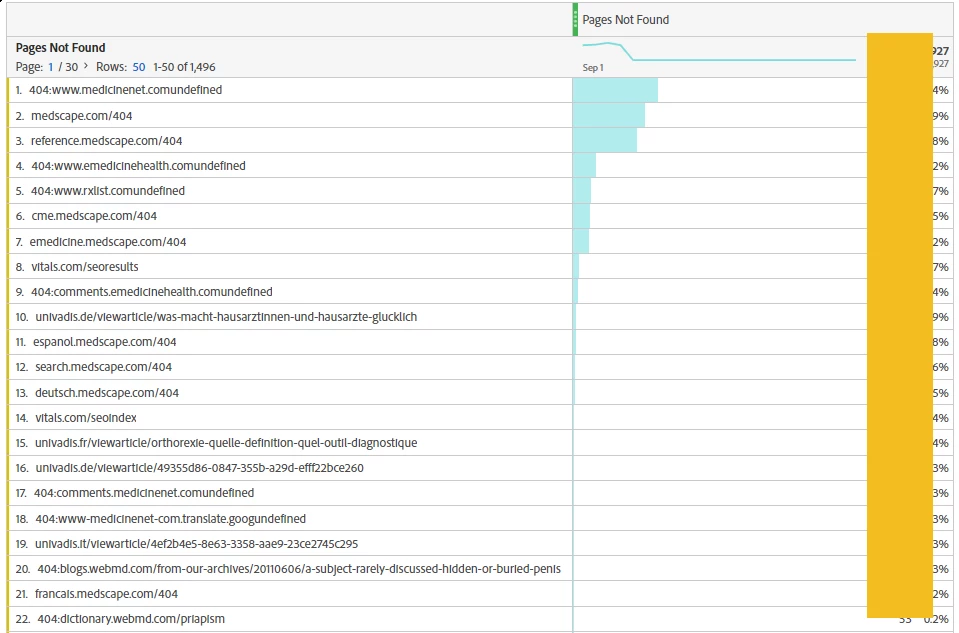
Hey @sumondutta I believe this should help -https://experienceleague.adobe.com/docs/analytics/components/dimensions/pages-not-found.html?lang=en


Pages not found dimension retrieves data from the pageType and g query strings in image requests. If the pageType query string equals errorPage, the g query string (page URL) is recorded. AppMeasurement collects this data using the pageType variable. If the pageType variable is not defined or set to anything other than errorPage, no data for this dimension is collected.

RobertBlakeley
Community Advisor
Community Advisor
September 4, 2023

And Adobe has created a pages not found report and a pages not found metric in Workspace.


Jennifer_Dungan
Community Advisor and Adobe Champion
Jennifer_DunganCommunity Advisor and Adobe ChampionAccepted solution
Community Advisor and Adobe Champion
September 5, 2023

Keep in mind, the suggested solutions still require that you have tracking on those 404 pages, and you pass the correct tag.


There is one minor issue, IF your site redirects all your 404 pages to a generic URL like https://www.domain.com/404.html" then this is the URL that will be tracked in the report... if the URL stays as "https://www.domain.com/ertertertyetyaw" then this will give you proper visibility into which pages are 404ing...


If you have the redirect scenario, you may need to work with your developers to pass the "pre-redirected url" so that you can track it with some custom tracking on the 404 page