Calculation of "Time spent per visit (seconds)" | Community
Skip to main content
cristinapio
Level 2
June 20, 2018
Solved

Calculation of "Time spent per visit (seconds)"

  • June 20, 2018
  • 3 replies
  • 4090 views

Hi,

I would like to know how to calculate the metric "Time spent per visit (seconds)".

In the Adobe Experience Cloud Help I found this table:

Thus the correct formula should be:

Time spent per visit (seconds) = Total seconds spent / (visits - bounces)

We tried to use the formula in the example below:

According to the Help Center formula we have to calculate it like this:

Time spent per Visit (seconds) = 153,26 / (3,914 – 2,964) = 161 seconds

But in this case the declared metric shows 39 seconds. I can imagine that this is the result of the following calculation (without considering the bounces):

Time spent per Visit (seconds) = Total seconds spent/ visits

Time spent per Visit (seconds) = 153,26 / 3,914 = 39 seconds

Does anyone have an answer to this circumstance? Which formula should be used here?

Thank you for your help.
This post is no longer active and is closed to new replies. Need help? Start a new post to ask your question.
Best answer by Garretth

Hi @cristinapio,
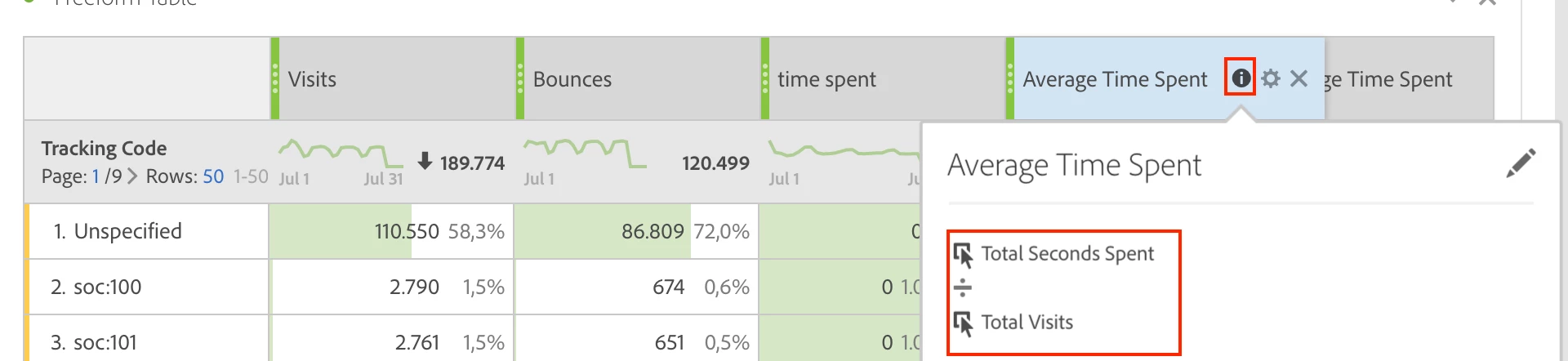
I am investigating this question and I do not have a default metric 'Average Time Spent Per Visit', which makes me wonder how exactly this metric is calculating in your report. Can you share the calculation by clicking the info button and sharing a screenshot of the calculation?

For example this is what I mean, but done with the Average Time Spent metric.

Thank you for your help in investigating this.

3 replies

July 25, 2019

Did you get the answer? I am looking for something similar.

Besides, how did you get 39 seconds?

GarretthAdobe EmployeeAccepted solution
Adobe Employee
July 26, 2019

Hi @cristinapio,
I am investigating this question and I do not have a default metric 'Average Time Spent Per Visit', which makes me wonder how exactly this metric is calculating in your report. Can you share the calculation by clicking the info button and sharing a screenshot of the calculation?

For example this is what I mean, but done with the Average Time Spent metric.

Thank you for your help in investigating this.

jantzen_b
Adobe Employee
Adobe Employee
March 23, 2020
Do any of the answers below answer your initial question? If so, can you select one of them as the correct answer? If none of the answers already provided answer your question, can you provide additional information to better help the community solve your question?