Calculated Metrics IF THEN ELSE Statements | Community
Skip to main content
July 15, 2019
Solved

Calculated Metrics IF THEN ELSE Statements

  • July 15, 2019
  • 6 replies
  • 6866 views

Hi, i am trying to use if then else statements in a calculated metric to give me a column with all relevant numbers. However it will only generate the first 2 correctly then seems to stop, i have tried stripping right back but i cant seem to get some to work at all.

I am simply using a calculated metric to say If metric = A then value of X, else If metric = B, then value of Y, if metric = C then value = Z ELSE value 0

Any help please would be great! Thank you

This post is no longer active and is closed to new replies. Need help? Start a new post to ask your question.
Best answer by rachell89752887

Hi,

I had the same issue. On an aggregated level, Adobe will read the calculated metric, and the first condition that is true will apply to all of the data, rather than it consider every hit and then aggregate up from there.


There is no workaround unless you break the data down using the dimension in your calculated metric. I have raised this with Adobe and their suggestion was to raise this to the forum.

Hope this helps!
Rachel

6 replies

mac28
Level 3
July 16, 2019

Hi Laurab,

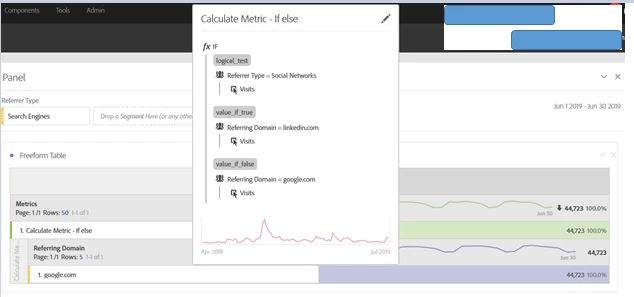
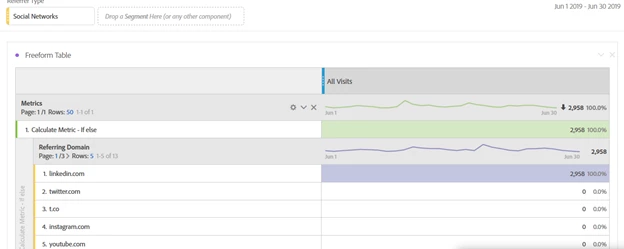
I've tried creating a calculated metric using 'if' statement (see the screengrabs) & in this case I've taken referring domains as a dimension with visit metrics & it seems to be working fine. You can use the similar logic & see if it's working for you.

Thanks

M

ashokkumarm
Level 4
July 18, 2019

Hi,

Could you provide the screenshot of calculated metric which you created.

Regards

Ashok

July 29, 2019

Hi Please see an example below: i can not get each section to work only the first 2 for scheme 2 and 3, thank you

July 29, 2019

thank you i have added my example below

rachell89752887
rachell89752887Accepted solution
September 11, 2019

Hi,

I had the same issue. On an aggregated level, Adobe will read the calculated metric, and the first condition that is true will apply to all of the data, rather than it consider every hit and then aggregate up from there.


There is no workaround unless you break the data down using the dimension in your calculated metric. I have raised this with Adobe and their suggestion was to raise this to the forum.

Hope this helps!
Rachel

September 12, 2019

Hi Rachel,

Yes it does, i am glad to know it is not just me thank you for your reply,

Laura