Calculated Metrics - BETWEEN function or Combining two Great Than or Equal to logic pieces of logic | Community
Skip to main content
August 29, 2022
Solved

Calculated Metrics - BETWEEN function or Combining two Great Than or Equal to logic pieces of logic

  • August 29, 2022
  • 1 reply
  • 1522 views

I'm trying to sift through some noise in my freeform panel. There's a metric I'm using and the data is fairly volatile. I'm trying to use a calculated metric to filter/sort my data for me. Is it possible for me to build a calculated metric that allows me to have "BETWEEN" logic in it?


It would be great if I use Greater Than or Equal To X then join it with an AND Less Than or Equal To Y. But I don't see a straightforward way of doing that in the builder (please correct me if I am mistaken). In lieu of that, is there a BETWEEN like function or approach I can take in the builder? For sake of example let's say I wanted the freeform panel to show me pages that have more than 100 entries and exits lower than 50, how can I achieve this metric? Or if you think there's a better approach than going the calculated metric route please let me know.


Thanks in advance! 
This post is no longer active and is closed to new replies. Need help? Start a new post to ask your question.
Best answer by Jennifer_Dungan

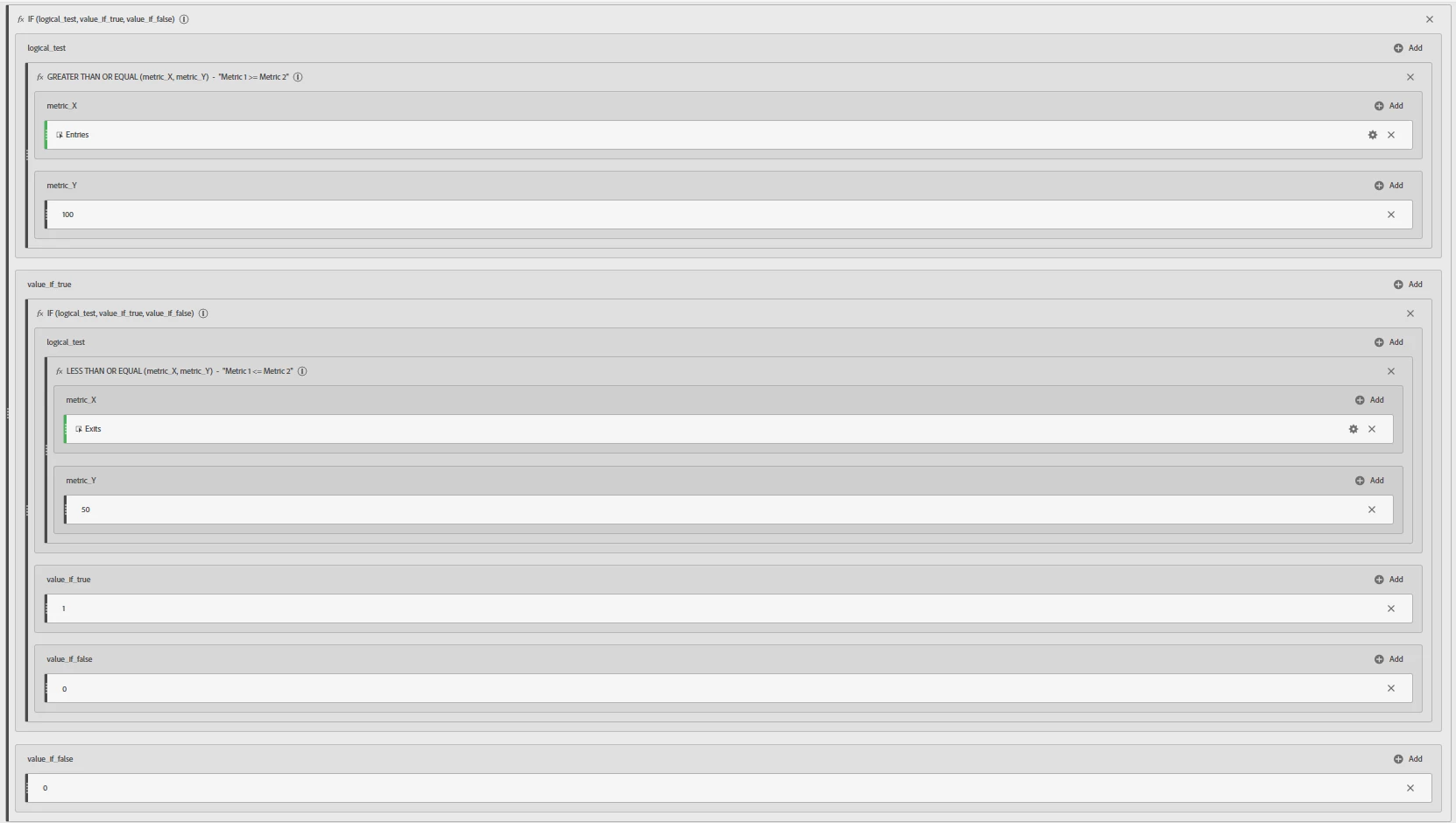
While not the easiest to accomplish... you can make a custom metric looking for these scenarios using nested IF statements:


IF Entries >= X Then 

      IF Exits <= Y Then

                Static Value = 1

      Else

                Static Value = 0

Else

       Static Value = 0


In this case, the first IF checks for Entries... if it matches it goes on do another IF Statement (if not it returns a boolean false or 0 value); then in the second IF you check the Exits... if it matches then set a boolean true or 1 value, and if not, once again set to 0


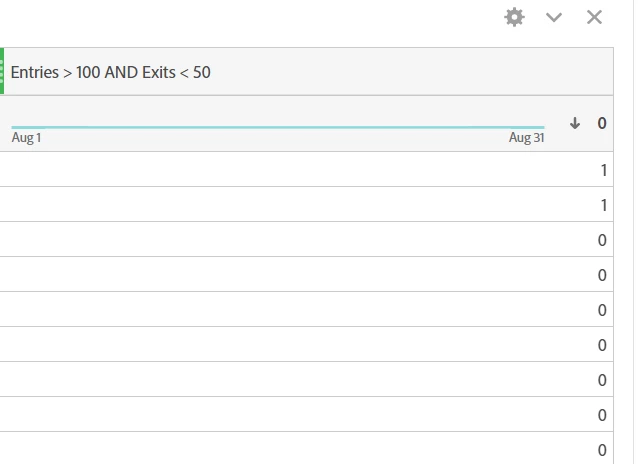
Here is a (small - sorry) screen shot of a similar calculated metric:


and the summary:


Now, what will happen if you use this metric with your Pages as the breakdown is the following:


"1" will appear next the pages that match your criteria, and "0" will be on the ones that don't... this doesn't actually filter the list of pages, but you can sort, or you might be able to create a segment looking for your custom metric to be 1? I didn't take my sample that far, as I didn't save this custom metric as a permanent, reusable metric that I can pull into a segment....


You are right though, it's not exactly straight forward... but hopefully this can get you started.

1 reply

Jennifer_Dungan
Community Advisor and Adobe Champion
Jennifer_DunganCommunity Advisor and Adobe ChampionAccepted solution
Community Advisor and Adobe Champion
August 29, 2022

While not the easiest to accomplish... you can make a custom metric looking for these scenarios using nested IF statements:


IF Entries >= X Then 

      IF Exits <= Y Then

                Static Value = 1

      Else

                Static Value = 0

Else

       Static Value = 0


In this case, the first IF checks for Entries... if it matches it goes on do another IF Statement (if not it returns a boolean false or 0 value); then in the second IF you check the Exits... if it matches then set a boolean true or 1 value, and if not, once again set to 0


Here is a (small - sorry) screen shot of a similar calculated metric:


and the summary:


Now, what will happen if you use this metric with your Pages as the breakdown is the following:


"1" will appear next the pages that match your criteria, and "0" will be on the ones that don't... this doesn't actually filter the list of pages, but you can sort, or you might be able to create a segment looking for your custom metric to be 1? I didn't take my sample that far, as I didn't save this custom metric as a permanent, reusable metric that I can pull into a segment....


You are right though, it's not exactly straight forward... but hopefully this can get you started.

FPW_AAAuthor
August 30, 2022

Thank you Jennifer! I will try this approach, I believe it will work. I will reply back once I've given it a go. 

FPW_AAAuthor
August 30, 2022

@jennifer_dungan worked like a charm! I'll use this for future inspiration as well.


Thank you for the help!