Calculated Metric Calculation | Community
Skip to main content
June 22, 2022
Solved

Calculated Metric Calculation

  • June 22, 2022
  • 2 replies
  • 1604 views

I have a calculated metric requirement, %locator rate = #locator/ total sessions.


I created this as locator (event metric) / visits(metric).


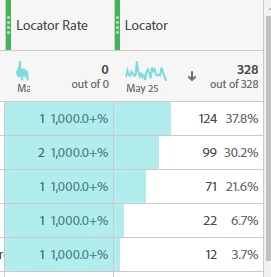
This is the output I get for Locator Rate which I'm unable to interpret,


This post is no longer active and is closed to new replies. Need help? Start a new post to ask your question.
Best answer by VaniBhemarasetty

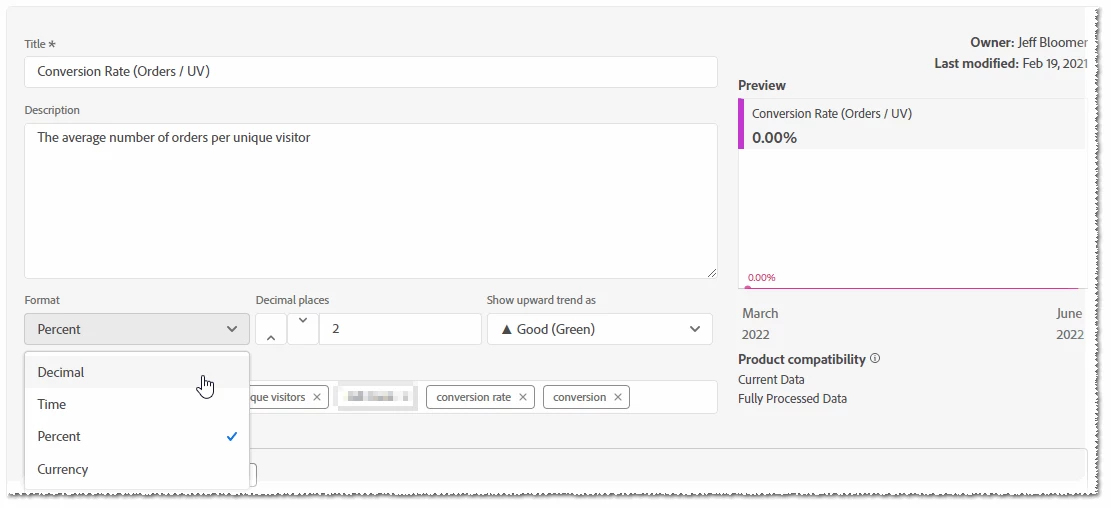
@jane_120 Can you please ensure that you are using decimal while creating this calculated metric? The calculated metrics setting allows you to change the formatting (i.e. decimal, percent, etc.) to present in the desired format on the workspace dashboard. You can check this documentation for your reference

https://experienceleaguecommunities.adobe.com/t5/adobe-analytics-questions/decimal-numbers-in-calculated-metrics/m-p/316894


2 replies

VaniBhemarasetty
Adobe Employee
VaniBhemarasettyAdobe EmployeeAccepted solution
Adobe Employee
June 22, 2022

@jane_120 Can you please ensure that you are using decimal while creating this calculated metric? The calculated metrics setting allows you to change the formatting (i.e. decimal, percent, etc.) to present in the desired format on the workspace dashboard. You can check this documentation for your reference

https://experienceleaguecommunities.adobe.com/t5/adobe-analytics-questions/decimal-numbers-in-calculated-metrics/m-p/316894


Jennifer_Dungan
Community Advisor and Adobe Champion
June 22, 2022

Just to add a little context to this.. 


@jane_120 in your screenshot, the default format is Integer, so you data is rounding to 1 or 2... or in the case of the column, it seems to be rolling to "0"... this is fundamentally why the % breakdown looks so odd...1/0 and 2/0 isn't really valid...


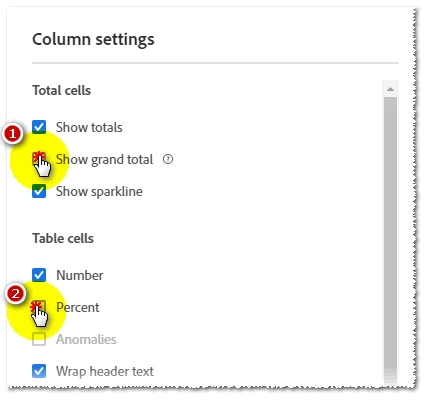
As @vanibhemarasetty said, I would change the rate to display as decimal, and I would hide % in the display... or maybe you actually want to display as a %.. in this case, if you change the format to %, only one number will show in your column (but it will no longer be % of the column total, it will actually be your calculation).

jeff_bloomer
Community Advisor and Adobe Champion
June 22, 2022

Both @jennifer_dungan and @vanibhemarasetty are correct.  This is just like doing a Conversion Rate (orders/visits or orders/uv), except you're doing a DECIMAL instead of a percentage.

In fact, after you remove the percentage displayed in your actual column, which is highly distracting next to your actual number, I believe things will make a lot more sense.  Also, if you know a lot of your users aren't using the Locator, it might be good to remove the GRAND Total from your display at the top.

      ⬇️⬇️⬇️⬇️⬇️⬇️⬇️⬇️

Between the three of us, I hope this helps!


jane_120Author
June 23, 2022

Thank you @jennifer_dungan  and @jeff_bloomer for your valuable inputs. It surely has helped me.