Calculated CTR Metric | Community
Skip to main content
August 12, 2024
Question

Calculated CTR Metric

  • August 12, 2024
  • 3 replies
  • 1404 views

Hello,


Some time ago I asked about how to calculate a CTR metric, but it is not working as the client expected.

I'd like to show a calculated CTR metric to a client but I can't seem to make it work.
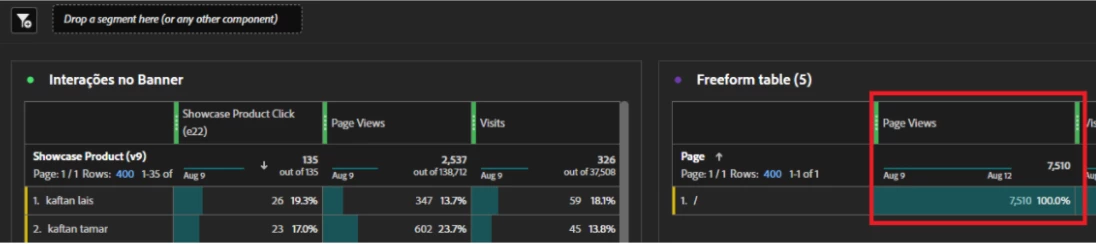
The metric we're trying to build would be calculated considering total page views where page equals '/' as denominator, and not page views that are persisted after the Showcase Product (v9) metric is registered, which is the value considered when I'm building the calculated metric:
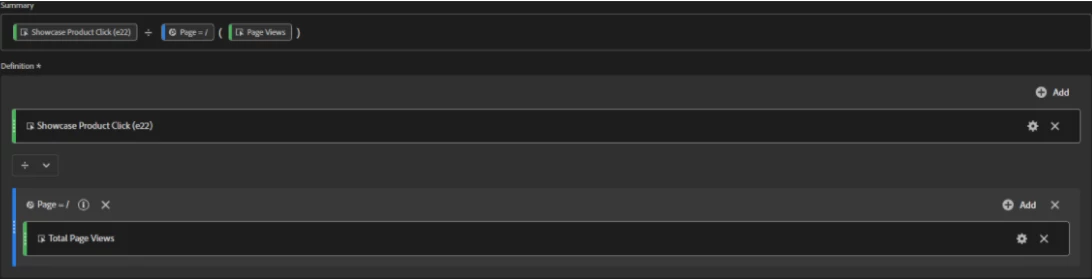


Is it possible to build that calculated metric considering the total page views that I outlined in red instead of the page views present in the 'Interações no Banner' table?
 

Thank you!

This post is no longer active and is closed to new replies. Need help? Start a new post to ask your question.

3 replies

Nick_Walter
Community Advisor and Adobe Champion
August 12, 2024

It looks like you may have tried to post an image but I'm not seeing it. Either way you should be able to make a sequential segment like this: VISIT (Page Name ="/" AND (EXCLUDE (Only After Sequence (v9 exists Then Occurrence exists))))


Hope that helps

Josh__Stephens
Community Advisor
Community Advisor
August 12, 2024

Hi @ricardo-33  - I can see your screenshots and if I understand your question correctly, you want to do something similar to this scenario from demo data screenshot.  

How many AMO clicks were there per homepage page views.  In this table, I can select both metrics (and homepage dimension filter above page view), right click, and select create metric from selection > divide.  


That adds a column - but you'll need to reformat it as a percentage - click on the info logo then the pencil and change to a percentage.

Here you can change the formatting and you'll also see the full definition of your metric.


Hope this helps

September 4, 2024

Hi Ricardo,


I have the same issue here. And I take that you want to calculate each banner's CTR(evar9 as dimension here) instead of page total's CTR(week as dimension in Josh's answer).

My understanding is that the solution is to have "banner impression" custom event implemented (together with banner name) to calculate each banner's CTR. Or for now, do it in excel manually with page view in a separate table. We cannot use click and PV as metrics for evar9 as dimension in the same table - they won't have the same PV for each evar9 value(row).

Wonder it in future AA's calculated metric can do a semi-static number function. Instead of puting in a type-in number, it can be a static PV of certain page, not filtered by dimension values.


Hope you can share more if there's other solutions

September 4, 2024

Hello Frankie,

We've implemented two events: "banner click" and "banner view," along with a prop with "," delimiter that captures the banners.

When the component containing the banners is viewed, the "banner view" event triggers, capturing all the banners in the prop. Similarly, when a user clicks on a banner, the same prop records the specific banner value.

This approach allows us to calculate the CTR by dividing the "banner click" count by the "banner view" count, as all necessary values are in the same table.

September 5, 2024

Thank you Ricardo. Seems implementing custom events for banner view&click is the only solution now for this requirement. Hope there's new functions to enable the calculation without implementation-specifically for static banner which normally shows alone with Pageload.