Calculate Pages per Visit on Dimension | Community
Skip to main content
Level 2
March 27, 2020
Solved

Calculate Pages per Visit on Dimension

  • March 27, 2020
  • 2 replies
  • 4026 views

I'm building a report where I want to see how many Page Views per Visit happened among people who viewed a particular page.


I have a Calculated Metric for Pages per Visit, which is Page Views / Visits. When I apply this metric to a page, it calculates based on how many page views that particular page got. I want to see how many Page Views happened across the entire Visit where a particular page was viewed. This can be done using a segment, but I can't reasonably create a segment for each of the pages I want to measure this for.


You can see the difference in this screenshot:
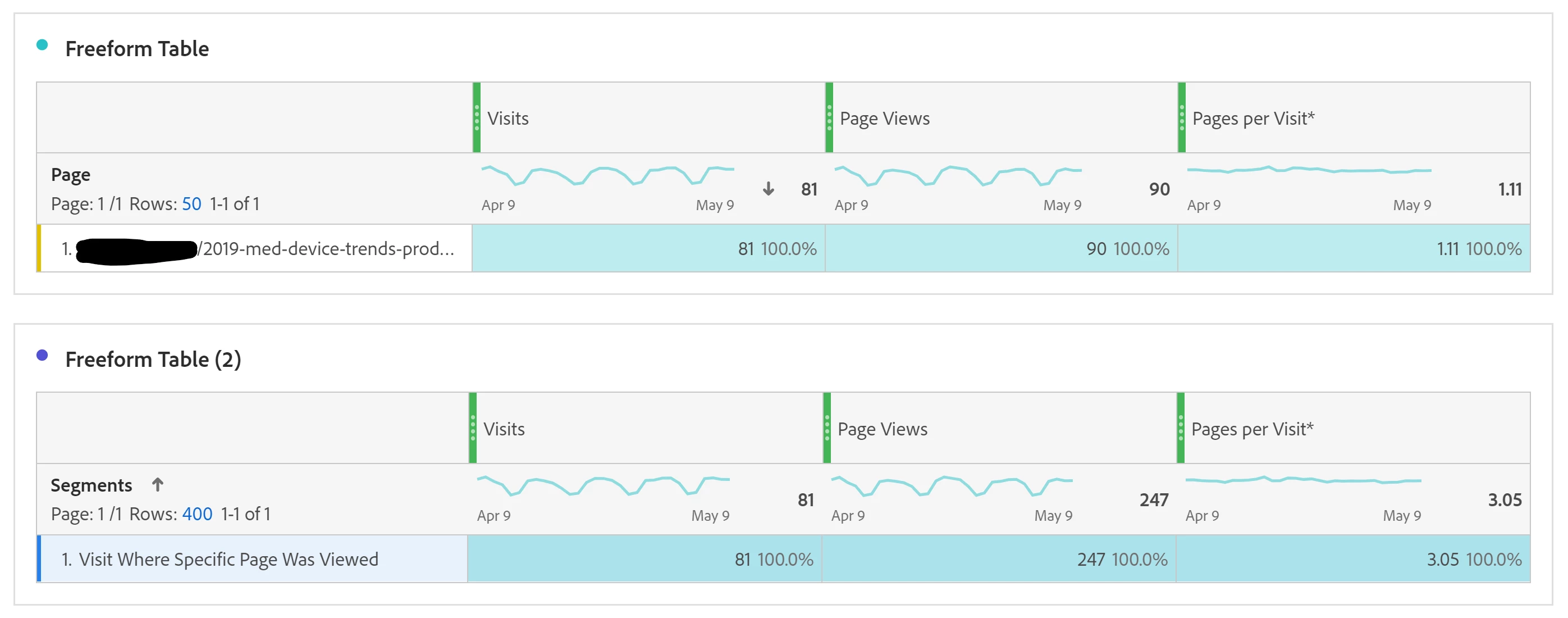
The top table shows measurement by page. The bottom table shows the measurement by segment. I want to get the bottom number, but without building a segment for every single page I want to measure.


Is this possible?


For reference, here's the segment I built for this example:

This post is no longer active and is closed to new replies. Need help? Start a new post to ask your question.
Best answer by wolflytics

In this case, you should use Page Velocity metric and it is calculated as Page View (Participation)  divided by Visits.

2 replies

Level 4
March 31, 2020
One option that would get you close would be to use a calculated metric, in which you modify the attribution of page views to 'visit participation'. This would include the view of the page and any subsequent pages viewed. This is a value used to create content velocity. Recommend viewing Jenn Kunz's awesome blog post to learn more. https://www.digitaldatatactics.com/index.php/2018/01/10/participation-and-linear-allocation-in-adobe-analytics/
wolflyticsAccepted solution
Level 2
April 1, 2020

In this case, you should use Page Velocity metric and it is calculated as Page View (Participation)  divided by Visits.