Build a Segment Based off Visitors' Most Recent eVar Value | Community
Skip to main content
Level 2
July 18, 2023
Solved

Build a Segment Based off Visitors' Most Recent eVar Value

  • July 18, 2023
  • 3 replies
  • 3608 views

Hello,


My team recently enabled eVars that track cookie opt-in/out information for three cookie categories. For each of these, if a visitor opts out of a category and then opts in, we'd like to be able to segment visitors by their most recent selection. Do you know how to build a segment based off visitors' most recently defined eVar value?


Thank you,

Ben

This post is no longer active and is closed to new replies. Need help? Start a new post to ask your question.
Best answer by Jennifer_Dungan

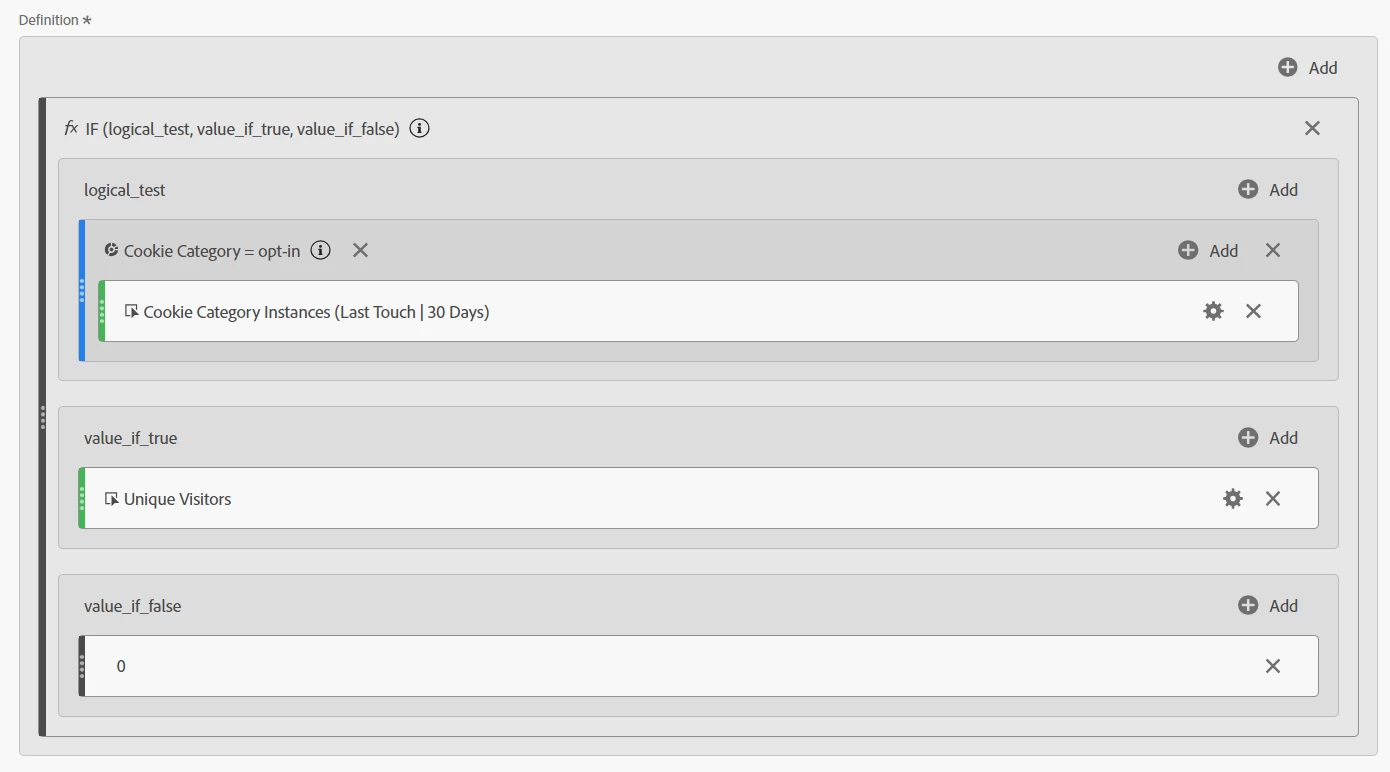
So this solution might seem a bit crazy.. but you have 2 values "opt-in" and "opt-out", and the user can change their value at any time.. so if you want to pull back UVs where the last value collected was "opt-in", you can do so with a calculated metric:


Using the IF function, you can use custom attribution on the "eVarX Instance" for "Last Touch | 30 Days" (or whatever period you need)

and a segment looking at eVarX equals "opt-in", if true, then return UVs metric, otherwise, return a static value of 0:


You can change the attribution of the metric here by clicking on the gear:
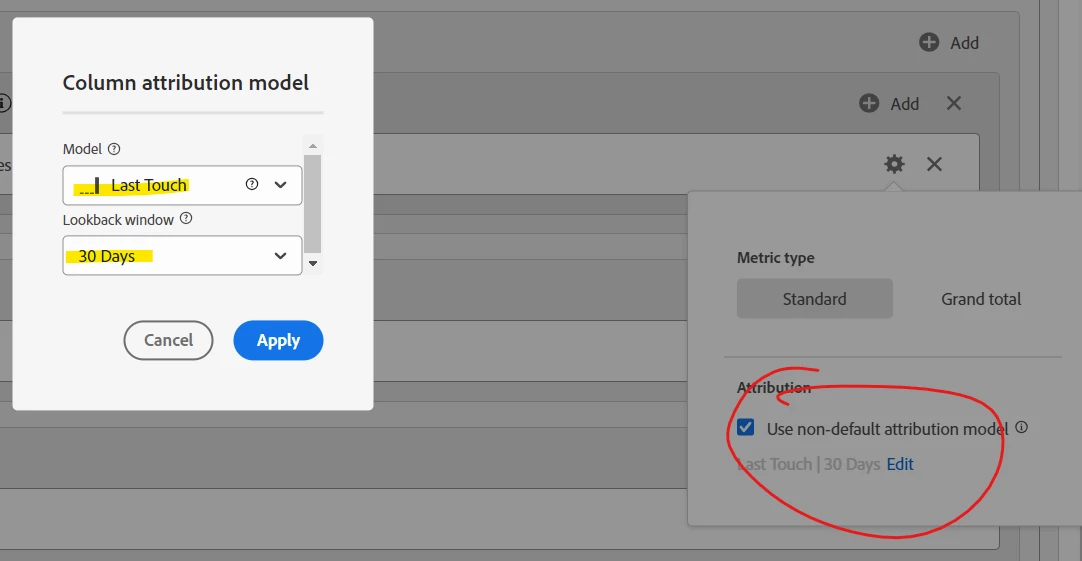


This way you can get the last touch for a specific value (i.e. opt-in)


If you just use the attribution model directly in the freeform, depending on your breakdown dimension, you could still be getting previous values as they were the "last value set on that dimension"... so you need to be careful that you aren't getting inflated values...


Those last touch attributions are great when you are looking at things like purchase conversions... but you are trying to get a sense of the current opt-in rate, and that complicates matters.

3 replies

Jennifer_Dungan
Community Advisor and Adobe Champion
Jennifer_DunganCommunity Advisor and Adobe ChampionAccepted solution
Community Advisor and Adobe Champion
July 18, 2023

So this solution might seem a bit crazy.. but you have 2 values "opt-in" and "opt-out", and the user can change their value at any time.. so if you want to pull back UVs where the last value collected was "opt-in", you can do so with a calculated metric:


Using the IF function, you can use custom attribution on the "eVarX Instance" for "Last Touch | 30 Days" (or whatever period you need)

and a segment looking at eVarX equals "opt-in", if true, then return UVs metric, otherwise, return a static value of 0:


You can change the attribution of the metric here by clicking on the gear:


This way you can get the last touch for a specific value (i.e. opt-in)


If you just use the attribution model directly in the freeform, depending on your breakdown dimension, you could still be getting previous values as they were the "last value set on that dimension"... so you need to be careful that you aren't getting inflated values...


Those last touch attributions are great when you are looking at things like purchase conversions... but you are trying to get a sense of the current opt-in rate, and that complicates matters.

bhuttonAuthor
Level 2
July 18, 2023

Thank you for your reply! I successfully replicated this technique and it will definitely come in handy. That being said, a segment would still be useful so that we can apply it to AAM audiences, etc. for compliance purposes. Do you know if expressing these visitors as a segment would be possible?

Jennifer_Dungan
Community Advisor and Adobe Champion
July 18, 2023

Segments don't seem to have the same custom attribution modelling available inside them.. but you should be able to create a segment using your calculated metric?


Whether it will be compatible with AAM is the next question...  I don't have Audience Manager so I can't really test.... 

jeff_bloomer
Community Advisor and Adobe Champion
July 18, 2023

Hi @bhutton!
This is definitely a fun question, and I mean that honestly.  I believe this can be tackled in a number of ways.

First off, you could have your eVar expiration for the cookie variable categories tied into a secondary variable, which would happen each time the customer updated their opt-in/opt-out status.
Second, you could then use ATTRIBUTION, to then manage your your reporting against said eVars to then understand how these values are being set. 😉

https://experienceleague.adobe.com/docs/analytics-learn/tutorials/analysis-workspace/using-panels/understanding-adobe-analytics-attribution-panel-and-lookback-windows.html 

jeff_bloomer
Community Advisor and Adobe Champion
July 18, 2023

AH!  Looks like my post got delayed in the page load earlier.  All of a sudden I'm seeing 8 responses from Jen above mine.  This is what happens when your computer decides to lag way behind in between policy updates and security patches.  I should know better than to try and do this when all that is going on behind the scenes. 😅


Jennifer_Dungan
Community Advisor and Adobe Champion
July 18, 2023

I didn't think it was possible for someone's computer to lag worse than mine! 🙂

philschmidt
Level 2
July 18, 2023

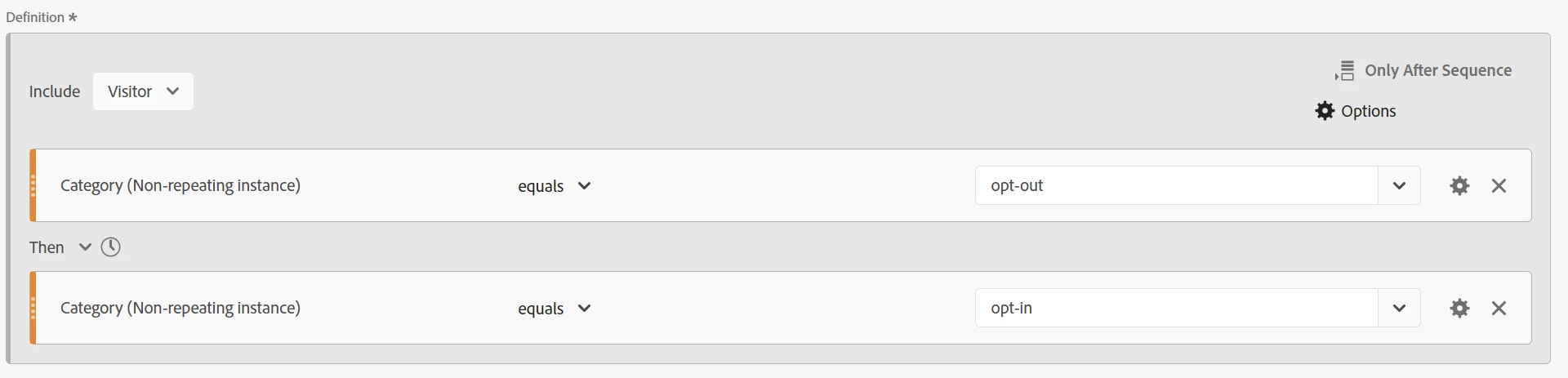
Try a sequential "visitor" segment using non-repeating instances your dimension (with "Only after sequence" applied to the segment). Most* of the data in the dimension report should be the "last one in" in the date range you have selected.

*It's "most" but not "all" because any additional opt-in/out selections made after the first opt-out>opt-in pair will all be returned for that visitor in this segment, but I can't imagine that very many people would do that.

Jennifer_Dungan
Community Advisor and Adobe Champion
July 19, 2023

Yeah, this is close... but anyone who switches back to opt-out again will also be included


opt-out > opt-in > opt-out


Since it matches the first two parts (bolded) of this flow....


So it's not quite there.. 


The non-repeating instance, according to the documentation is "consecutive" hits.. so if a user did:


A > A > B > A


The 1st and 4th value would be returned when looking for non-repeating instance of "A", since the B in the middle breaks the consecutive repetition.


But you can try it... but again, given the complex nature of this requirement make sure to test and ensure it's working the way you expect it to work.... 

philschmidt
Level 2
July 19, 2023

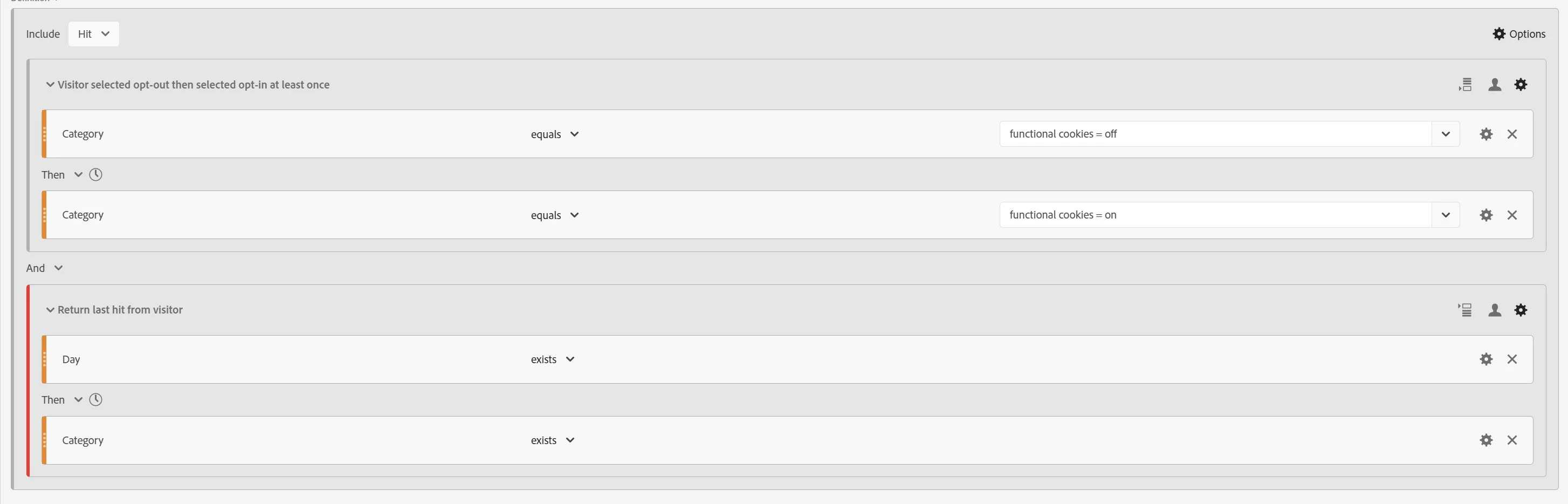
Yep, I agree my original segment is imperfect. As I mentioned, additional opt-in/out selections made after the first opt-out>opt-in pair will all be returned for that visitor in my original segment. @bhutton here's an updated segment that I think will give you what you're looking for:

Change the segment to a "hit" segment and add two "visitor" containers (with an "AND" between the two containers).

  1. The first container is an "only after sequence" visitor container containing "Onetrust Function Cookies equals 'functional cookies = off'" THEN "Onetrust Function Cookies equals 'functional cookies = on'". This container in the segment matches the underlined portion of this sequence: A > A > B > B  > B > A > A
    • Note: The "non-repeating" portion of my original segment wasn't actually needed, so I've removed that setting in this updated segment.
  2. The second container is an "only before sequence" visitor "Exclude" container containing "Day exists" THEN "Onetrust Function Cookies exists". This container in the segment matches and excludes all but the last "Onetrust Function Cookies exists" hit for the visitor: A > A > B > B  > B > A > A

The combination of these two containers in a "hit" segment should return the last "Onetrust Function Cookies" value within visitors that selected opt-out then opt-in at any time within your selected date range.

For me, the key to understanding how each of these sequential segment containers work is the fact that the "only after sequence" and "only before sequence" settings names are a bit misleading (at best) because they also return one of the hits within the matching sequence.

  • The "only after sequence" setting actually returns data starting with and including the last hit in the FIRST sequence match and all the data after that hit (including any other matching sequences after the first sequence match)
  • The "only before sequence" setting actually returns data starting with and including the first hit in the LAST sequence match and all the data before that hit (including any other matching sequences before the last sequence match)