Average Event Count per User | Community
Skip to main content
January 31, 2024
Solved

Average Event Count per User

  • January 31, 2024
  • 1 reply
  • 1051 views

Hi,
How can we get total number of events fired and Average Event Count per user?

This post is no longer active and is closed to new replies. Need help? Start a new post to ask your question.
Best answer by RobertBlakeley

Depends on what you mean by "total events" and "user"

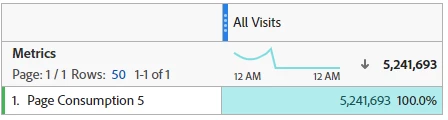
1. If you mean the total for a given event you have set up, getting a total is  simply a matter of dragging the event onto the workspace as in the screenshot below, where page consumption 5 is event5. 
If you want to know how many visitors happened, there are two ways depending on how you are defining user.

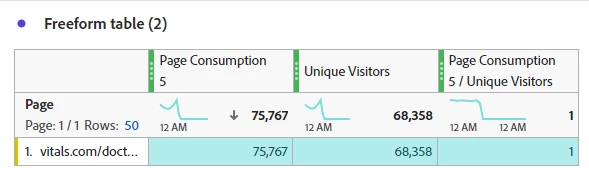
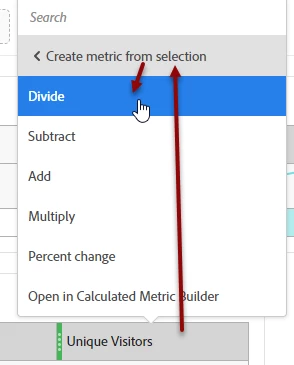
A. If you mean how many users went to a certain asset and then triggered your event, you would need to use the dimension that captures that asset. Apply that dimension and then the event metric and unique visitors metric. You could then right click the metrics to create a calculated average per visitor.
 

B. On the other hand, if you want the event to only count unique visitors, you would need to serialize that event in the event set up. This would have the event count only once for each visitor. This is a more complex set up that would need to be done ahead of time. The Adobe documentation is here: https://experienceleague.adobe.com/docs/analytics/implementation/vars/page-vars/events/event-serialization.html?lang=en

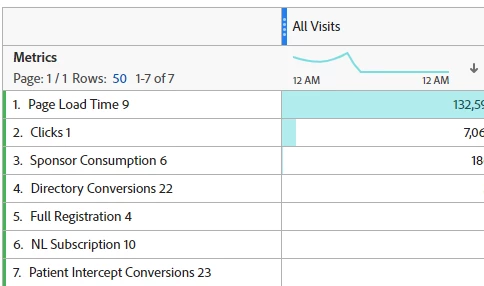
2. If by Total you want to see the count of events across different events, you might try something like the following. Note that in our implementation what a given event counts is so different across events that a total would be meaningless.
1 reply

RobertBlakeley
Community Advisor
RobertBlakeleyCommunity AdvisorAccepted solution
Community Advisor
January 31, 2024

Depends on what you mean by "total events" and "user"

1. If you mean the total for a given event you have set up, getting a total is  simply a matter of dragging the event onto the workspace as in the screenshot below, where page consumption 5 is event5. 

If you want to know how many visitors happened, there are two ways depending on how you are defining user.

A. If you mean how many users went to a certain asset and then triggered your event, you would need to use the dimension that captures that asset. Apply that dimension and then the event metric and unique visitors metric. You could then right click the metrics to create a calculated average per visitor.


B. On the other hand, if you want the event to only count unique visitors, you would need to serialize that event in the event set up. This would have the event count only once for each visitor. This is a more complex set up that would need to be done ahead of time. The Adobe documentation is here: https://experienceleague.adobe.com/docs/analytics/implementation/vars/page-vars/events/event-serialization.html?lang=en

2. If by Total you want to see the count of events across different events, you might try something like the following. Note that in our implementation what a given event counts is so different across events that a total would be meaningless.

Jennifer_Dungan
Community Advisor and Adobe Champion
January 31, 2024

In addition to @robertblakeley's great suggestions, there's another way to get "UVs that perform custom actions"


You can create a segment for:


VISITOR

       eventX exists


Then you just need to stack that segment with the UVs metric.


You can even use this in calculated metrics, such as "UVs with Cart Additions / All UVs"