Attribution Models - Data Validity | Community
Skip to main content
April 15, 2021
Solved

Attribution Models - Data Validity

  • April 15, 2021
  • 2 replies
  • 1177 views

I'm attempting to educate a client about the various attribution models and frequency and recency information that may affect which one they choose.  A report I ran shows something that makes zero sense to me.


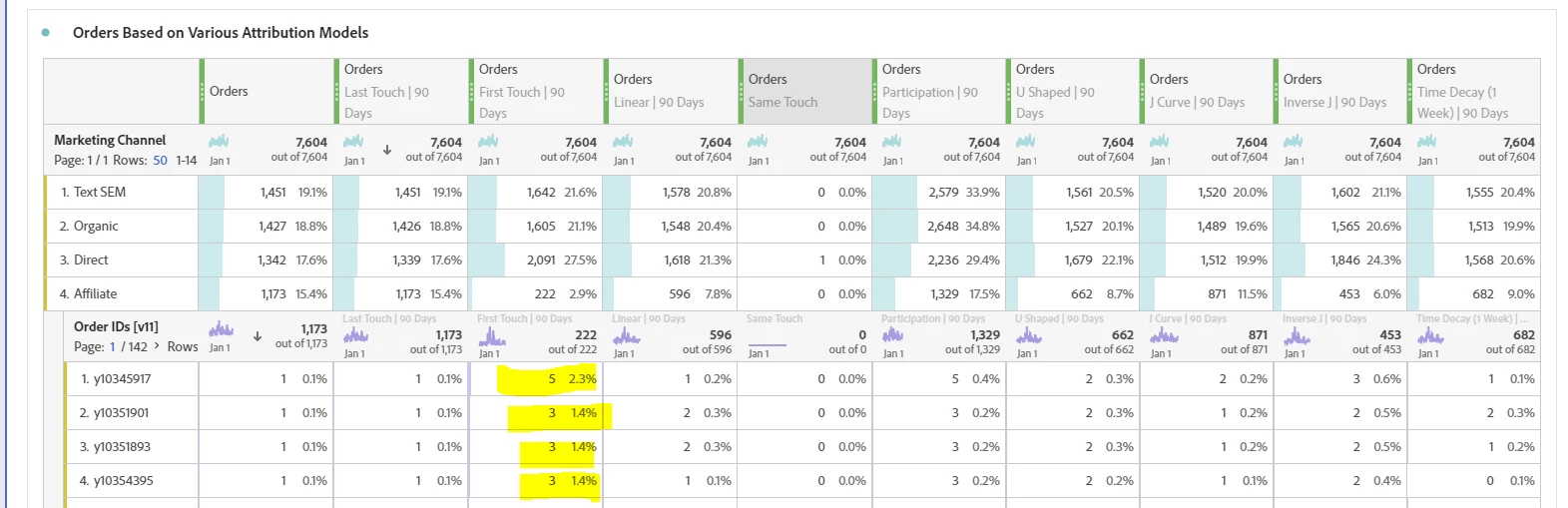
It's a Marketing Channel Report with Orders as the metric:

  • The date range is set for the previous 90 days minus the current date.
  • I broke down the Affiliate Channel by Order ID. 
  • The First Touch (90 Day) column, shows 5 first touches for one Order ID.

How can that be possible?  It doesn't feel "true" so I'm hesitant to show the client without a reasonable explanation for this seemingly invalid result.


In fact, the only models that feel "true" to me are Last Touch and Same Touch. The others are all quesionable.
Thank you for any insight into this!!

This post is no longer active and is closed to new replies. Need help? Start a new post to ask your question.
Best answer by paulab51973029
Well, it looks like I discovered a problem with order duplication! So we can close this. Thank you all for indulging me! However, it did occur to me that this COULD be indicative of a different promo code used in separate instances, which could inflate the number of First Touches for an order. That's where I was headed before I stumbled on the duplicate orders.

2 replies

paulab51973029AuthorAccepted solution
April 15, 2021
Well, it looks like I discovered a problem with order duplication! So we can close this. Thank you all for indulging me! However, it did occur to me that this COULD be indicative of a different promo code used in separate instances, which could inflate the number of First Touches for an order. That's where I was headed before I stumbled on the duplicate orders.
November 28, 2023

Are you sure, it was a duplicating problem?


Double Check, by breaking down the Order ID by MID, to see which Visitor made this order. Then create a new Table and select MID as Dimension and Orders as metric. Filter for the specific MID. The Person should have made 5 orders(1st row of your snippet). Then you can break it down by Order ID, in the 2nd Table, and now you should see 5 different Order IDs. And the ID with 5 Orders in the First Touch Attribution, should be the first Order the Person made. 

First Touch, the Algorithm looks for total Orders and then looks for the First entry Value of the given Dimension (Order ID) in your case, and attributes the total sum of Orders to the First Entry. This is true for other Dimensions and metrics as well. 

November 17, 2023

Hi, 

I'm facing the exact same Issue. How can I check, if I also have a problem with order duplication? Appreciate any information on that.