Lol, probably cause Report Builder was made a long time ago, and isn't as intuitive 😛
I don't have any resources handy, but I use Report Builder and can try to help you.
Basically, when you want to do date comparisons, you need to do two separate requests.
So I will normally set up a "Raw Data" sheet, and let's say I want to pull in two date ranges: Last Month and 2 Months Ago for comparison on Page Views, Visits and Unique Visitors.
Then I will make a References Sheet (i.e. "Common Elements" - here is where I will use Excel formulas to set my date ranges dynamically (=EOMONTH(TODAY(),-2)+1 and =EOMONTH(TODAY(),-1) to get "last month" for instance) - While I could use the date selector in Request Wizard, this gives me more control without having to edit the requests.
I will then create my calls referencing my cells:
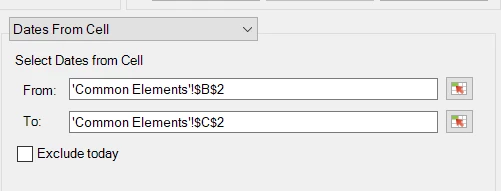
(IF I need to rerun a specific comparison, I can manually enter dates into my cells, re-run the report, then put my formulas back after - all without modifying the requests)
Then I will configure my rows and columns, you can move items around, and hide labels that you may not want/need (you will see a little preview of the layout)
When you make your second request, depending on your layout, if you line it up to be beside or below your previous request, there may be column labels that will work for both, you can hide the "second copy" (as long as you are sure everything will align - this all depends on what you are pulling and how you are laying it out)
Now that you have two requests pulling in date range A and date range B, you can use your Excel skills to compare the values, add them to pivot tables, or graph them, etc.
I hope this is a good start?