Analyzing the clicks on website | Community
Skip to main content
July 7, 2021
Solved

Analyzing the clicks on website

  • July 7, 2021
  • 4 replies
  • 2007 views

I want to analyze in which portion of the website people are clicking more. Is there any way that I can find out?

This post is no longer active and is closed to new replies. Need help? Start a new post to ask your question.

4 replies

Adobe Employee
July 7, 2021

@bikash040988 ,


You can check the Site section report in workspace if you have implemented channel variable against Occurrences metric to get desired result.

https://experienceleague.adobe.com/docs/analytics/components/dimensions/site-section.html?lang=en


If you have not implemented channel variable, you can refer Page report against Page Views metric to check which page is being viewed most.


Also you can check the Flow report to see what path users are taking to reach out to a specific page. 
https://experienceleague.adobe.com/docs/analytics/analyze/analysis-workspace/visualizations/flow/flow.html?lang=en


Brian_Johnson_
Brian_Johnson_Accepted solution
Level 8
July 7, 2021
July 7, 2021
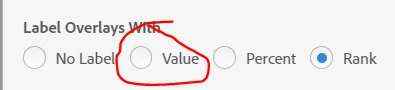
Hi Brian, I have used the activity map browser extension but the problem with the extension is that they will give rank according to the number of clicks. Then I have to check in the csv to see how many clicks are there for that particular portion..
Adobe Employee
July 7, 2021

@bikash040988,

You can check the clicks or values for that portion or link with Activity map tool as well. You just need to change the settings from Rank to Values in the Activity map tool settings.

Or can click on the Eye icon to check the link clicks while using Activity map tool.

July 7, 2021
@vidurb80577666, Thanks and I am able to see the number of clicks there. Is there any way in the report that I can filter out the hidden from visibility section?
Adobe Employee
July 7, 2021

@bikash040988,

Sorry cannot apply any filter based on Visibility section. 

July 7, 2021
Thanks again for your help