Analytics for Target (A4T) panel not found | Community
Skip to main content
Level 2
July 16, 2020
Solved

Analytics for Target (A4T) panel not found

  • July 16, 2020
  • 2 replies
  • 1815 views

Hi,


We are trying to see target reporting workspace in Adobe Analytics after A4T integration, but we can't find the Analytics for Target (A4T) panel in Adobe Analytics.


Are there any steps that we need to follow for the panel to appear?


Regards,

Sri
This post is no longer active and is closed to new replies. Need help? Start a new post to ask your question.
Best answer by isinha

Hi @srikoll ,

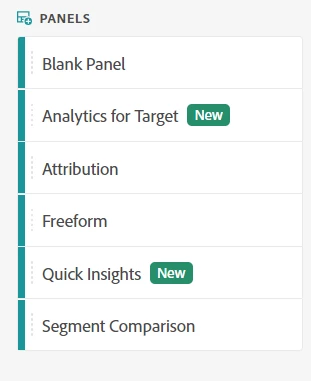
Aren't you able to see the A4T panel in Analysis Workspace? It shows up in the list of panels, as seen below. Can you please share the Analytics company name?

Thank you!


2 replies

isinhaAdobe EmployeeAccepted solution
Adobe Employee
July 16, 2020

Hi @srikoll ,

Aren't you able to see the A4T panel in Analysis Workspace? It shows up in the list of panels, as seen below. Can you please share the Analytics company name?

Thank you!


sucagarw
Adobe Employee
Adobe Employee
August 11, 2020

Hi @srikoll ,


You need to make sure A4T is enabled on the report suite to have A4T panel appear in Analysis workspace.

Level 2
November 17, 2021

Hi @sucagarw ,


I have the issue where i dont see the A4T under panels in Adobe Analytics. Could you please suggest on how to enable A4T on the report suite?

Adobe Employee
November 17, 2021

@vallus - Could you check if you can see Analytics for Target related dimensions in Workspace? If the dimension isn't available, A4T isn't enabled for the report suite ID. If the dimension is available, the issue is likely with provisioning - you can reach out to Customer Care and they can fix it real quick.

Thanks!