Alt code typing in Analytics Workspace view creates new panels | Community
Skip to main content
January 5, 2024
Question

Alt code typing in Analytics Workspace view creates new panels

  • January 5, 2024
  • 1 reply
  • 1249 views

When I need to use alt codes to type symbols in a workspace, any number click will create a new empty panel. For example ALT + 124 (to get a vertical line, so called "post" symbol) would create three new empty panels.


I do not know if there is a solution to that other than me getting a proper keyboard. It's not a major issue, but slightly annoying,

This post is no longer active and is closed to new replies. Need help? Start a new post to ask your question.

1 reply

Pablo_Childe
Community Advisor
Community Advisor
January 5, 2024

You can also use character map. Windows and Mac have them I find for multiple charachters can be quick alternative and then stops teh extra window pop ups.


GLTU

Jennifer_Dungan
Community Advisor and Adobe Champion
January 5, 2024

I often just keep a doc of commonly used symbols handy, and copy and paste them into my Workspace (emojis can be pasted too). 

Jennifer_Dungan
Community Advisor and Adobe Champion
January 8, 2024

... or you can type the ALT code basically in any other program/browser tab and Alt- or Ctrl-Shift between your open program depending what you had open. 


I know it is a silly little thing but why would anyone override ALT code typing? (insert smiley face here)😄


I guess because Adobe wanted specific hotkey for common visualizations, and didn't consider that numbers are also used in standard special character codes?
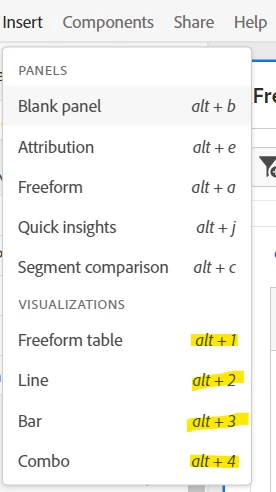


Many programs create specific hotkeys (it's pretty common practice to be honest), but not all of them would need to access the special character mapping (or in this case, they didn't look to see if the user stopped typing the full character sequence)....


For instance, in MS Office programs Alt+1 makes a smiley face, Alt (hold) 1-4-7 produces an "ô" character.. I guess the JS that Adobe wrote sees the Alt+1 and creates a new Freeform, instead of waiting for the entire 1-4-7 sequence... 


You could try to log that as a ticket, but I don't know if or when they might address that...

