AEP Web SDK migration | Community
Skip to main content
July 10, 2024
Question

AEP Web SDK migration

  • July 10, 2024
  • 4 replies
  • 2140 views

Hi everyone, I am new to AEP Web SDK and I am trying to migrate some of our codes.


How can I able to implement the manual sending of beacon and manual clearing of variables in AEP Web SDK? Attached image is my current implementation in AA. Thank you.




This post is no longer active and is closed to new replies. Need help? Start a new post to ask your question.

4 replies

cserrurier
July 10, 2024

Hello,

With the AEP Web SDK, it is a whole new way of tracking !
i recommend to use the extension Adobe Experience Platform Web SDK and the "Send event" action (see my screenshot)
For clearVars(), i am currently working on my migration and i think, it is no longer needed but it depend on your website and technology.

Best regards

July 10, 2024

Hi @cserrurier 


But I have another custom code in the Set Variables that is also in the same rule that uses Data Element. So in one Action, I have two ways of setting. First is, by manually sending beacon. Second is, using a data element. Would you recommend that I separate this two? Should I make another rule for my currently manual sending of beacon implementation and use the "Send Event" action?

cserrurier
July 10, 2024

Hello,
It is difficult to answer without the code.
Can you share a screenshot of your Custom code Action ?

Best regards

Ankit_Chaudhary
Community Advisor
Community Advisor
July 10, 2024

Hi @ninglaoshi 

The concept of clear vars and set vars is used for evars and props when you implement adobe analytics however if you are sending data to AEP using web sdk evars and props are no longer required you have to create a schema instead.

check out this adobe analytics data collection migration to web sdk tutorial for more details

July 10, 2024

Kindly check these below tutorials it will help you:

https://medium.com/station10/approaches-to-implementing-adobe-analytics-via-aep-web-sdk-and-adobe-launch-46574b76c5f1

https://experienceleague.adobe.com/en/docs/platform-learn/implement-web-sdk/applications-setup/setup-analytics

Also for sending event we can use custom code, like mentioned in below documentation

https://experienceleague.adobe.com/en/docs/experience-platform/web-sdk/commands/sendevent/xdm

So, suppose some time it become difficult to use extension, then we can use custom code and send the alloy event on the basis of the type.


bjoern__koth
Community Advisor and Adobe Champion
July 10, 2024

Hi @ninglaoshi 

for what it's worth, the probably quickest way to migrate your code would be using (this is what I typically do for all new clients)

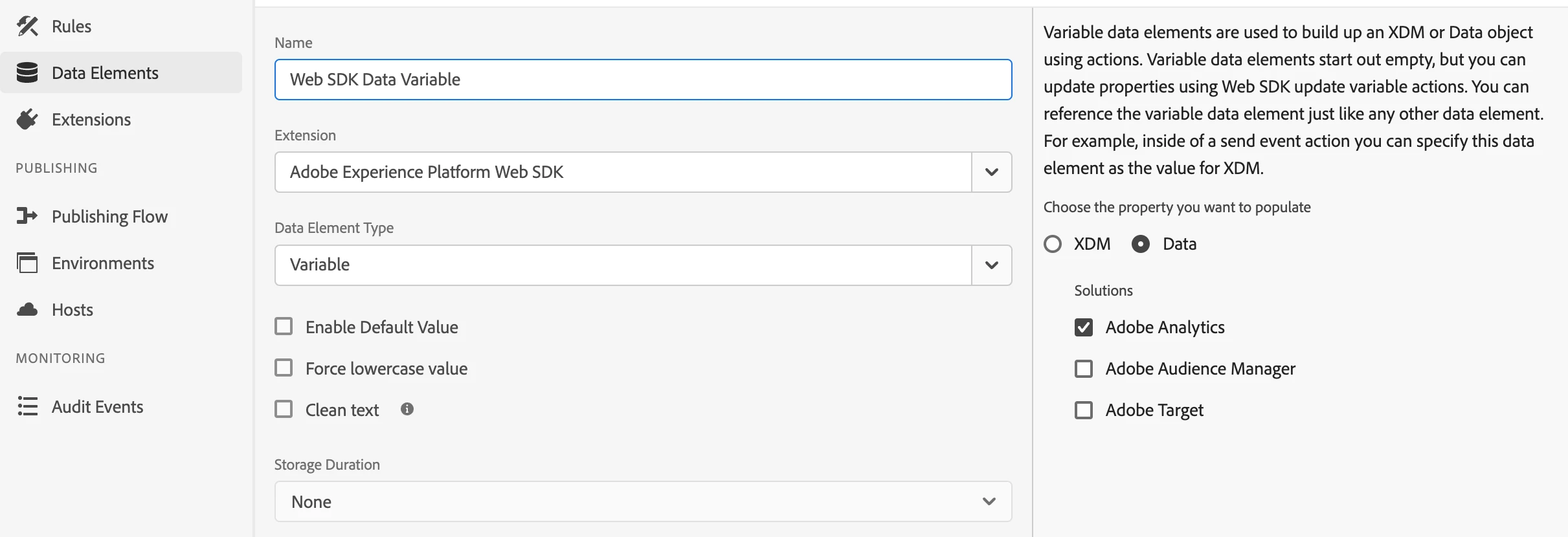
  • a "Web SDK Variable" data element that is set as "Data" with Adobe Analytics enabled
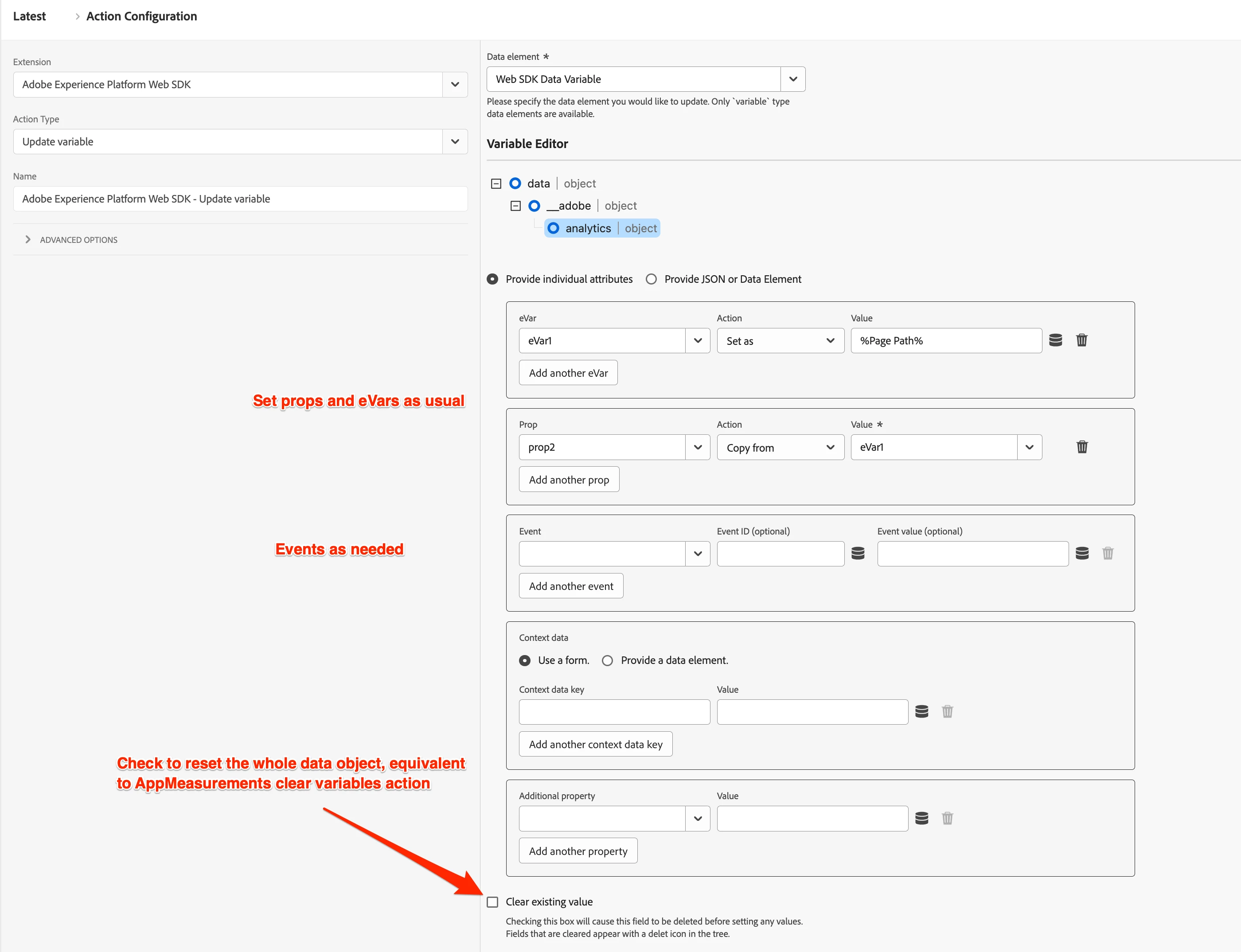
  • in your rule that is supposed to track the page view, use an Update Variable action and set all props/eVars/events as you would've done it in AppMeasurement
    • the "clear existing value" checkbox will essentially reset the whole variable, so you will to provide the whole mapping here as well
      NOTE: if you are using the same payload across different rules, consider setting the core data in a separate rule that fires before the Analytics page view / link tracking rules, and only set the additional data that is specific to the e.g., page view rule. In that case, make sure to reset the data element in the new rule and not in the page view / link track rule
    • also worth mentioning that there is also a custom code part on the action in which you can essentially reuse existing code that was referring to the "s" object from AppMeasurement.


content.__adobe = content.__adobe || { }; content.__adobe.analytics = content.__adobe.analytics || { }; let s = content.__adobe.analytics; s.eVar99 = "hello world"; // no need for linkTrackEvents and linkTrackVars anymore!!! s.events = "event10,event25";​


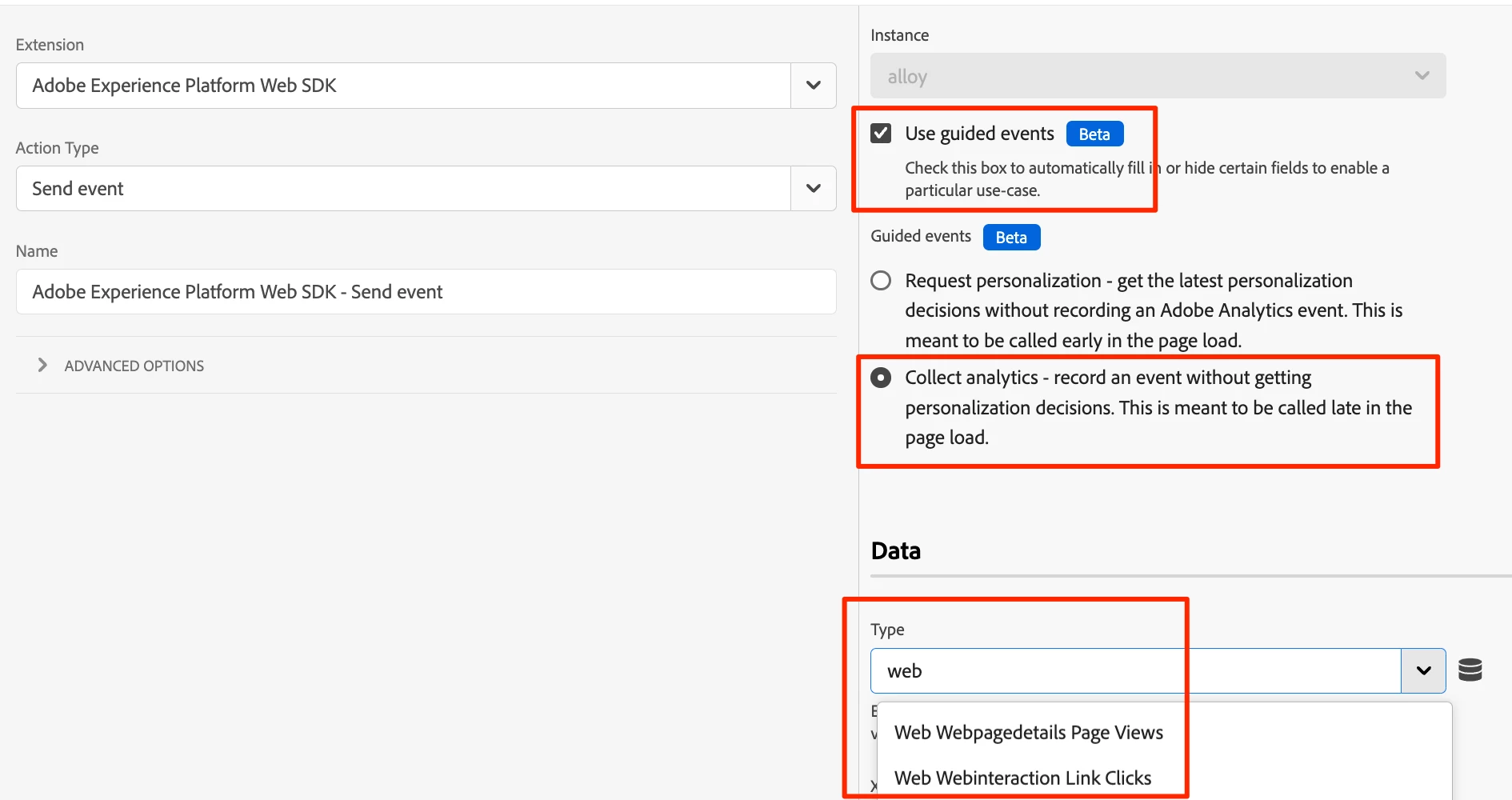
  • use a WebSDK sendEvent action
    • select "use guided events" in combination with "Collect analytics"
    • choose the Analytics event you want to send (Page View or Link Click)


This approach will essentially fill the data.__adobe.analytics part of the request's payload.


Hope that helps

Cheers from Switzerland!
July 11, 2024

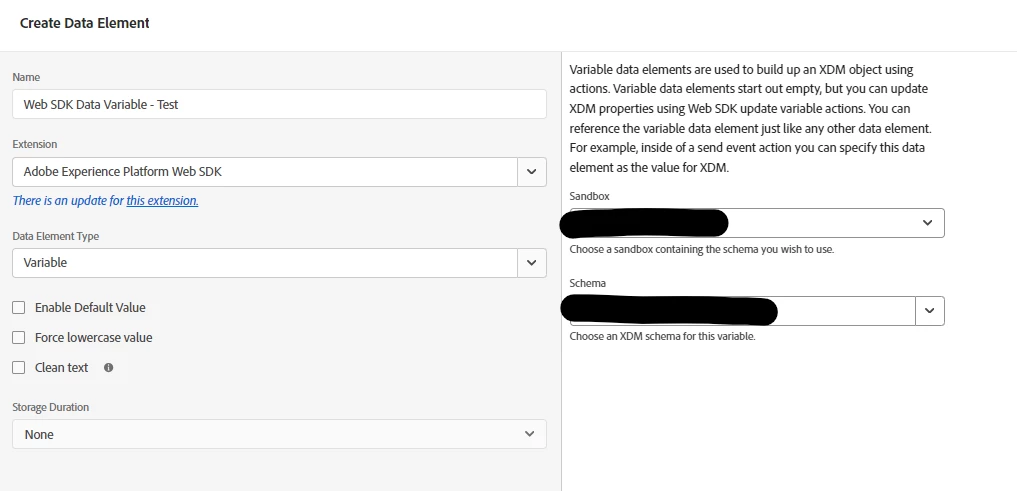
hi @bjoern__koth thanks for your input. But upon checking on my end, I think we don't have that "Data" setting. and we only have "XDM" in rules


Ankit_Chaudhary
Community Advisor
Community Advisor
July 11, 2024

Hi @ninglaoshi 

It seems like you're using an old version of web SDK extension this feature is available as part of the recent new release in web SDK extension try updating your extension to get this.