adobe workspace rolling fiscal month as metric headers for dashboard | Community
Skip to main content
May 17, 2018
Solved

adobe workspace rolling fiscal month as metric headers for dashboard

  • May 17, 2018
  • 1 reply
  • 963 views

I need a monthly fiscal range from the 22nd of the previous month to the 21st of the current month that shows up in the Time Section right below the metrics section in Adobe Workspace.

Many thanks in advance.

David C

This post is no longer active and is closed to new replies. Need help? Start a new post to ask your question.
Best answer by Urs_Boller

i first tried with a custom date range, the closest i could do is the following:
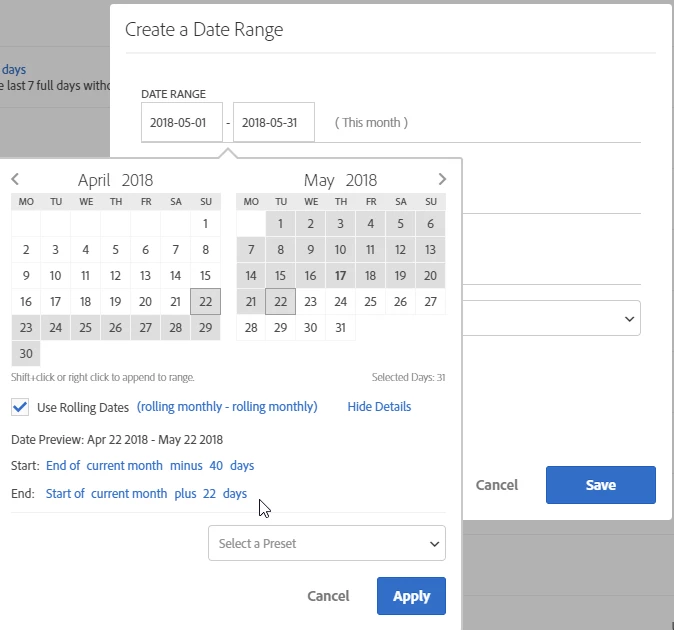
this time range will take you close to the desired time range, but doesn't work for some month:

feb/march due to the number of days in february

jul/aug due to the 2 month in row with 31 days

a workaround could be the following: create a segment and use it either in each project or in a virtual report suite:
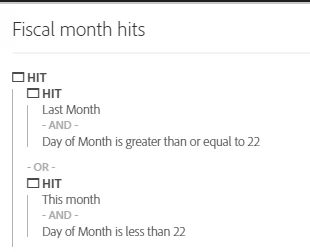
basically you create a hit segment which only counts hits for the desired days of lost month and those from this month. if your project has a time range of "last 60 days" and you add this semgent to the header, you will only have the desired hits:
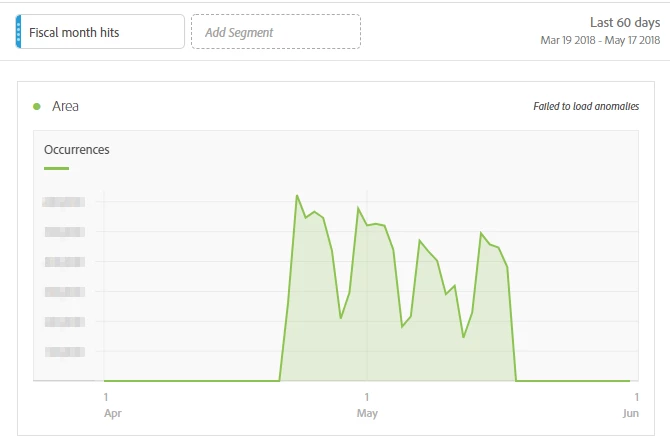
the problem is, that this only works if you use it in the last days of a month, not in the first days of a new month. but you could use this for sending reports out to business every 22nd of each month ...

i hope someone else finds the right solution

1 reply

Urs_Boller
Community Advisor
Urs_BollerCommunity AdvisorAccepted solution
Community Advisor
May 17, 2018

i first tried with a custom date range, the closest i could do is the following:

this time range will take you close to the desired time range, but doesn't work for some month:

feb/march due to the number of days in february

jul/aug due to the 2 month in row with 31 days

a workaround could be the following: create a segment and use it either in each project or in a virtual report suite:

basically you create a hit segment which only counts hits for the desired days of lost month and those from this month. if your project has a time range of "last 60 days" and you add this semgent to the header, you will only have the desired hits:

the problem is, that this only works if you use it in the last days of a month, not in the first days of a new month. but you could use this for sending reports out to business every 22nd of each month ...

i hope someone else finds the right solution