Adobe icon / logo next to metrics | Community
Skip to main content
June 29, 2022
Solved

Adobe icon / logo next to metrics

  • June 29, 2022
  • 2 replies
  • 2189 views

Hi all,


Apologies if this has been asked before, had a look in the community but couldn't find anything.


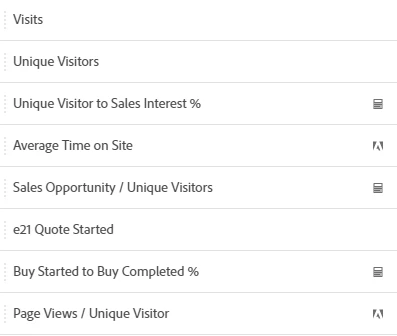
Some of the metrics on our Adobe Analytics instance have a little calculator icon next to them. I'm pretty sure this means they are Calculated Metrics.


However, others have a little Adobe icon next to them. I'd assume this means they are Standard Metrics (as opposed to Custom). However, some pretty common metrics like Unique Visitors, Visits and Pageviews don't have the Adobe icon.


What does this mean?


Thanks,

Santi


This post is no longer active and is closed to new replies. Need help? Start a new post to ask your question.

2 replies

Jennifer_Dungan
Community Advisor and Adobe Champion
June 29, 2022

This was something Adobe added a few years ago..


Basically how I read these:


  • Things like Page Views, Visits, Unique Visitors are standard metrics
  • Items with the calculator icon are your own calculated metrics (things that you and your team have made in your own instance)
  • Items with the Adobe icon are calculated metrics, but ones that Adobe has created (basically you can't edit these - they don't show up in the Calculated Metrics manager under components) - Before we had to create our own calculated metrics like "Page View / Unique Visitor" since Adobe didn't have it out of the box... however, since I prefer to show 2 decimal places, I still use my own custom calculated metric

If you click on the (i) icon on these items, you can see that some of these include in the description that they are used in some of the standard Adobe Workspace Templates, but you can also see the calculation of the metric.

yuhuisg
Community Advisor
yuhuisgCommunity AdvisorAccepted solution
Community Advisor
July 1, 2022